www.m2tech.biz
4. Remote Control
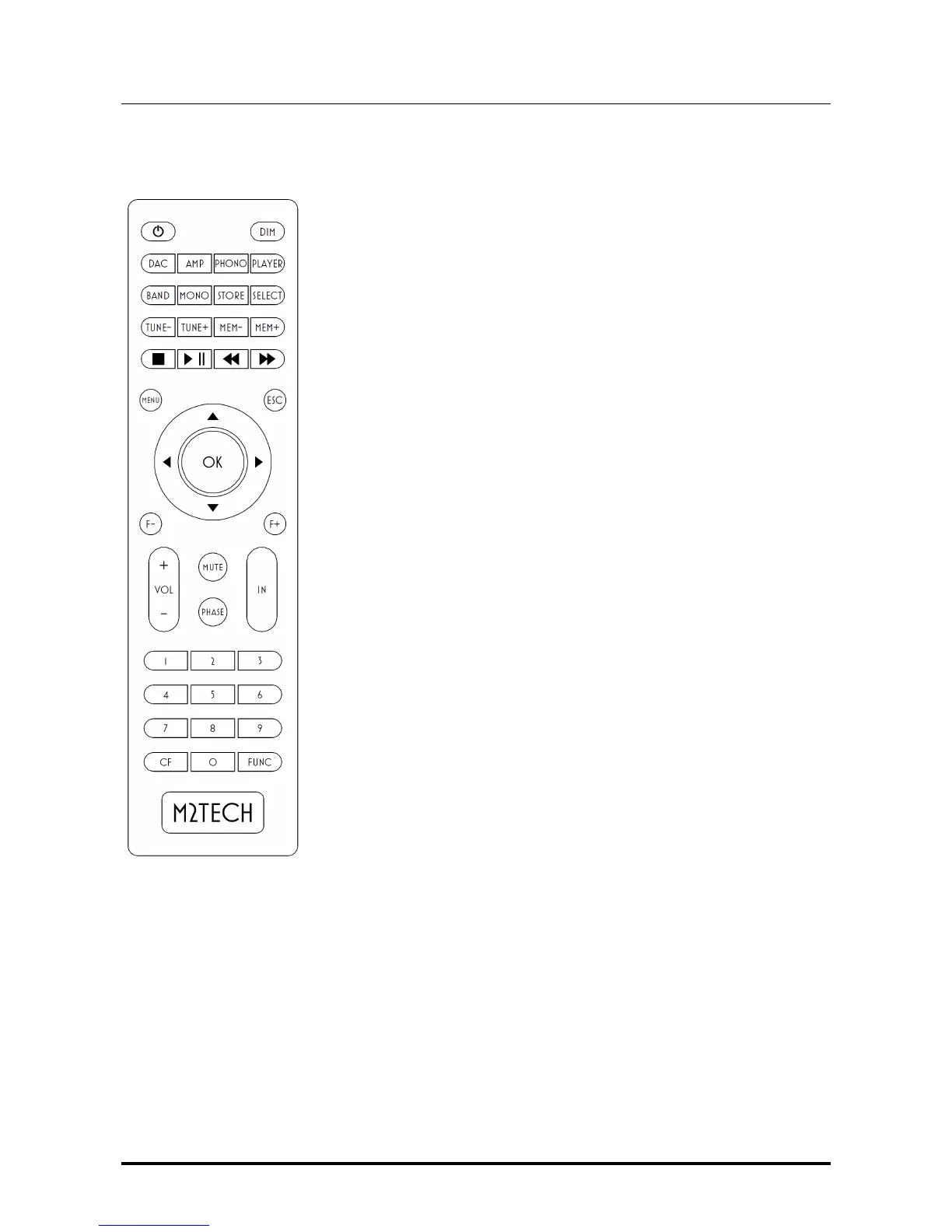
The NASH comes with a fully-loaded remote control which allows
for setting all of its controls, as well as for controlling other
M2Tech Rockstars series products.
Please note when a command is sent to the NASH the “PHONO”
key blinks in green. If any of the other key “DAC”, “AMP” or
“PLAYER” blinks instead, the NASH will not receive the command.
In this case, press the “PHONO” key to select the right commands
codes for the NASH.
Below is a brief description of the relevant keys for the NASH.
Standby key: This allows for putting the NASH in standby mode
(prolonged push) and for awakening it.
DIM: Display dimming.
PHONO: Instructs the remote to send commands using the phono
system code.
MENU: Configuration menu access.
ESC: Menu exit with changes discarded.
Cursor keys: Allow for menu navigation.
OK: Menu exit with changes stored.
IN+/IN-: Input selection.
Figure 3


 To Next Page