www.m2tech.biz
Option 1 and 3 also apply when the power mode switch is set to “A” and the NASH
was previously powered by pushing the front panel button (Fig.1, 1) and then put in
standby using the “ON/OFF” key on the remote control or the “ON/OFF” button in the app.
7.2.9. REMOTE ON/OFF: Setting the NASH to Accept/Ignore the IR Remote
ON/OFF command
When the NASH is used together with the VAN DER GRAAF MKII, the power mode switch is set
to “B” and the power mode is set to “enable”, it may be desirable to inhibit the on/off
command from the IR remote control, as the VAN DER GRAAF MKII will receive and execute
the on/off command from the remote instead.
This way, pushing the on/off key on the remote will instruct the VAN DER GRAAF MKII to
enable/disable its outputs to power the NASH and other attached M2Tech units on/off in the
programmed order. Please read the VAN DER GRAAF MKII user manual for details.
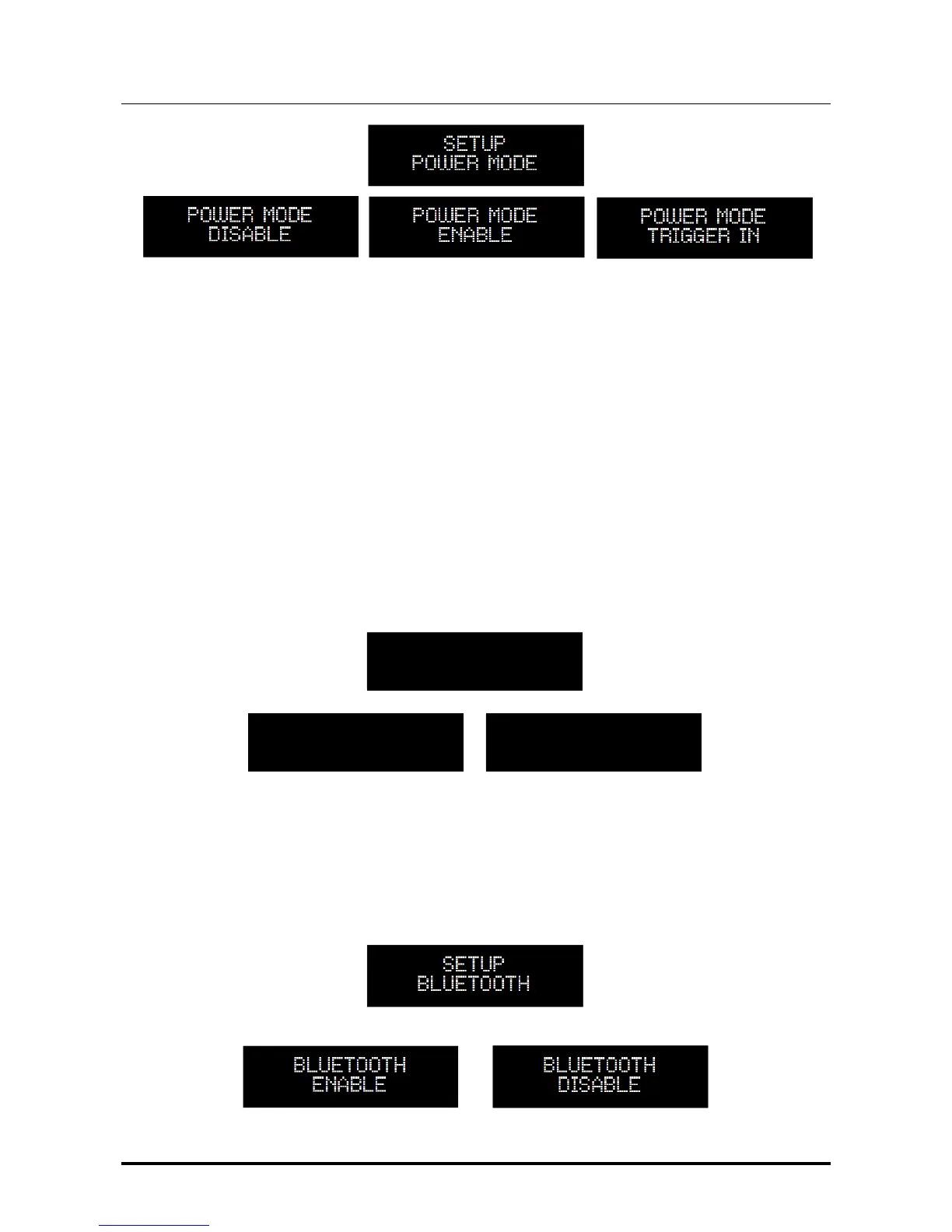
SETUP
REMOTE POWER
REMOTE POWER
ENABLE
REMOTE POWER
DISABLE
7.2.10. BLUETOOTH
®
: Enabling/Disabling the Bluetooth
®
LE Receiver
User may choose to enable or disable the Bluetooth
®
Low Energy interface.
This can be done accessing this menu feature.


 To Next Page