18
M3 Orange User Manual
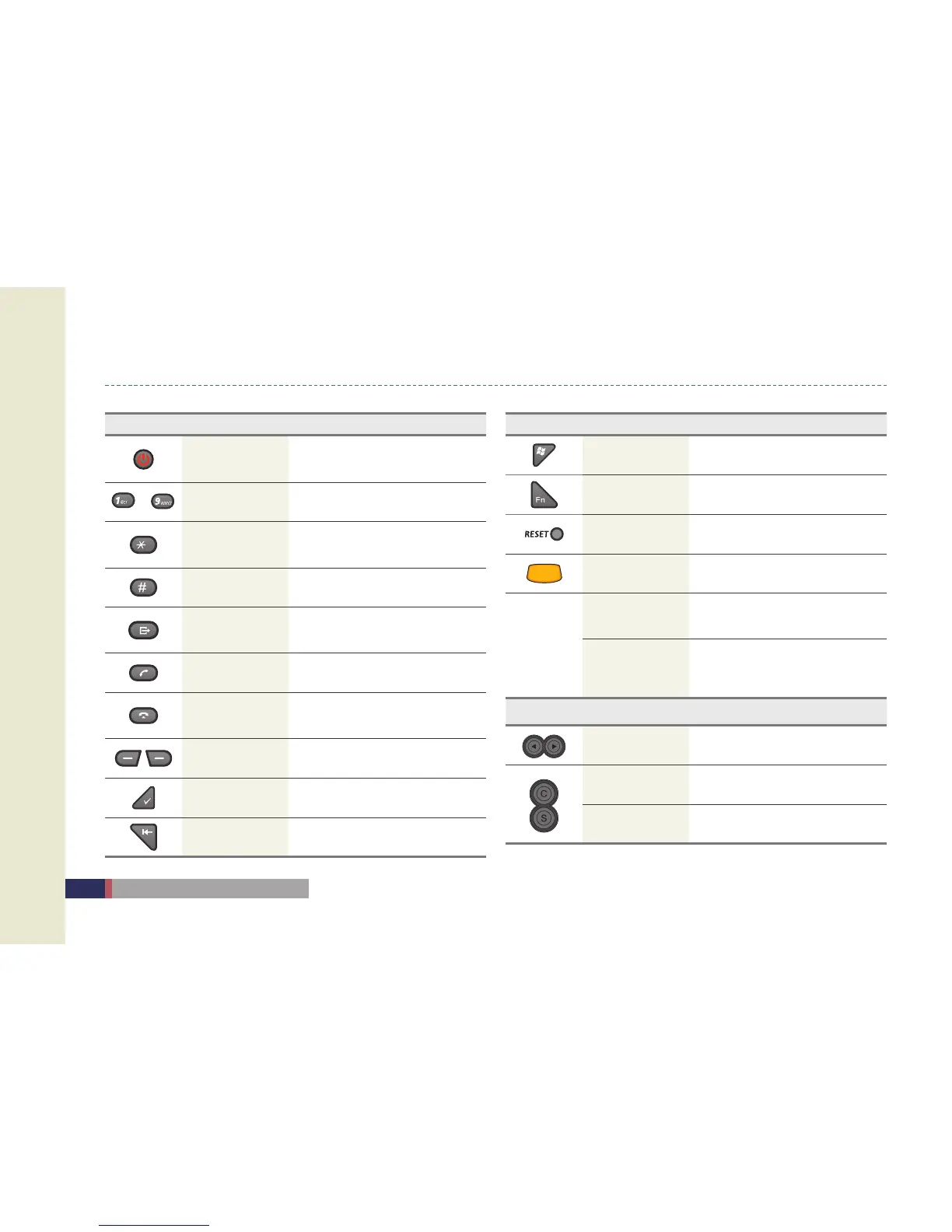
Button Information
Button Name Function
Power button
Short Press: Back light ON/OFF
Long Press: Power ON/OFF
~
Number Button Number input
Star(*) Button
Short Press: * input
Long Press: Vibration mode On/Off
Sharp(#) Button # input
Alphanumeric
press to switch between alphabet
and number input
Call Button Connet the phone call
End Button
Short Press: End the call
Long Press: Phone On/Off
-
Function mode
Enter Button Operation Button
BackSpace Delete the letter
Button Name Function
Start Button Open the main menu
Function -
Reset Button Soft Reset
Scan Button Barcode scan function
LCD Click
One-Click
Same function as One-click function
of computer
Tab & Hold
Long press
Long press the stylus pen
Select the option
(Copy, Delete, Paste)
Side Button Name Function
Up / Down Button Volume up and down
Camera Button Execute camera / Take picture
Scanner Button Scanner beam operation


 To Next Page