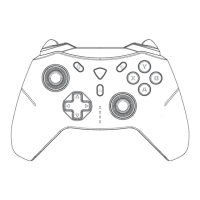
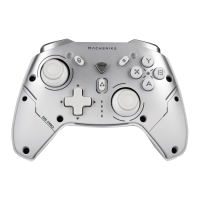
This document is a Quick Start Guide for the MACHENIKE M-GAME GAMEPAD, specifically models HG510W & PRO. It provides essential information regarding the device's functions, technical specifications, usage, and maintenance.
Function Description
The MACHENIKE Gamepad is a multi-platform compatible controller designed for PC, Switch, iOS, Android, and HarmonyOS. It features various input methods and programmable options to enhance the gaming experience. The gamepad supports different connection modes, including wireless (Bluetooth) and wired (USB cable), allowing for flexible use across multiple devices.
Key functions include:
- Wake-on function: The product has a wake-on function, requiring the user to select the corresponding device mode before connecting wirelessly.
- Multiple modes:
- X (Wireless Xinput mode/PC mode): Recognized as "Xbox Wireless Controller."
- D (Wireless Dinput/Android mode): Recognized as "MACHENIKE HG510W."
- S (Switch mode): Recognized as "Pro Controller."
- V (Apple iOS mode): Recognized as "Xbox Wireless Controller."
- Pairing mode: To enter pairing mode, press and hold the Home button for 3 seconds in the off state until the indicator light flashes quickly.
- Changing pairing device: To change the pairing device, press and hold the Home button for 5 seconds to turn off the controller, then select the desired mode and press the Home button for 3 seconds to re-enter pairing mode.
- Wired connection: Connect the device directly using the USB cable.
- Xinput Mode (Windows 8/10/11): Compatible with Windows operating systems, widely used in 3A games and on Microsoft and Steam platforms. S mode (Switch Pro) can also operate on Windows, enabling gyroscope function through Steam, with compatibility depending on adaptation.
- Switch Mode (Nintendo Switch): Press and hold FN+A buttons for three seconds to switch to the Switch controller layout. Supports HOME button to wake the controller and remote console. Features Gyro motion control (requires game support). Linear stroke function is not supported due to Switch platform limitations.
- V Mode (iOS - iPhone and iPad): Supports linear stroke function (requires game compatibility) and HOME button wake-on/quick connect. Configurable via the Keylinker app. Compatible with iOS 15 system version.
- D Mode (Android Devices - HarmonyOS phone/android phone/tablet/smart TV/TV box): Supports linear stroke function (requires game compatibility) and HOME button wake-on/quick connect. Configurable via the Keylinker app.
- Keylinker App: Machenike Keylinker app allows custom settings for gamepad buttons, triggers, macros, and joysticks. It can be downloaded from the Machenike official website.
- Brightness Adjustment: Press FN + D-pad ←/→ to adjust the overall backlight brightness. Press Fn+Turbo buttons to cycle through constant light, breathing, motion, or off effects for the V-band.
- Vibration Intensity Adjustment: Press Fn + D-pad ↑ / ↓ to adjust vibration intensity in four steps (0-3).
- Battery Display: Four indicator lights display remaining battery power. During pairing or function adjustments, they temporarily act as function indicators before returning to battery display.
- Motion Sensor Control Simulation: Press Fn+R3 buttons to toggle motion sensor control simulation of the right stick, indicated by three blinking lights.
- Programmable Buttons (M1/M2): Supports macro configuration via the controller itself or the Keylinker app.
- On-controller macro recording: Press Fn + M1/M2 simultaneously to enter recording state (V-shaped indicator strip lights flow). Set function buttons in sequence (A/B/X/Y/up/down/left/right/L1/L2/R1/R2 and left/right stick). Up to 42 motions (21 actions) can be settled. Press M1/M2 again to save.
- Keylinker App macro recording: Enter the interface in the app, select M1/M2, click record, set function keys, adjust duration, and click "Apply" to save.
- TURBO Function: Supports A/B/X/Y/Up/Down/Left/Right/L1/L2/R1/R2 buttons.
- Manual TURBO: Requires pressing the button to trigger.
- Activating TURBO: Press Turbo+A (or other supported button) once for manual rapid fire, press again for automatic rapid fire, and a third time to turn off.
- TURBO Speed Adjustment: Press and hold the TURBO button, then move the Right stick up to speed up rapid fire or down to slow it down.
Important Technical Specifications
- Executive Standard: Q/0212LSKJ0910-2019
- Working Current: 10-40mA
- Sleep Mode Current: 10uA-50uA
- Vibration Current: 80-130mA
- Input Power: 5.0V === 500mA
- Battery Capacity: 3.7V/860mAh (Built-in lithium battery)
- Charging Time: About 2-4 hours
- Using Distance Range: ≤8M
- Battery Life: Approximately 8-10 hours
- Control Part Components:
- Directional pad (D-pad): 1 set, raised plus sign-shaped toggle with mechanical micro switch.
- A, B, X, Y buttons: 4 pieces, mechanical micro switch.
- Home button: 1 piece, turns on console or controller.
- Left and right stick: 2 pieces, Hall electromagnetic joystick.
- Left and right bumper/triggers (L1, R1, L2, R2): 4 pieces, three-position adjustable linear trigger.
- TURBO Button: 1 piece, rapid fire mode button.
- Multi-function button: 1 piece, supports screenshot, light band setting, and other function settings.
- Programmable button (M1/M2): 2 pieces, custom programmable back buttons.
- Automatic Sleep: The product enters sleep mode after about 5 minutes of no operation, and the controller light turns off.
- Wired Connection: USB-A to USB-C cable.
- USB Cable Length: About 1 meter.
Usage Features
- Multi-platform compatibility: Seamlessly switch between PC, Switch, iOS, Android, and HarmonyOS.
- Wireless and wired options: Offers flexibility for different gaming setups.
- Customizable controls: The Keylinker app allows users to tailor button mappings, trigger sensitivity, macros, and joystick settings to their preferences.
- Adjustable lighting and vibration: Personalize the gaming experience with adjustable backlight brightness, V-band effects, and vibration intensity.
- Motion sensor control: Simulate motion control for the right stick, enhancing immersion in supported games.
- Macro functionality: Program complex sequences of actions with the M1/M2 buttons, either directly on the controller or through the Keylinker app.
- Rapid fire (TURBO) function: Gain an advantage in games with manual or automatic rapid fire capabilities, with adjustable speed.
- Ergonomic design: The button layout includes a directional pad, ABYX buttons, left and right sticks, bumpers, and triggers for intuitive control.
Maintenance Features
- Cleaning: Use a soft duster or damp cloth to clean the gamepad.
- Avoid harsh chemicals: Do not use solvents (gas, thinner, alcohol, kitchen detergent, chemical wipes) as they may cause deformation and color fallout.
- Avoid excessive moisture: Do not use a wet rag to wipe the gamepad, as this can cause internal damage.
- Environmental precautions:
- Do not spray flammable insecticides or other sprays near the gamepad.
- Do not expose the gamepad to liquids like water or juice, as this can cause malfunctions or damage.
- Do not plug or unplug the USB cable with wet hands.
- Avoid using the gamepad in humid or hot places (e.g., bathrooms).
- Do not use it in dusty environments (e.g., beach) or areas with strong magnetic fields.
- Do not place it on top of heat-generating equipment.
- Physical precautions:
- Do not use excessive force, as this can lead to hand fatigue and button attrition.
- If you experience wrist or finger soreness, adjust your posture, reduce strength, or temporarily stop using the device.
- If your hands feel unwell during use, stop immediately to prevent skin rash or other allergic reactions.
- Storage: Keep the manual for future reference.

 Need help?
 General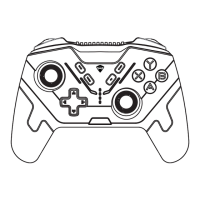

 To Next Page