DC16 Owner’s Manual
14
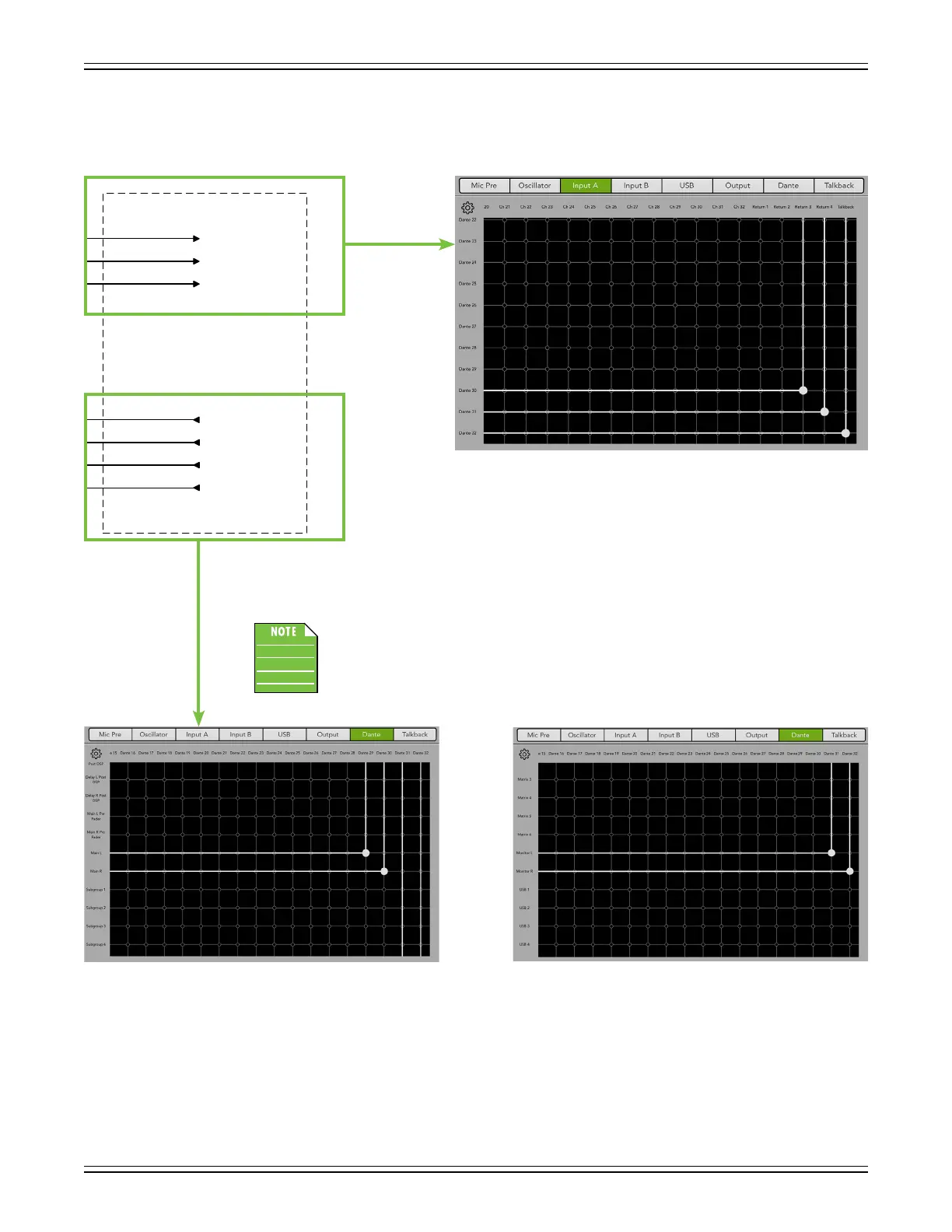
Now let’s take a look at Master Fader’s I/O Patch. For reference, the right-hand side of the signal ow – the
DL32R side – may be seen below-left. As stated previously, the rst thing routed in Master Fader’s I/O Patch
is Input A (below-right). Again, Dante 30-31 is routed to Return 3-4 and Dante 32 is routed to Talkback.
Next up are the Dante outputs. As stated previously, the Main L/R is routed to Dante 29-30
and the Monitor L/R is routed to Dante 31-32. See below.
All four are patched simultanously, but a screen shot combining both the Main L/R
and Monitor L/R is impossible. That said, all four are patched here, but we’ll show
you two screenshots of the Dante routing: one of the Main L/R to Dante 29-30
(below-left) and one of the Monitor L/R to Dante 31-32 (below-right).
DL32R
In
Out
Talkback
Dante
1
2
3
4
Analog/iPad Stereo L
Analog/iPad Stereo R
(no source)
Dante
1
2
3
4
iPad Record L
iPad Record R
Monitor/Phones L
Dante
1
Monitor/Phones R
Return 3 Input A
Return 4 Input A
Talkback
31
32
Dante
30
(no default patch for Dante 1-29)
31
32
Dante
30
29
Monit or R
Main L
Monit or L
Main R
(no default patch for Dante 1-28)


 To Next Page