Owner’s Manual
11
Owner’s Manual
DLM12S Subwoofer: Rear Panel Features continued...
9. OLED Display
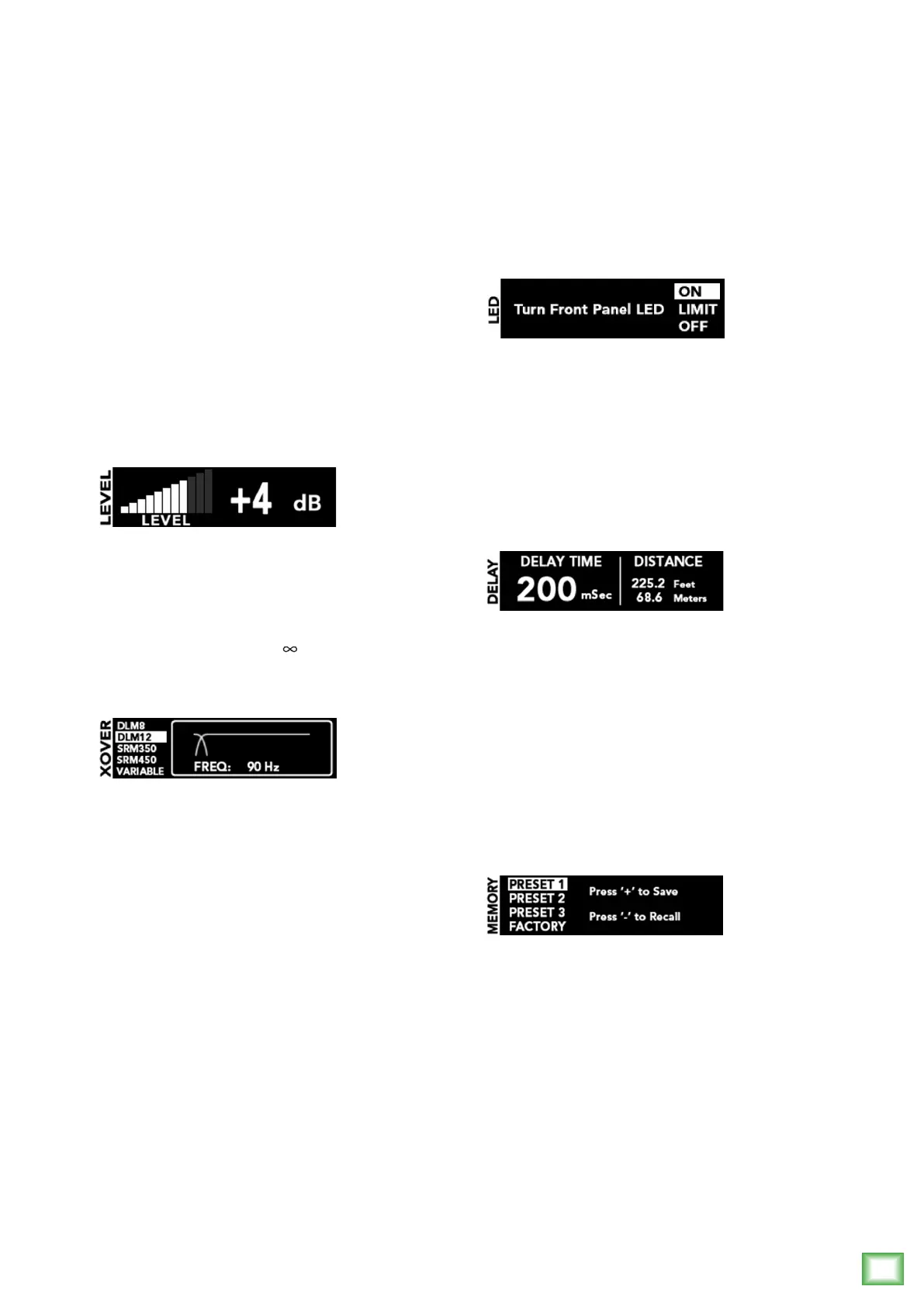
TheOLEDDisplayisoneofthemostvitalfeatures
oftheDLM12Ssubwoofer.Itdisplayssubwoofer
informationincluding(butnotlimitedto)volume,
selectedcrossover,delaysettingsandotherparameters.
WhenaDLM12Ssubwooferispoweredup,thelast
stateitwasinwillloadupandtheOLEDDisplaywill
presentthevolumescreenandsettings.
DLM12SsubwooferswilldisplayarunningRunning
Manscreensaverifparametershaven’tbeenchangedin
awhile.SimplytouchoneoftheDLPbuttonsto“wake
up”theOLEDDisplay.
10. VOL Button
Volume[VOL]adjuststheoverallsignallevelatthe
inputstothebuilt-inampliers.PresstheVOLbutton
toaccessandupdatethesubwoofer’svolumeand
changethevolumebypressingthe+or–button[16]
repeatedlyuntilyouhavereachedthedesiredvolume.
Thevolumerangesfromoff(–
dB)to+10dB.
11. XVR Button
TheDLM12Scrossover[XVR]allowsyoutochoose
fromalistofpresetcrossoverfrequenciesforMackie
loudspeakers,asnotedbelow.Thisoptimizesthe
subwooferandloudspeakersconnectedtothe
DLM12Shighpassoutputs.IfnotusingDLMorSRM
loudspeakers,avariablemodeallowsyoutoselect
thebestcrossoverfrequencysuitedforyourPAsystem
from60Hzto120Hz.
Frequenciesbelowtheselectedcrossoverfrequency
aresenttothesubwooferwhilefrequenciesabovethe
selectedcrossoverfrequencyaresenttothehighpass
outputs[6].Thecrossoverfrequencyshouldbeset
tothelowestfrequencyresponseratingofthemain
loudspeakers.PresstheXVRbuttonrepeatedlyuntil
thedesiredcrossoversettingishighlighted.
• DLM8:110Hz
• DLM12:90Hz
• SRM350:100Hz
• SRM450:95Hz
• Variable:60Hz–120Hz
Thelastonelisted–variable–maybesettotaste.
Simplypressthe+or–button[16]repeatedlyuntil
youhaveachievedthecrossoverpointyoudesire.
Itrangesfrom60Hzto120Hz.
12. Front LED On / Limit / Off
PressingtheVOL[10]andXVR[11]buttons
simultaneouslygivesyoutheoptiontoturnthefront
LEDon,offorlimit.Pressthe+or–button[16]to
makeachoice,followedbyanyotherbuttontoexitthe
screen.ChoosinglimitmeanstheLEDisonfull-time.
However,itwillickerwhenthelimiterisactive
[3dBofattenuation,averaged].
13. DLY Button
Delay“delays”theaudiosignalforasetperiodof
time.WiththeDLM12Ssubwoofer,it’susedforaligning
delaystacks,balconylls,etc,notasaneffect.
PresstheDLYbuttontoaccessandupdatethe
subwoofer’sdelay.Changethedelaybypressing
the+or–button[16]repeatedlyuntilyouhave
reachedthedesireddelay.Delaytimesrangefrom
0ms[0.0feet/0.0meters]to300ms[337.8feet/
102.9meters].
14. MEM Button
SettingsforDLMsubwoofersmaybesavedtomemory
andrecalledatalatertimebyutilizingthememory
[MEM]button.
Pressthisbuttonrepeatedlyuntilthepresetspot
youwanttosavesettingsto(orrecallsettingsfrom)is
highlighted.Therearethreeuserpresetsandafourth
torecallthefactorydefaultsettings.
Oncethepresetyouwanttosaveto(orrecallfrom)
ishighlighted,pressthe“+”button[16]tosavethe
currentsettingsorpressthe“–”buttontorecalla
presetthatwaspreviouslysaved.


 To Next Page