SHOWBOX BATTERY POWERED ALL-IN-ONE PERFORMANCE RIG WITH BREAKAWAY MIX CONTROL
24
FX Knobs
These two push-button, rotatable knobs have a massive amount
of responsibilities, but lucky for us, they’re up to the task!
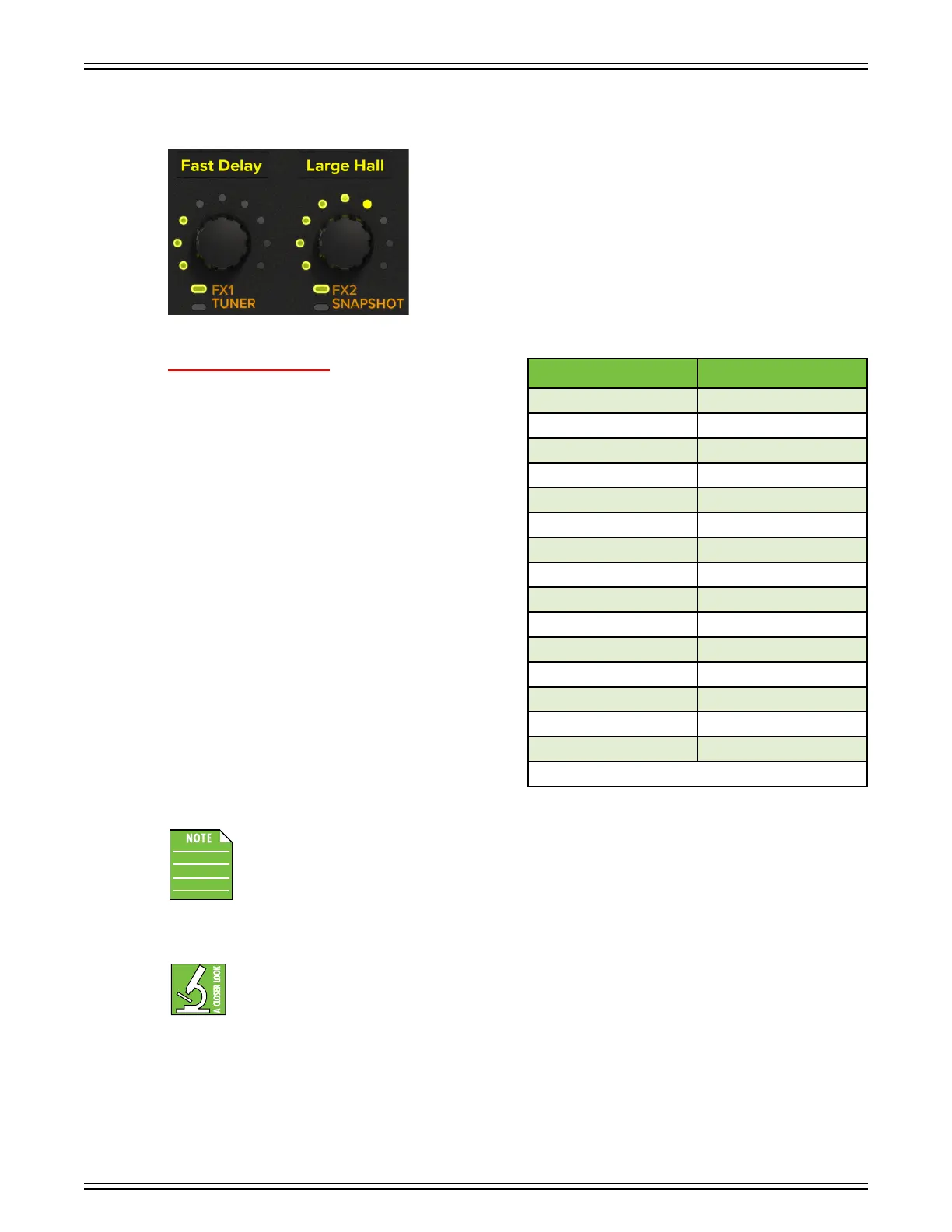
As you can see to the lef, the knob on the lef is where to select
FX and access the tuner, and the knob on the right is where
to select FX2 and access snapshots. But there is more... so, so,
so much more! Read all about it, starting below...
We will begin by discussing the FX / tuner knob, then moving
on to the FX2 / snapshots knob. By default, no eects are
selected –
“None” written on the scribble strips above each
FX knob – and not available (“N/A”) on channel 5/6.
SELECTING FX ON SHOWBOX:
Here is how to select FX in five easy steps [FX and FX2]:
. Select the channel.
2. Single-tap the FX or FX2 knob to enter
‘FX Select
Mode’.
The LEDs surrounding the FX knob will
illuminate and flash yellow
when tapped. Additionally,
the
scribble strip will also flash at the same rate.
3.
When flashing, rotate the knob to find an eect.
Once found, press the button to make the selection.
It will replace the previously selected eect on the
scribble strip.
It will remain in ‘FX Select Mode’
so long as there is activity. It will revert back to normal
(solid LEDs) after ten seconds of inactivity (or another
single tap of the FX knob).
4. Once an eect is selected – regardless of choice
and channel – the FX amount is set to the default
position of 2 o’clock (noon, first five LEDs
illuminated).
5. Rotate the knob to increase/decrease the amount
of eect for the selected channel. The
FX
knobs range
from OFF (knob far-lef) to MAX (knob far-right). Unity is at 2 o’clock (noon, first five LEDs illuminated).
Quickly double-tapping an FX knob allows for true bypass of the eect to ensure that there is no
coloration of the signal if the eect is not needed. The LEDs surrounding the FX knob will flash
when o.
However, the scribble strip LEDs will remain solid.
When the eect is disengaged, the FX control has no
eect on the signal. Use this to make an A/B comparison between the FX’d signal and the signal without
eect. Single- (or double-) tap the FX knob to turn the eect back on.
FX1 – By default, the lef knob is always on ‘FX’ (not tuner)
.
The eects on FX are in series (i.e. inline eects). This means that channels -4 can each have a dierent eect
without sharing... (unless you want to)! The following helps us remember the dierences, and perhaps it will help
you, as well:
FX = Series = Separated
FX2 = Parallel = Paired
Keep in mind that the FX level may be set dierently for all four channels.
There are additional details about the FX in Appendix C (pages 47-48).
FX Number FX Eect
0 NONE
SMALL CHORUS
2 LARGE CHORUS
3 FAST DELAY
4 SLOW DELAY
5 DELAY + CHORUS
**6 **REVERSE DELAY
7 OVERDRIVE
8 FUZZ
9 CRUNCH
0 FLANGER
PHASER
2 TUBE MODEL
**3 ** ACOUSTIC GUITAR SIM
4 TREMOLO
**These FX are available only on channels 2 and 4.


 To Next Page