SHOWBOX BATTERY POWERED ALL-IN-ONE PERFORMANCE RIG WITH BREAKAWAY MIX CONTROL
29
MAIN control
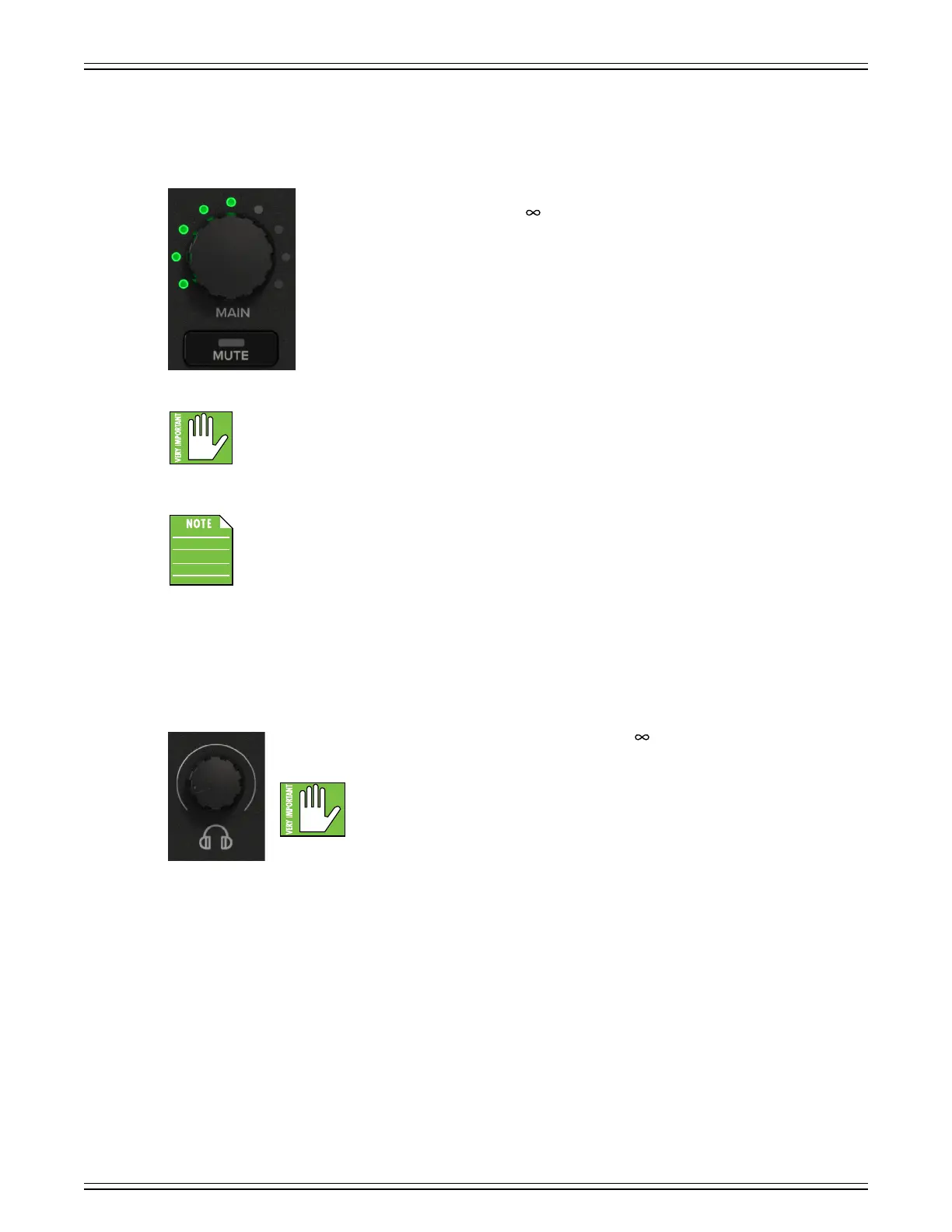
Main Volume Knob and Mute Button
The main volume knob adjusts the overall signal level at the input to the built-in power amplifiers.
The main mix signals ranges from o (– ) with the knob fully down, unity gain is at 2 o’clock
(noon, top-centered LED illuminated)
, and fully up (max) provides +6 dB of additional gain.
This additional gain will typically never be needed, but it’s nice to know that it’s there.
As you may have noticed to the lef (or on an actual ShowBox), the single-color LEDs
surrounding the main volume knob are green. The default position for the main volume
knob is 2 o’clock (noon, top-centered LED illuminated).
The far-right – ninth – LED illuminates green (if at max volume). However, if the incoming signal
is too hot, this LED will illuminate red to show that the input is clipping. If this occurs, turn down
the input volume/gain knob and/or main volume knob.
Quickly double-tapping the main volume knob will display the firmware version of the ShowBox
(“base”, replacing the FX scribble strip) and the breakaway mixer (“UI”, replacing the FX2 scribble
strip). The FX will be displayed again afer 4-5 seconds. Now that you know how to view the firmware
versions, here’s a friendly reminder that you should let the knob remain peaceful, calm and tranquil,
only viewing the fimrware versions if instructed by Tech Support. Thank you for listening!
Located conveniently below the main volume knob is the main mute button. Pressing it mutes all inputs...
including the phones output and mix output. Additionally, the button’s LED will illuminate red to confirm the mute.
If there is no sound coming out, be sure to check this switch first. If you desire phones output only, turn the main
volume knob all the way o, and make sure the headphone volume is up. We all have family, friends,
and roomates that don’t want to be bothered by our songs, either.
Headphones Volume Knob
This knob is used to adjust the volume at the phones output from (o) to maximum gain (max).
Make sure that this knob is fully o before selecting or adding a new source.
WARNING: The headphone amp is loud and can cause permanent hearing damage.
Even intermediate levels may be painfully loud with some headphones. BE CAREFUL!
Always turn the phones level control all the way down before connecting headphones,
or doing anything new that may aect the headphone volume. Then turn it up slowly
as you listen carefully.


 To Next Page