Energy Meter
microCLIMA
Installation and Operating Instructions
V. 1.03 October’06
microCLIMA
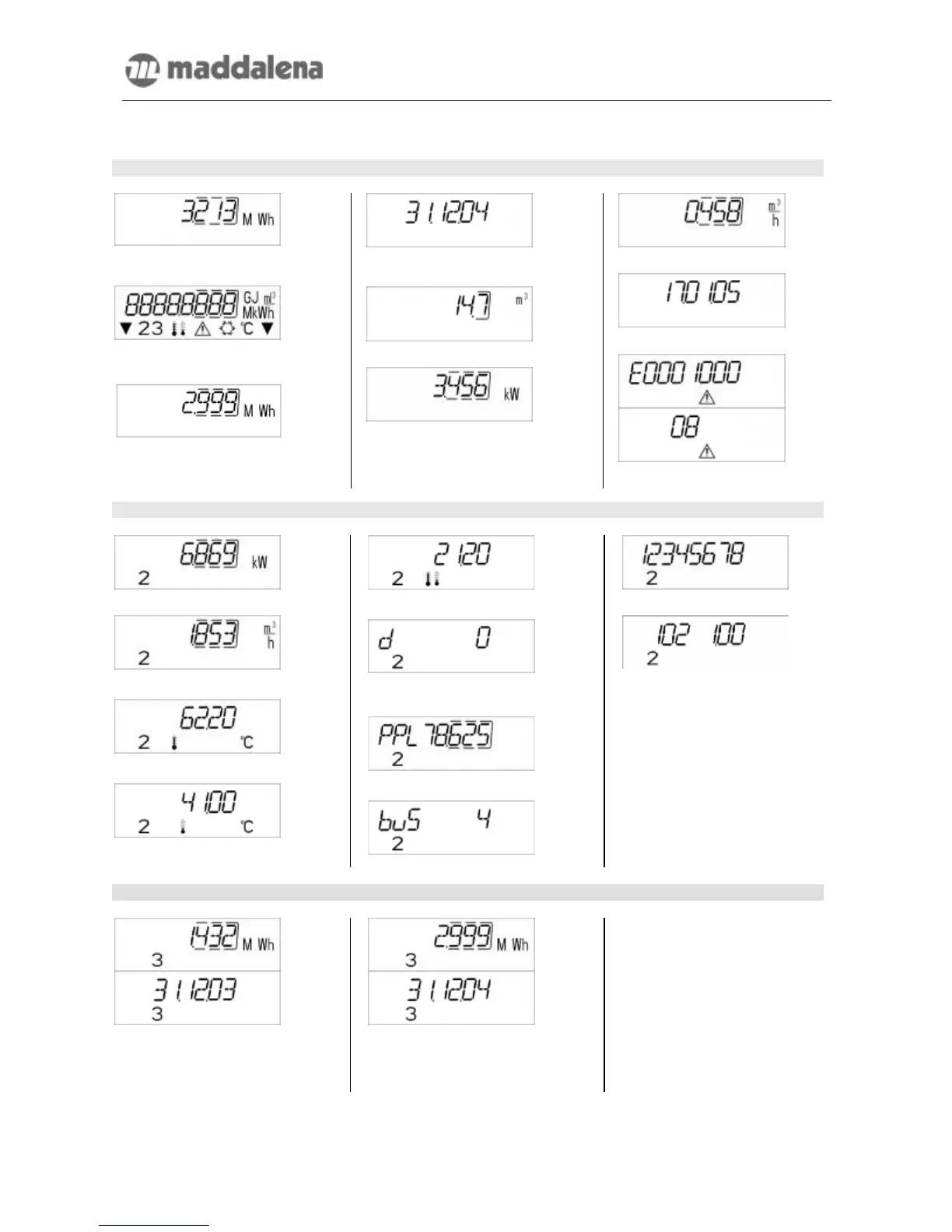
7. Display Information
1. Level / Main Loop
1) Total heat quantity in MWh –
standard display
2) Segment test, all segments
triggered simultaneously.
3) Heat quantity at last reading date
alternating with last reading date*
3) Last reading date alternating with
heat quantity at last reading date*
4) Total volume since installation in
m³
5) Current power in kW
6) Current flow in m³/h
7) Current date
8) Error message (alternating binary
and hexadecimal display)
2. Level / Technician’s Loop
1) Maximum power in kW
2) Maximum flow in m³/h
3) Forward flow temperature in °C
4) Return flow temperature in °C
5) Temperature difference
6) Days in operation since ver-
ification
7) Pulse value; pulses per liter
8) M-bus address
9) Serial number of the heat meter
10) Firmware / software version
3. Level: Statistics Loop
1) Heat quantity at next-to-last
reading date alternating with that
reading date
2-16) 15 monthly reading values
alternating with the corresponding
reading dates*
* Up to the end of the month the consumption and reading date for that month will be shown as 0.



 To Next Page