t
FeaturesofYourMicrowaveTouchControl Panel
The Touch Control Panel allows you to set the oven
controls electronically with the touch of a finger. It's
designed to be easy to use and understand. With your
microwave oven, you have the option of using your
Cook Code or Roast Code pads for quick and easy
convenience cooking. Or you may make your own
programs to suit your individualized cooking style.
"EE EE" Appears on Readout
• When using Temp Cook function, you have entered
a temperature less than 90°E or more than 199°F.
"PR OB" Appears on Readout:
• Probe has been forgotten when Roast Code or Temp
Cook functions are being used.
• Probe is not securely seated in oven wall receptacle.
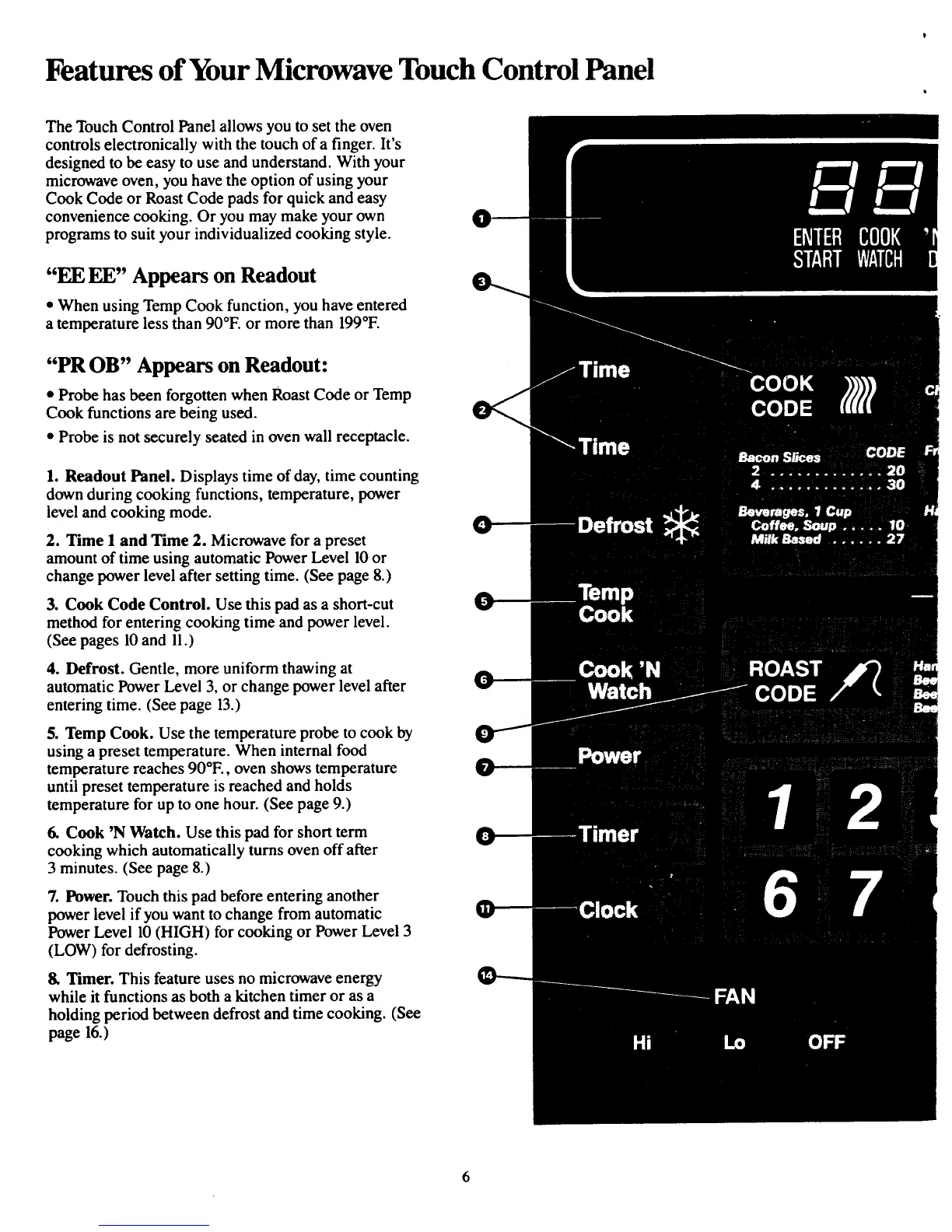
1. Readout Panel. Displays time of day, time counting
down during cooking functions, temperature, power
level and cooking mode.
2. Time I and Time 2. Microwave for a preset
amount of time using automatic Power Level 10or
change power level after setting time. (See page 8.)
3. Cook Code Control. Use this pad as a short-cut
method for entering cooking time andpower level.
(See pages 10and 11.)
4. Defrost. Gentle, more uniform thawing at
automatic PowerLevel 3, or change power level after
entering time. (See page 13.)
5. Temp Cook. Use the temperature probe to cook by
using a preset temperature. When internal food
temperature reaches 90°E, oven shows temperature
until preset temperature is reached and holds
temperaturefor up to one hour. (See page 9.)
6. Cook 'N Watch. Use this pad for short term
cooking which automatically turns oven off after
3 minutes. (See page 8.)
7. Power. Touch this pad before entering another
power level if you want to change from automatic
Power Level 10 (HIGH) for cooking or Power Level 3
(LOW) for defrosting.
8. Timer. This featureuses no microwave energy
while it functions as both a kitchen timer or as a
holding period between defrost and time cooking. (See
page 16.)



 To Next Page