8
ENG
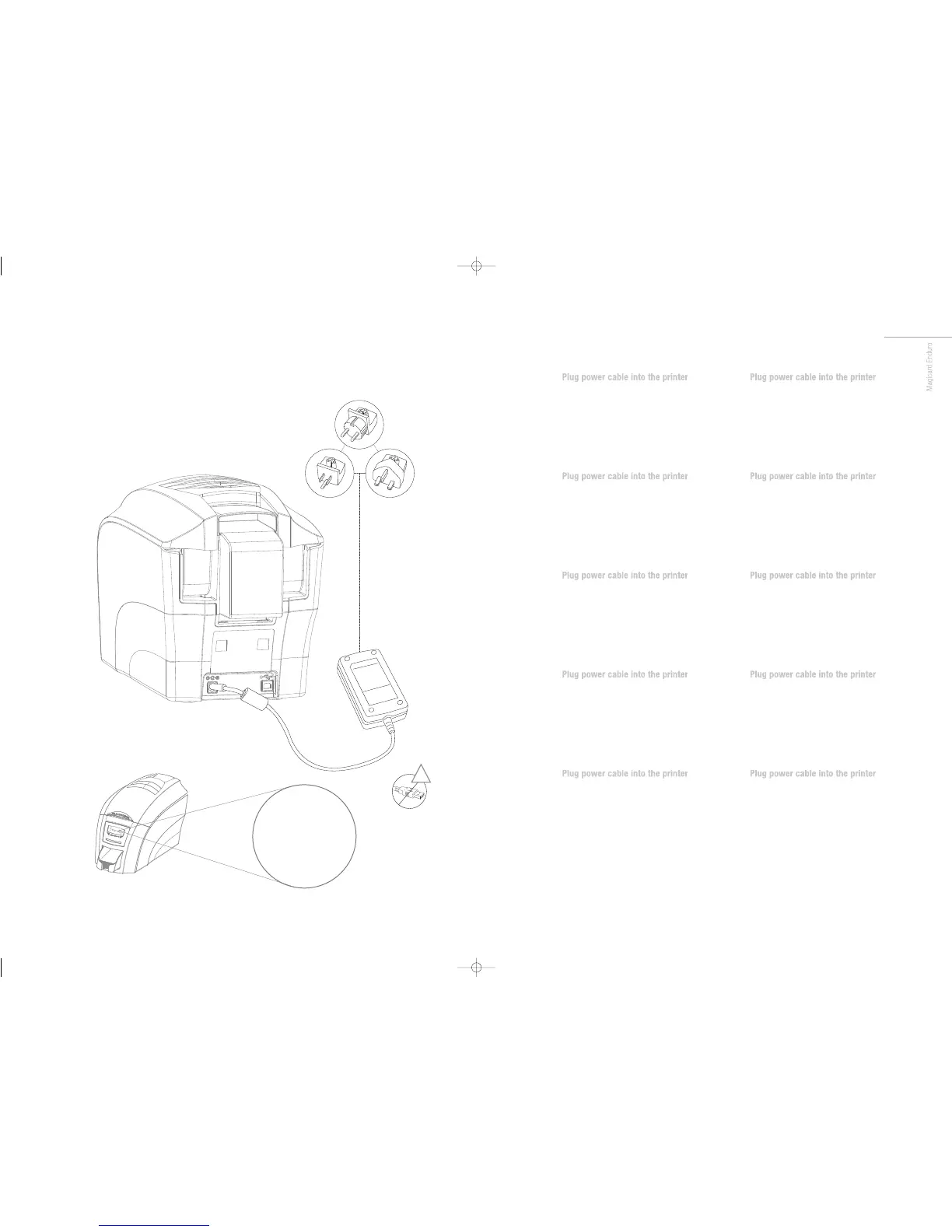
Select the adapter for your region and connect to power
supply unit. Plug in and connect to printer which will
automatically switch on. Display should read “Standby”.
IMPORTANT: Please do not connect the USB until the CD-
ROM has been installed.
FR
Select the adapter for your region and connect to power
supply unit. Plug in and connect to printer which will
automatically switch on. Display should read “Standby”.
IMPORTANT: Please do not connect the USB until the CD-
ROM has been installed.
ES
Select the adapter for your region and connect to power
supply unit. Plug in and connect to printer which will
automatically switch on. Display should read “Standby”.
IMPORTANT: Please do not connect the USB until the CD-
ROM has been installed.
PT
Select the adapter for your region and connect to power
supply unit. Plug in and connect to printer which will
automatically switch on. Display should read “Standby”.
IMPORTANT: Please do not connect the USB until the CD-
ROM has been installed.
IT
Select the adapter for your region and connect to power
supply unit. Plug in and connect to printer which will
automatically switch on. Display should read “Standby”.
IMPORTANT: Please do not connect the USB until the CD-
ROM has been installed.
DE
Select the adapter for your region and connect to power
supply unit. Plug in and connect to printer which will
automatically switch on. Display should read “Standby”.
IMPORTANT: Please do not connect the USB until the CD-
ROM has been installed.
CN
Select the adapter for your region and connect to power
supply unit. Plug in and connect to printer which will
automatically switch on. Display should read “Standby”.
IMPORTANT: Please do not connect the USB until the CD-
ROM has been installed.
RU
Select the adapter for your region and connect to power
supply unit. Plug in and connect to printer which will
automatically switch on. Display should read “Standby”.
IMPORTANT: Please do not connect the USB until the CD-
ROM has been installed.
PL
Select the adapter for your region and connect to power
supply unit. Plug in and connect to printer which will
automatically switch on. Display should read “Standby”.
IMPORTANT: Please do not connect the USB until the CD-
ROM has been installed.
NL
Select the adapter for your region and connect to power
supply unit. Plug in and connect to printer which will
automatically switch on. Display should read “Standby”.
IMPORTANT: Please do not connect the USB until the CD-
ROM has been installed.














 To Next Page