12
ENG
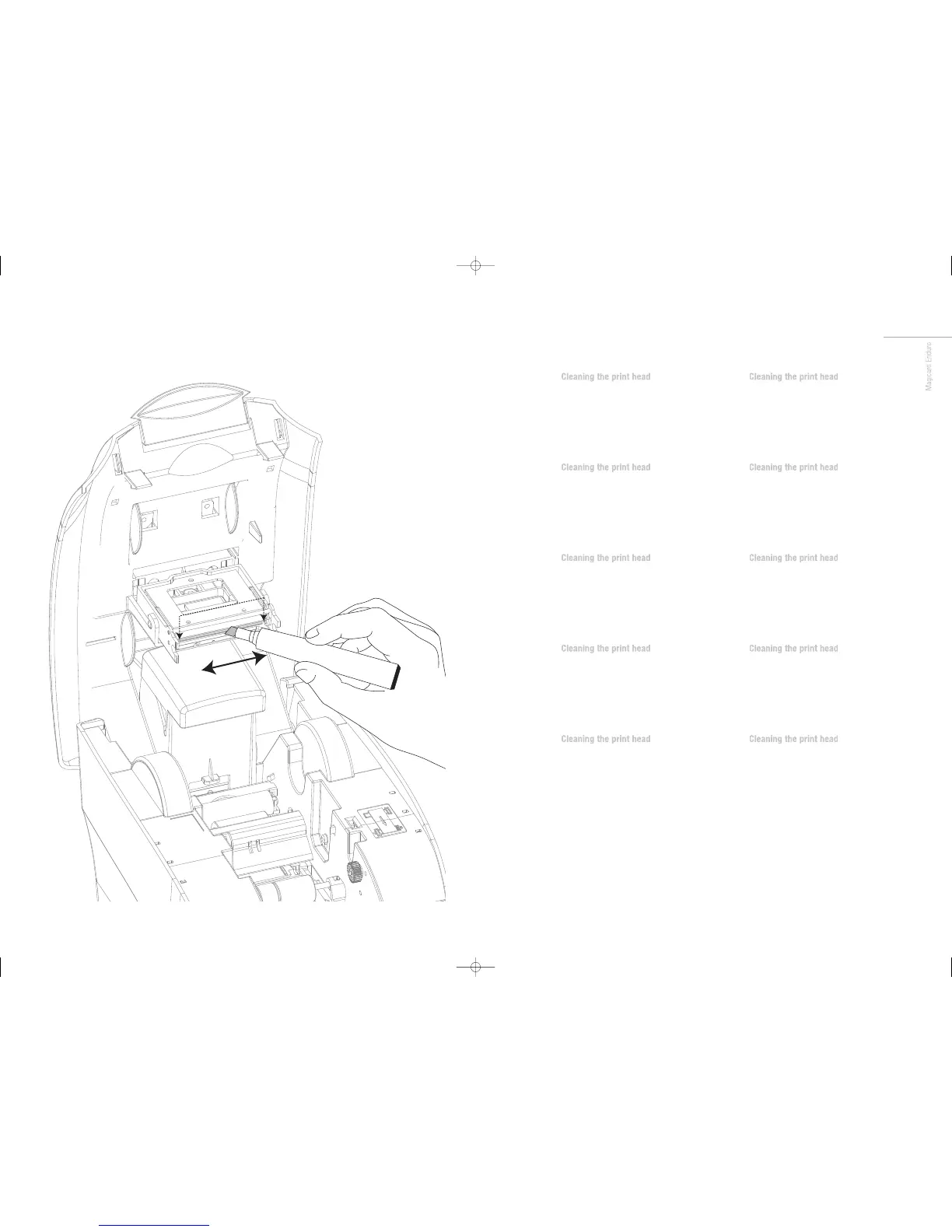
We recommend that you clean the print head
each time you replace the dye-film.
• Take the cleaning pen from your Enduro cleaning kit.
• Open the printer and carefully rub the pen several times,
along the complete length of the print head.
FR
We recommend that you clean the print head
each time you replace the dye-film.
• Take the cleaning pen from your Enduro cleaning kit.
• Open the printer and carefully rub the pen several times,
along the complete length of the print head.
ES
We recommend that you clean the print head
each time you replace the dye-film.
• Take the cleaning pen from your Enduro cleaning kit.
• Open the printer and carefully rub the pen several times,
along the complete length of the print head.
PT
We recommend that you clean the print head
each time you replace the dye-film.
• Take the cleaning pen from your Enduro cleaning kit.
• Open the printer and carefully rub the pen several times,
along the complete length of the print head.
IT
We recommend that you clean the print head
each time you replace the dye-film.
• Take the cleaning pen from your Enduro cleaning kit.
• Open the printer and carefully rub the pen several times,
along the complete length of the print head.
DE
We recommend that you clean the print head
each time you replace the dye-film.
• Take the cleaning pen from your Enduro cleaning kit.
• Open the printer and carefully rub the pen several times,
along the complete length of the print head.
CN
We recommend that you clean the print head
each time you replace the dye-film.
• Take the cleaning pen from your Enduro cleaning kit.
• Open the printer and carefully rub the pen several times,
along the complete length of the print head.
RU
We recommend that you clean the print head
each time you replace the dye-film.
• Take the cleaning pen from your Enduro cleaning kit.
• Open the printer and carefully rub the pen several times,
along the complete length of the print head.
PL
We recommend that you clean the print head
each time you replace the dye-film.
• Take the cleaning pen from your Enduro cleaning kit.
• Open the printer and carefully rub the pen several times,
along the complete length of the print head.
NL
We recommend that you clean the print head
each time you replace the dye-film.
• Take the cleaning pen from your Enduro cleaning kit.
• Open the printer and carefully rub the pen several times,
along the complete length of the print head.
Enduro QSG multi language V3 - 07:Enduro QSG multi language V2- 07 29/1/08 14:10 Page 33














 To Next Page