How to Set up Your MAGICSING
-
Chapter.02
Chapter.02
-
How to Set up Your MAGICSING
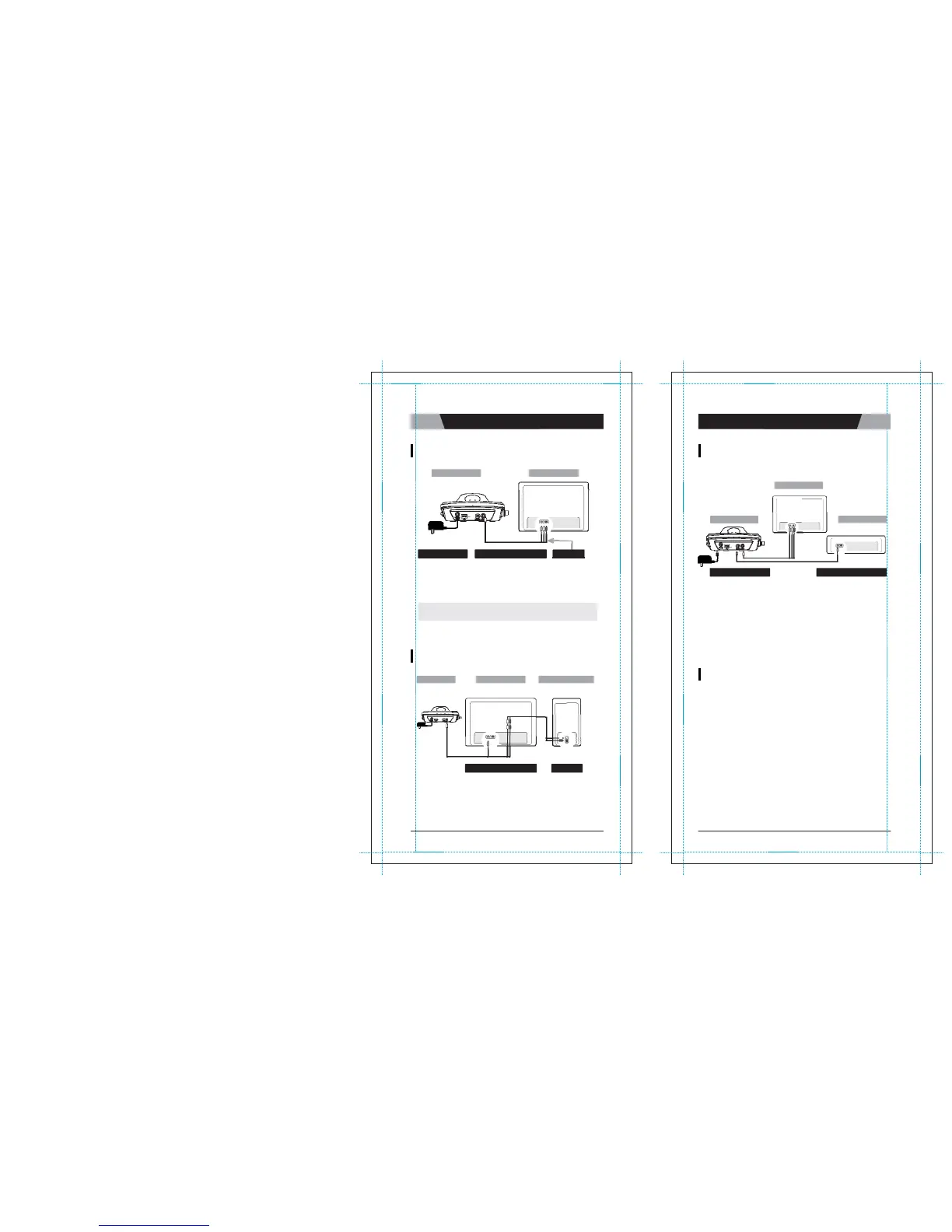
HOW TO CONNECT TO
A TV
ET19KV
Main Station
Television
HOW TO CHANGE THE BACKGROUND
VIDEO
USING OTHER VIDEO SOURCES
Television
ET19KV
Main Station
External
Device
AUDIO L
/
R & VIDEO OUT
INPUT PORT I AUDIO L
/
R & VIDEO
IN
AV CABLE (RCA)
1.
Connect the Audio
/
Video cable to the
RCA
jack terminal on your TV, a
s
shown above. If there are only two
RCA
jack terminals on your
TV
(
m
o
n
o
TV), connect the yellow jack (male) to the yellow
RCA jack
t
e
r
m
i
n
a
l
and connect the white jack (male) to the other
RCA
jack terminal of your
T
V
.
※
Please turn off the function
“
A
u
t
o
m
a
ti
c
Volume
L
e
v
e
lli
ng
”
(AVL
/
AVC)
o
n
your television
s
e
t
.
HOW TO CONNECT TO A TV & STEREO
(SOUND
SYSTEM)
VIDEO IN
OUTPUT PORT
|
VIDEO OUT
1.
Connect the video cable to the
VIDEO OUT
jack terminal on other
o
p
t
i
o
n
a
l
video sources
(
VCD,
D
V
D
,
V
I
D
E
O
)
.
2.
Connect the other side of the video cable to the
VIDEO IN
jack terminal
o
f
M
A
G
I
C
S
I
N
G
.
3.
Press [MODE+0+1]
on either the mic or the remote control to use
o
t
h
e
r
video sources as background video by selecting
"
E
X
T
.
V
I
D
E
O
I
N
P
U
T
"
on the
“
c
o
n
f
i
gu
r
a
t
i
o
n
m
e
nu
”
.
ET19KV
Main Station
Television
Stereo
(
Sound
System
)
HOW TO CONVERT [PAL] OR
[NTSC] MODE OF TV
1.
To convert to PAL mode, t urn of f the mic
f
i
r
s
t
.
Press and hold button [8] on the mic, and then press the [
P
O
W
E
R
]
bu
tt
o
n
using another finger until the word
“
P
A
L
”
appears on the
TV
screen.
(Do not release button
[8] a nd the [
P
O
W
E
R
]
button until the word
“
P
A
L
”
appears on the
TV
s
c
r
ee
n
.
)
INPUT PORT I VIDEO
AUDIO L
/
R
2.
To convert to NTSC mode, turn off the mic
fi
r
s
t
.
Press and hold button
[9] on the mic, and then press the
[
P
O
W
E
R
]
button u
s
i
ng
another finger until the word
“
N
T
S
C
”
appears on the
TV
s
c
r
ee
n
.
(Do not release button
[9] and the
[
P
O
W
E
R
]
button until the word
“
N
T
S
C
”
a
pp
ea
r
s
on the
TV
s
c
r
ee
n
.
)
1.
Connect the y ellow jack to the yellow
RCA
terminal on your TV.
C
o
nn
e
c
t
the red and white jack to jack terminals on your s tereo (sound sys
t
e
m
)
.
You might need an extension cable
if
your stereo (sound sys
t
e
m
)
is placed far away from your
T
V
.
CHAPTER.
02
|
01
VER.100
02
|
CHAPTER.
02
VER.100



 To Next Page