Functions & Settings
-
Chapter.04
Chapter.04
-
Functions &
Settings
ET MANAGER
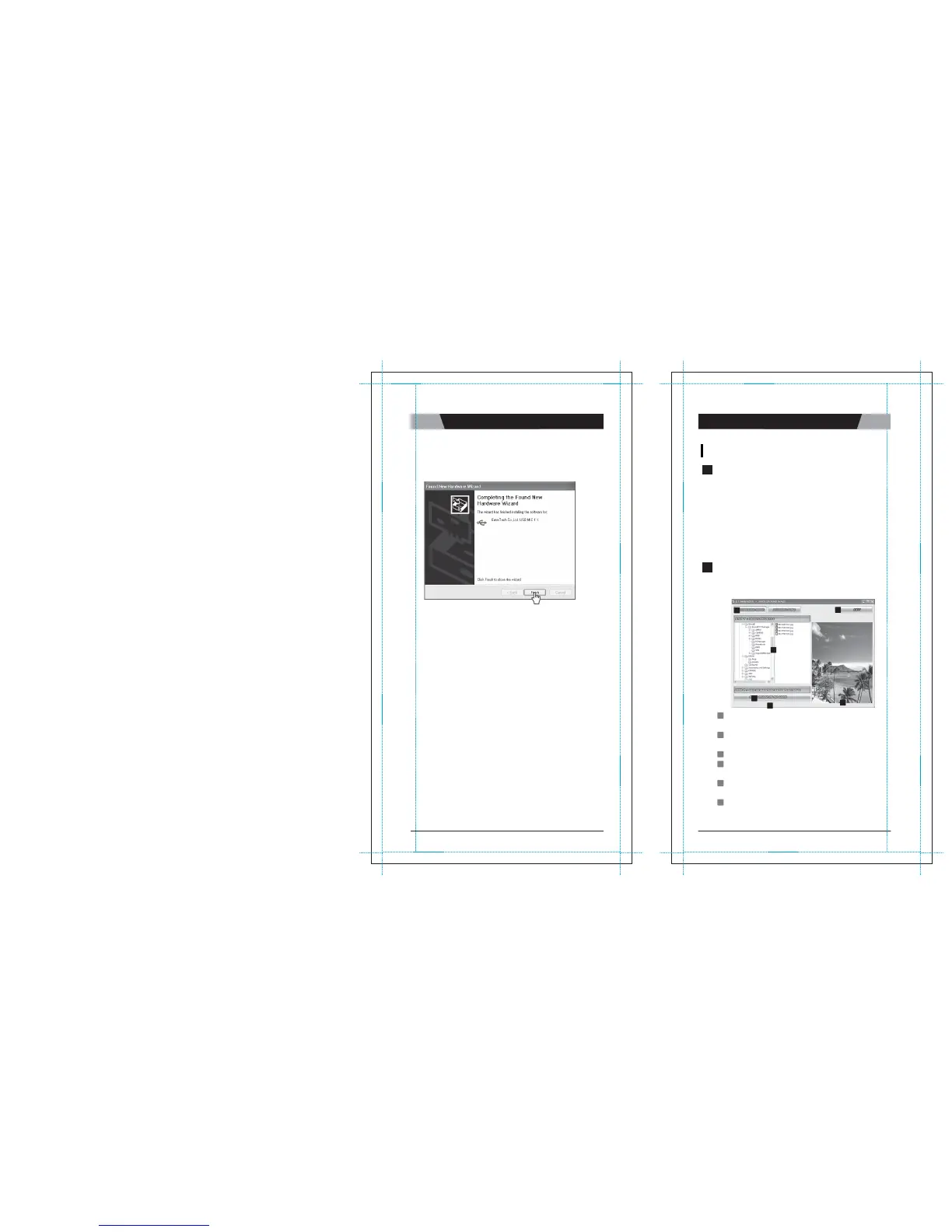
d) Click “Finish” to close the
wizard.
1
GENERAL
DESCRIPTION
A. Background
I
m
a
g
e
Converts image files you have in your PC
into background images of
MagicSing so that you can enjoy your personalized
picture backgrounds
on T V.
B. Recorded
S
o
ng
You
can save your songs in the Recording Pack and you can convert and
transmit the recorded songs into your PC as a "MP2" file (USB
cable needed)
to play those through PC
or MP3 player.
Note : This function is available only when you use a Recording Pack.
2
FUNCTION
A. Background
I
m
a
g
e
1) User Interface La
y
o
u
t
1
6
2
4
5
3
1
BACKGROUND IMAGE
:
Shows the
"
B
a
c
k
g
r
o
und
I
m
a
g
e
"
w
i
nd
o
w
when you click on this
bu
tt
o
n
.
2
IMAGE FILE SEARCH WINDOW
:
Enables you to search folders
i
n
your PC and select the images from the chosen
f
o
l
d
e
r
s
.
3
IMAGE VIEWER
:
Enables you to see your chosen
i
m
a
g
e
s
.
4
SAVE IMAGE IN SD CARD
: Converts the selected i mage t o a
MagicSing background image file when you click on this
bu
tt
o
n
.
5
CONVERT PROGRESS BAR
: Shows the length of the time in
w
h
i
c
h
your image files are being saved into an SD
c
a
r
d
.
6
EXIT
: Allows you to exit from the
"
E
T
manager
w
i
nd
o
w
"
a
b
o
v
e
.
CHAPTER.
04
|
22
VER.100
23
|
CHAPTER.
04
VER.100



 To Next Page