Functions & Settings
-
Chapter.04
Chapter.04
-
Functions &
Settings
SOFTWARE
INSTALLATION
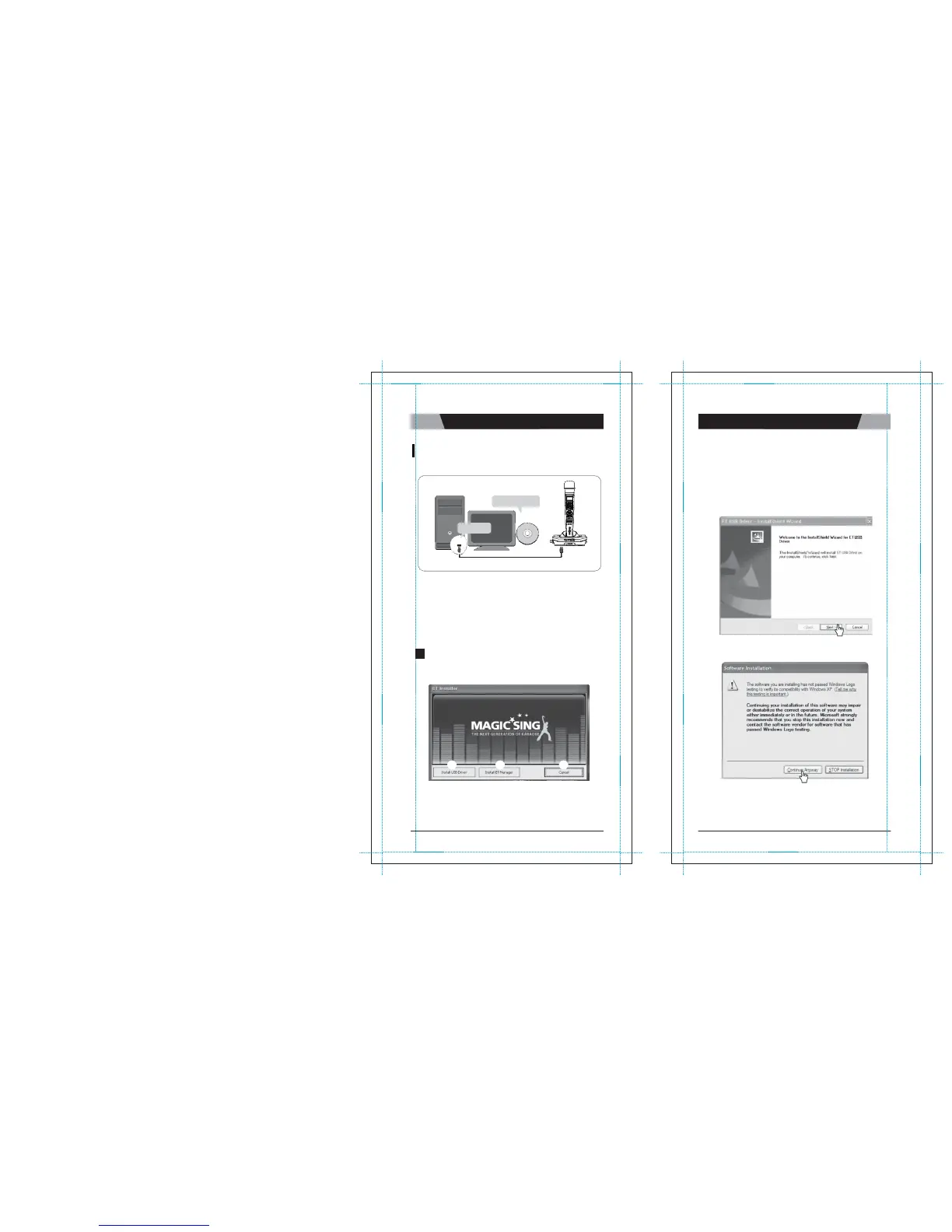
Installing the ET manager and USB driver in your PC
:
*PC
INSTALLATION CD
1) USB
Driver
I
ns
t
a
ll
a
ti
o
n
This installation should be completed in advance to execute
ET
M
a
n
a
g
e
r
.
Click
"
I
n
s
t
a
ll
USB
D
r
i
v
e
r
"
(
①
)
and follow the below instruction of
“
E
T
U
S
B
Driver
-
InstallShield
W
i
z
a
r
d
”
a
s
shown
b
e
l
o
w
.
a) Click
“
N
e
x
t
”
to start the
i
n
s
t
a
ll
a
t
i
o
n
.
USB
Port
*USB Cable
1. Enables you to use your own images or pictures in your computer as
MagicSing background pictures on TV.
2. Enables you to convert the recorded songs from the Recording Pack
to your PC as wave
files.
Note :
In the a bsence of the I nstallation CD,
you can install the
ET manager and USB driver softwares in your PC
by downloading
them from our website.
(www.enter-tech.com)
1
HOW TO INSTALL USB DRIVER
+
ET
M
A
N
A
G
E
R
b) Click
“
C
o
n
t
i
nu
e
a
n
y
w
a
y
”
to p
r
o
c
ee
d
.
Insert t he Installation CD into your PC, and then you will see
the pop-up
screen as shown
below.
1
2
3
Note :
Please do not connect MagicSing to a PC by USB
cable before
installing "Install USB
Driver".
CHAPTER.
04
|
16
VER.100
17
|
CHAPTER.
04
VER.100


 To Next Page