MM
aa
gg
ii
cc
SS
ii
nngg
Optional Items
-
Chapter.05
Chapter.05
-
Optional
Items
RECORDING PACK
You can record your own singing into the Recordng Pack.
ADDITIONAL SONG PACK
You
can add more of your favorite songs to MagicSing.
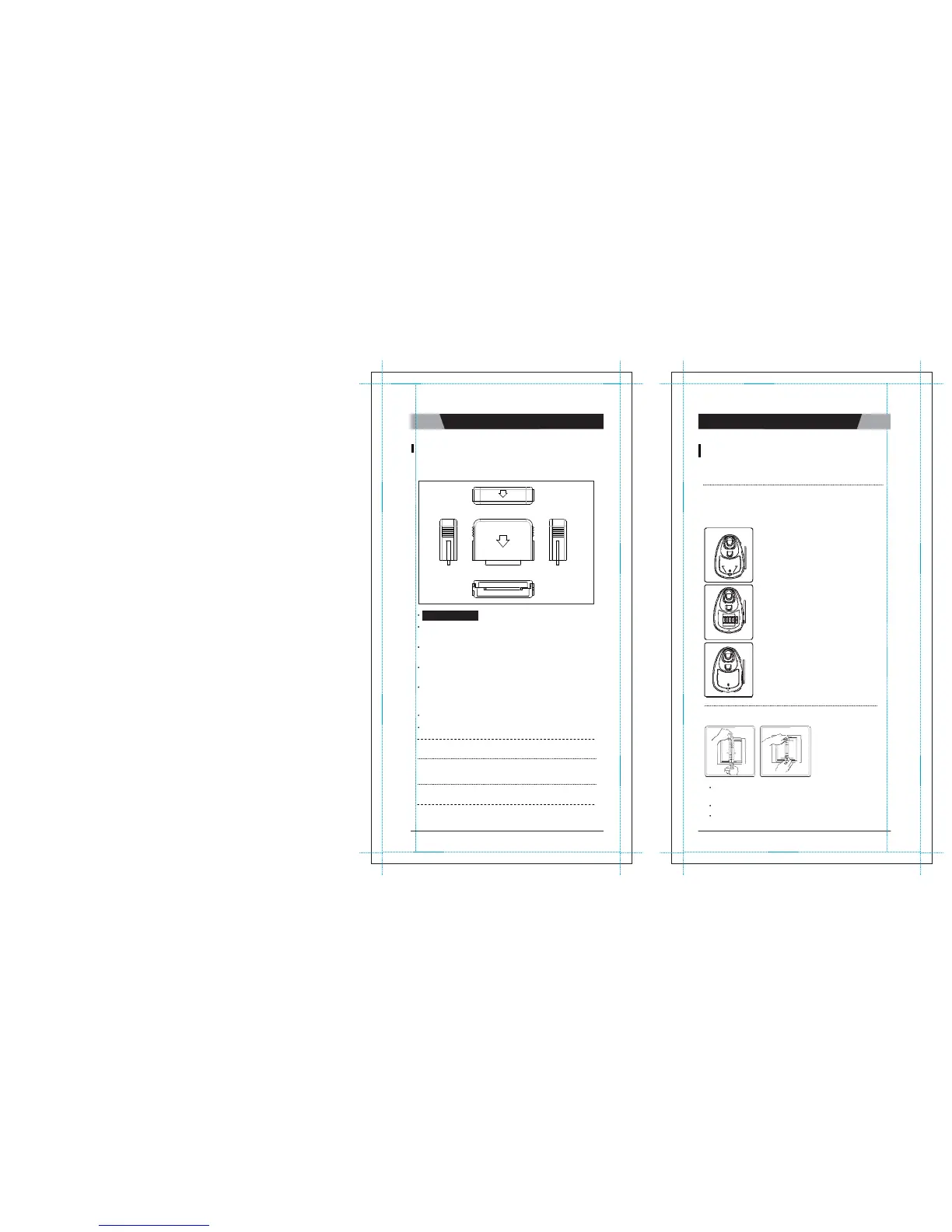
How to Insert an Additional Song
P
a
c
k
First, turn
OFF
the power. This is very important to turn off the main
s
t
a
t
i
o
n
before removing or inserting a song
p
a
c
k
.
main
s
t
a
t
i
o
n
Clip Lo
c
k
●
Turn off the power of the main
s
t
a
t
i
o
n
●
Pull up the clip lock on the back cover of the
m
a
i
n
station, according to the direction of the
a
rr
o
w
,
then remove the back
c
o
v
e
r
.
Turn off M
a
g
i
c
S
i
ng
:
MagicSing should be turned off
f
i
r
s
t
.
●
Make sure the arrow on the song pack is p
o
i
n
t
i
ng
left when you insert t he song p
a
c
k
.
(6 additional song packs can be
i
n
s
e
r
t
e
d
.
)
Insert the Recording Pack into one of the slots in the back of the
m
a
i
n
station according to the direction of the
a
rr
o
w
.
Turn on the power of main station then select a song number
a
nd
press
[
●
]
under the
“
r
e
c
o
r
d
”
section on the remote
c
o
n
t
r
o
l
.
To stop the recording, press
[
●
]
again on the remote control or you
c
a
n
also press
[▶/
■
].
To play back the recorded songs, press
[▶]
under the
“
r
e
c
o
r
d
”
section
o
n
the remote control, and your recorded songs will be listed on the
s
c
r
ee
n
.
Select a song using
[▼/▲],
then press
[▶/
■
] .
To stop the playback, press
[▶/
■
]
a
g
a
i
n
.
To delete the recorded s ongs, pr ess
[
R
E
S
]
on the highlighted
s
o
ng
s
.
SONG LIST
I
N
S
E
RT
I
O
N
●
After the song pack is inserted, close the back
c
o
v
e
r
.
●
Turn on the power of main
s
t
a
t
i
o
n
.
You cannot record your singing performance in the internal memory o
f
main station while you are recording
it
in the recording p
a
c
k
.
You cannot record your singing performance in the middle of a song. If
y
o
u
press
[
●
]
in the middle of the song, the song stops, restarts, and
t
h
e
n
recording takes p
l
a
c
e
.
The Tempo, Jump and Key functions w ill no t work when you are
p
l
a
y
i
ng
back the recorded
s
o
ng
s
.
Press down both the top and the bottom metal tabs of the
b
i
nd
e
r
simultaneously to open the binder
r
i
ng
s
.
Insert the new song list between the binder
r
i
ng
s
.
Close the binder
r
i
ng
s
.
CHAPTER.
05
|
01
VER.100
02
|
CHAPTER.
05
VER.100


 To Next Page