Product Gui de
-
Chapter.03
Chapter.03
-
Product Guid e
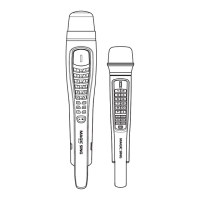
5. NAVIGATION BUTTONS
-
Press these buttons to choose different
m
o
d
e
s
,
different songs and so on by scrolling up/down and
l
e
ft
/
r
i
gh
t
.
6. PLAY
/
STOP BUTTON
-
Press
[
▶
/
■
]
once to play the selected s
o
ng
.
11. PAUSE BUTTON
II
-
Press this button to pause the song you are s
i
ng
i
ng
.
-
After pressing this button, you can also enjoy the
"
H
o
w
to
S
i
ng
"
function by using the navigation
bu
tt
o
n
s
.
12. VOLUME BUTTON
-
Press
[
▶
/
■
]
again to stop playing the s
o
ng
.
7. SEARCH BUTTON
VOL
-
When you press
[VOL]
, two different sub volume control
m
e
nu
s
appear on the
TV screen
①
Music(press
o
n
c
e
)
②
Multiplex(Press two
ti
m
e
s
)
.
SEARCH
-
Pressing [
S
E
A
R
C
H
]
will prompt you to different modes
o
f
choosing a
s
o
ng
.
13. MIC BUTTON
-
You can also search a song from the o
n
-
s
c
r
ee
n
list by p
r
e
ss
i
ng
[
▼
],
[▲]
or inputting characters. (Refer to
C
h
a
p
t
e
r
.04
-
01
)
8. POWER BUTTON
-
Turns on or off the
m
i
c
.
MIC
-
Press
[MIC]
to adjust t he volume of the main mi c then press
[
▼
],
[
▲
]
to decrease
/
increase the v
o
l
u
m
e
.
-
This setting w ill remain until the product is reset or the values
a
r
e
changed by
u
s
e
r
s
.
Press
[POWER]
slightly to turn it o
n
.
14. MELODY BUTTON
Press
[POWER]
for 3 seconds to turn it o
ff
.
-
When there is no input signal within 10 minutes, the power will
b
e
turned off
a
u
t
o
m
a
t
i
c
a
ll
y
.
MEL
-
Press this button, and then use the navigation but tons t o adjust
t
h
e
melody levels of a s
o
ng
.
9. MY-MIC BUTTON
15. ECHO
BUTTON
-
This function enables you to save your own customized settings o
v
e
r
the song you
c
h
o
s
e
.
-
While singing a song, adjust settings such as the volume,
m
e
l
o
d
y
,
ECHO
-
Press this button and then use the navigation but tons t o a
d
j
u
s
t
the
ECHO
levels of a
s
o
ng
.
echo, etc., press
[ ]
on the mic to save the
s
e
tt
i
ng
s
.
1
6
.
KEY BUTTON
-
To see the stored
[
MY-MIC
]
song list, press
[ ]
a
g
a
i
n
.
-
Press
[
▼
],
[▲]
to select the song you wish to sing again with
t
h
e
adjusted set tings. Press
[▶/■]
to play the song and press
[
RES
]
t
o
delete it from the
li
s
t
.
-
The lists containing the customized settings will be retained even a
ft
e
r
turning off the
E
T
19
K
V
.
KEY
-
Press
[KEY]
and then press
[
▼
],
[▲]
to decrease
/
increase the
p
i
t
c
h
level while singing a s
o
ng
.
The T V
screen wi ll display the range of keys (
-7
~
8 ) with the
d
e
f
a
u
l
t
value [0] on the key bar at the upper part of the s
c
r
ee
n
.
-
At the end of the song or when you press
[▶/■]
to stop the
s
o
ng
,
this setting will return to the initial default value
[
0
]
.
10. VOCAL ASSIST BUTTON
-
Press this button to see the list of vocal a
ss
i
s
t
.
(Refer to
C
h
a
p
t
e
r
.
04-08)
-
While singing a song, you can activate or deactivate vocal a
ss
i
s
t
function by pressing this button
r
e
p
ea
t
e
d
l
y
.
CHAPTER.
03
|
03
VER.100
04
|
CHAPTER.
03
VER.100


 To Next Page