ExpressBox 3T | Chapter 3 Verify Installation
• When you have a bad cable, you don't see LEDs D701, D24 AND D21 coming on. Swap or replaced the
Thunderbolt Cable.
• If you already swapped the Thunderbolt cable and still LEDs D701, D24 AND D21 are not coming on this
indicates you have a bad interface card.
Q: How can I determine if the driver for my PCIe card is Thunderbolt Compatible?
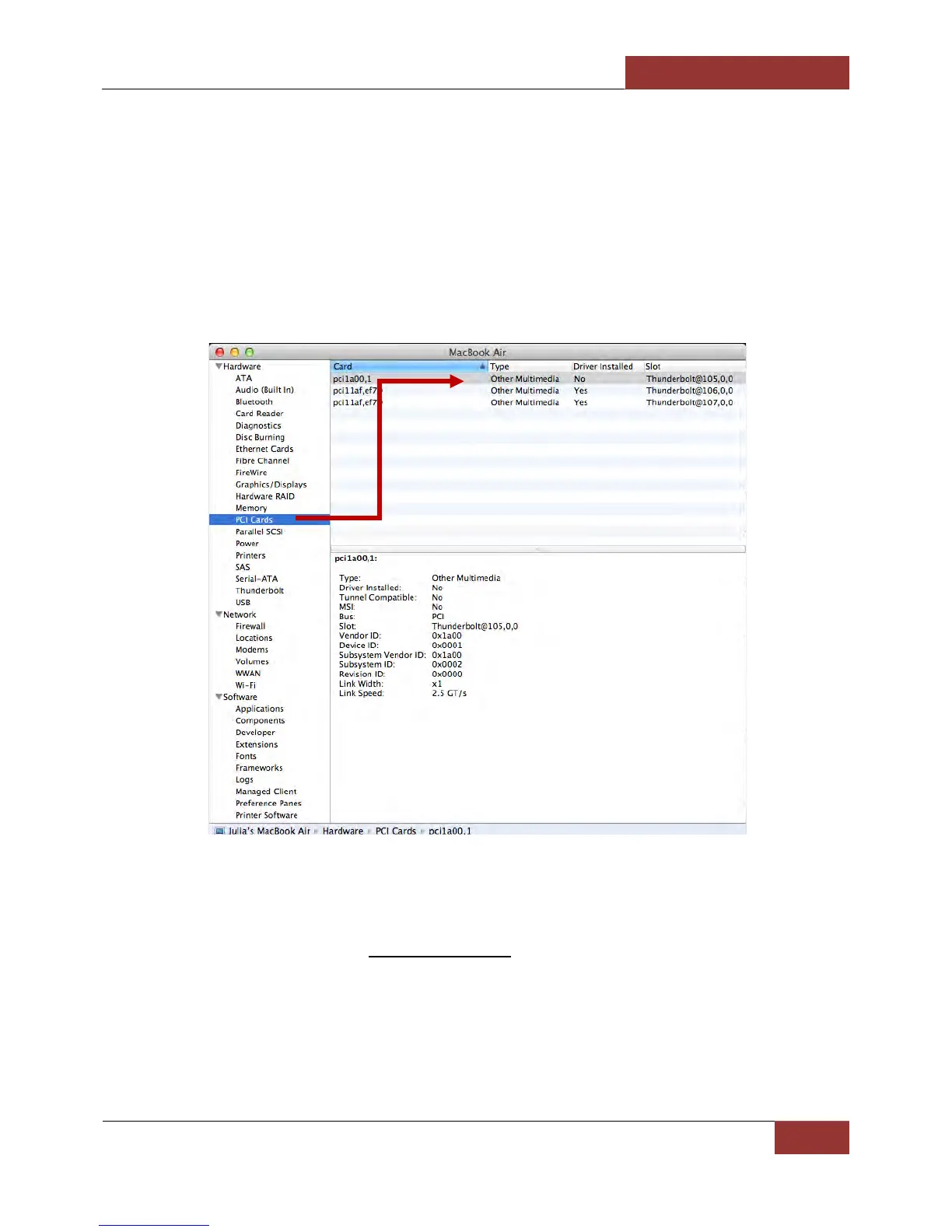
A: Thunderbolt Tunneling is required for Mac OS. In Apple System Profile, click on the specific PCIe card in question
to see if it’s Thunderbolt Tunnel Compatible. If it shows “Yes” then Thunderbolt tunneling has been enabled. If it
shows “No”, then the driver does not work through Thunderbolt and the PCIe card will not be visible in ExpressBox
3T.
Q. My PCIe card is not getting detected when installed in 1st PCIE slot, what should I do?
A. You have to configure the DIP Switch (SW1) on the backplane, setting it to proper configuration to match the
PCIE card specs.
This troubleshooting is only applicable to Rev A5.1 backplane. The main function of this DIP Switch is as follows
- To set the 1st PCIe slot to train to either GEN1 or GEN2
- To allow a x8 or x16 PCIE card to run under x4 slot


 To Next Page