ExpressBox 3T | Chapter 3 Verify Installation
Chapter 3 Verify Installation
Hardware
Check the status of the LEDs on the Interface cards and backplane to verify good connection or link between your
host computer and expansion unit.
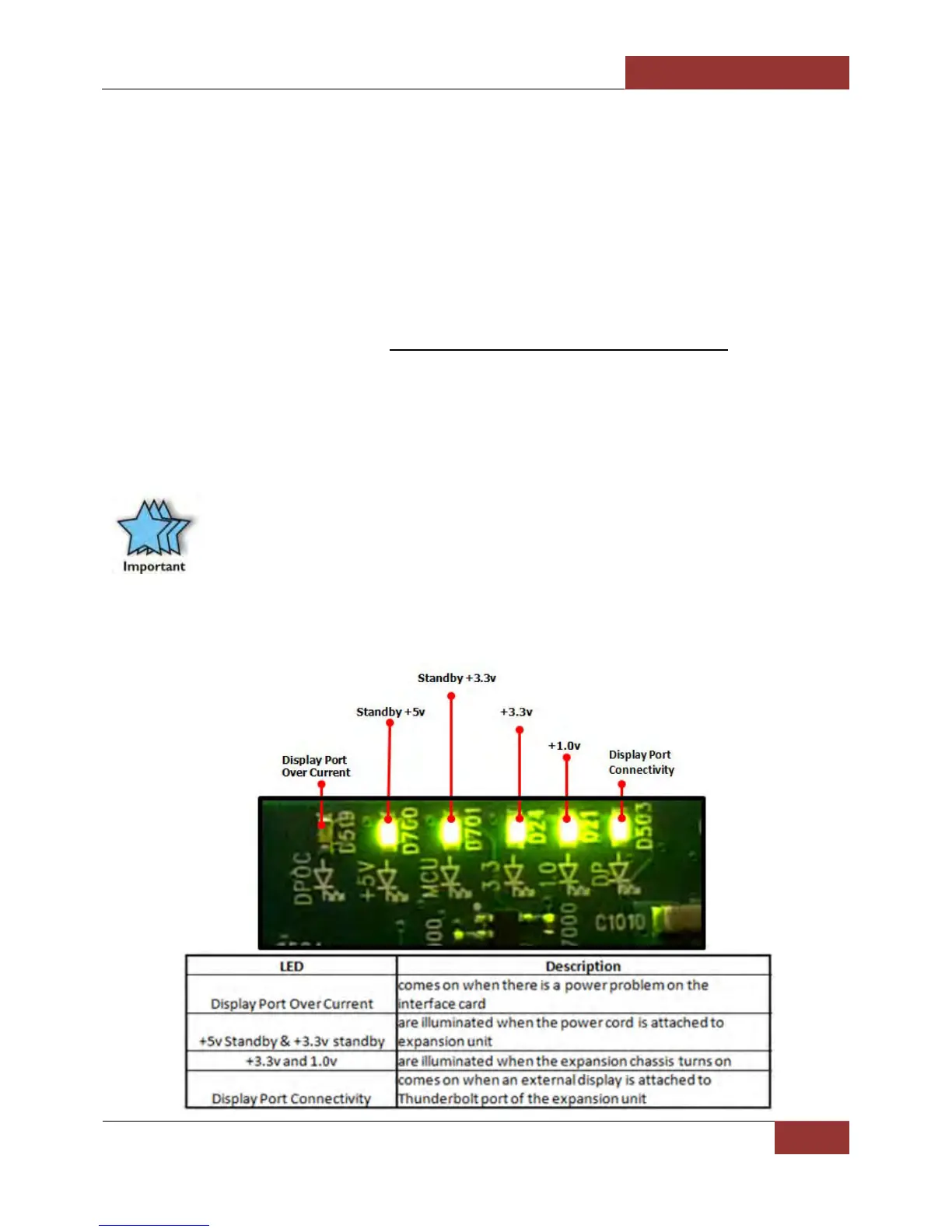
1. Thunderbolt™ 1 interface card : 5 solid green LEDS are illuminated and three solid green LEDs on the
backplane. For more details see “Thunderbolt™ 1 Interface Card LEDs” below.
2. Thunderbolt™ 2 Interface Card: 7 solid green LEDs are illuminated and 3 solid green LEDs on the
backplane. For more details go to “Thunderbolt™ 2 Interface Card LEDs on page 20
”.
Thunderbolt™ 1 Interface Card & LEDs
When the Thunderbolt™ 1 Interface card is fully operational and with an external Display device attached, 5 green
LEDs are illuminated (solid green), see FIGURE T1-A .
IMPORTANT
If you are only seeing Two Green LEDs that are illuminated on the Thunderbolt Interface card after
the Magma Roben-3 is turned on, this indicates that there a hardware failure within your expansion
unit. Check your Thunderbolt cable, make sure it is connected firmly and the Thunderbolt Interface
card is seated in the PCIE slot properly.
FIGURE T1-A


 To Next Page