Operation Manual
touchTymp MI 24
and
MI 34
Version
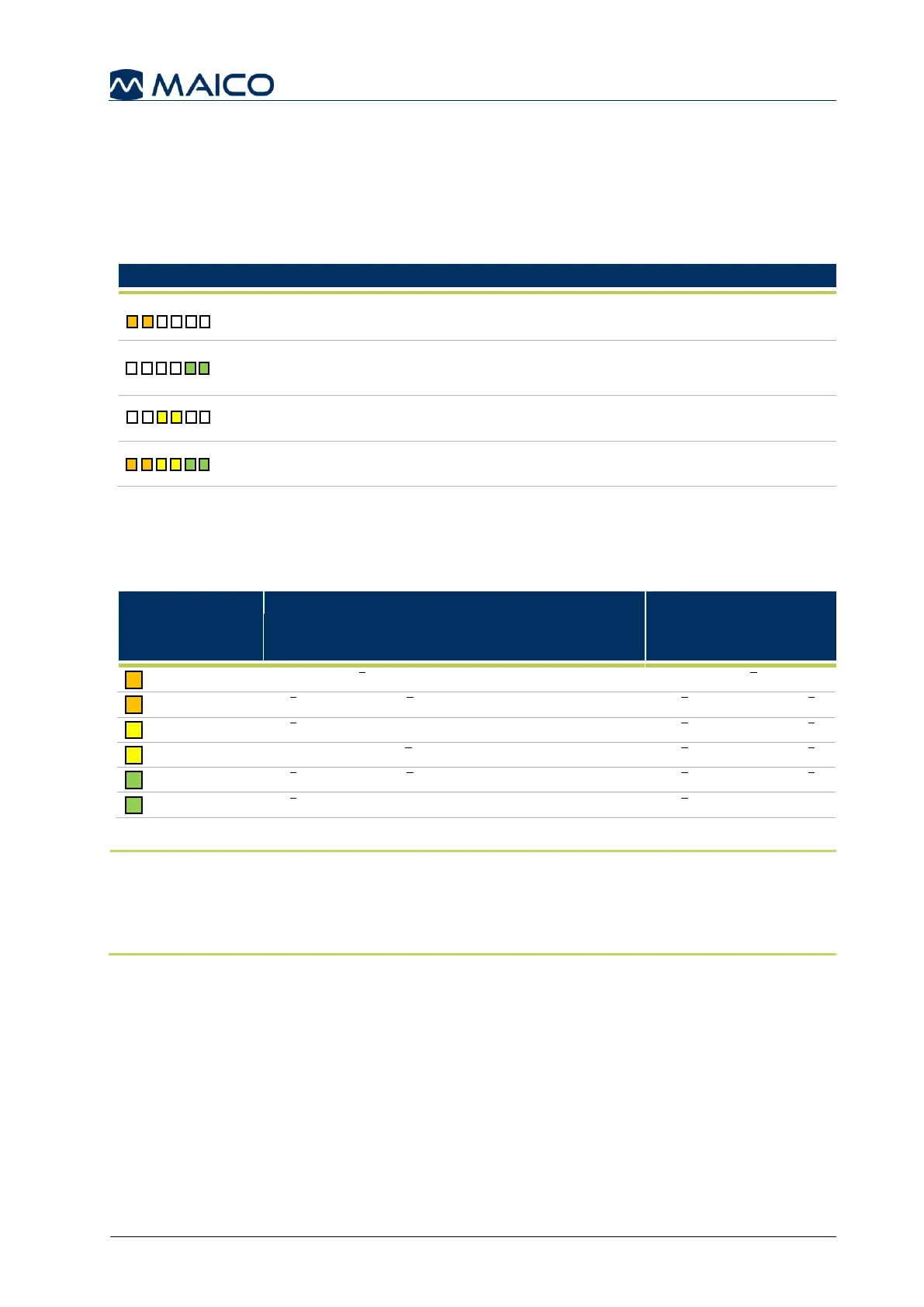
The Light Bar
The light bar function on the probe allows the examiner to view test progression and
final compliance for patient focused operation. It can be set on or off in the Basic
settings menu (see section 5.6.3). If set on, the light bar offers the following
functionalities dependent on the test modus (Table 7).
Table 7 Light Bar Functions 1
Tympanometry &
Acoustic Reflex:
Shows result: No Response (NR)
Tympanometry &
Acoustic Reflex:
Stimulus is being given (additionally
the last result is shown)
Lights up (rolling up) dependent on
the values (normative box)
While completing Tympanometry testing the Light Bar will light up indicating the height
of the compliance according to the following Table 8.
Table 8 Light Bar Functions 2
NOTE: The indication of Pass/No Response can be set on or off individually for 226 Hz and
1000 Hz for Tympanometry and Acoustic Reflex testing (see section 5.6.8).
The light bar will not show any indication of test result when set off (see section 5.6.3).
However, the Pass/No Response indicators will be shown on the screen or in the diagram.



 To Next Page