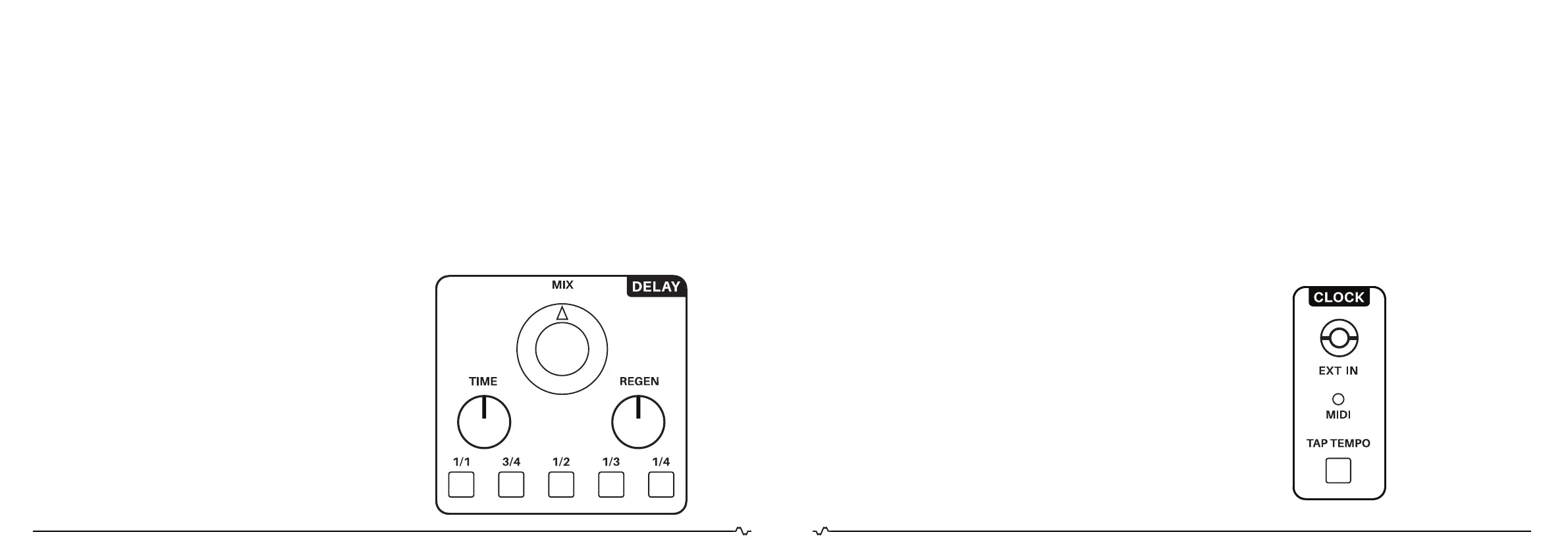
DELAY
The delay section is a digital stereo audio delay with a
16bit resolution at 48kHz sample rate. The delay time goes
up to one second and can be synchronized to MIDI or ex-
ternal clock. The delay has three controllable parameters:
MIX, TIME and REGEN. We will detail them one by one:
MIX
The MIX control sets the amount of delayed
signal (wet) that is blended with the original signal (dry).
When the MIX control is fully clockwise the delayed signal
is around the same audio level as the original signal.
TIME
The delay time can be manually set using the
TIME control knob. When the TIME control is turned
fully counterclockwise the delay time is shortest. When this
control is turned fully clockwise the delay time is longest.
The delay time can also be synchronized to three
different clock sources: Tap tempo, MIDI and external
(Eurorack) clock. This can be achieved using the division
buttons. You can undo the synchronization by pressing
the blinking division button again.
REGEN
REGEN is an abbreviation for “regeneration”. This
control sets the volume of the delayed signal that is fed
back (feedback) into the delay input. When the REGEN
control is fully counterclockwise there is no feedback at
all and you will hear the delayed signal only once. When
this control is fully clockwise there is a lot of feedback and
you will hear the delayed signal repeating itself for a long
period of time.
NOTE:
There is a tiny bit of delay time modulation to emulate a tape
delay/echo effect. The modulation rate differs between
the left and right output channel of the delay. This creates
a stereo widening effect best heard when listening to the
delay in a stereo setup.
MAJELLA
ENGINEERING
IMPLEX
MADE IN THE NEHTERLANDS
CLOCK
The IMPLEXUS offers three clock synchronization sourc-
es for the audio delay and the low frequency oscillators.
These three sources are: Tap Tempo (internal clock),
External clock (Eurorack) and MIDI clock. We will detail
them one by one:
TAP TEMPO
The TAP TEMPO button sets the (internal) clock tempo
by pressing it twice. The time between these two “taps”
becomes the new master clock tempo.
EXT IN
The EXT IN (external) mini jack input allows you to con-
nect your Eurorack or any kind of clock source that pro-
duces pulses in the range of 0-8V. The time between two
pulses becomes the master clock tempo.
MIDI clock
When a MIDI clock is being received by IMPLEXUS
via USB/DIN, the time between 24 MIDI pulses (MIDI
sends 24 pulses per quarter note) becomes the new
masterclock tempo. Note that when a MIDI clock is being
received by the IMPLEXUS, the TAP TEMPO button and
external input are completely ignored.
NOTES:
-The LED from the TAP TEMPO button indicates the clock
tempo (also for MIDI clock synchronisation). The MIDI LED
indicates MIDI note ON/OFF.
-When a MIDI clock is being received by the IMPLEXUS,
the Tap Tempo button and external input are completely
ignored.
-The maximum clock period is one second. When the
IMPLEXUS receives a clock with a longer period than one
second between taps or pulses, it will simple ignore it and
the clock period stays the same.
MAJELLA
ENGINEERING
IMPLEX
MADE IN THE NEHTERLANDS
2726.


 To Next Page