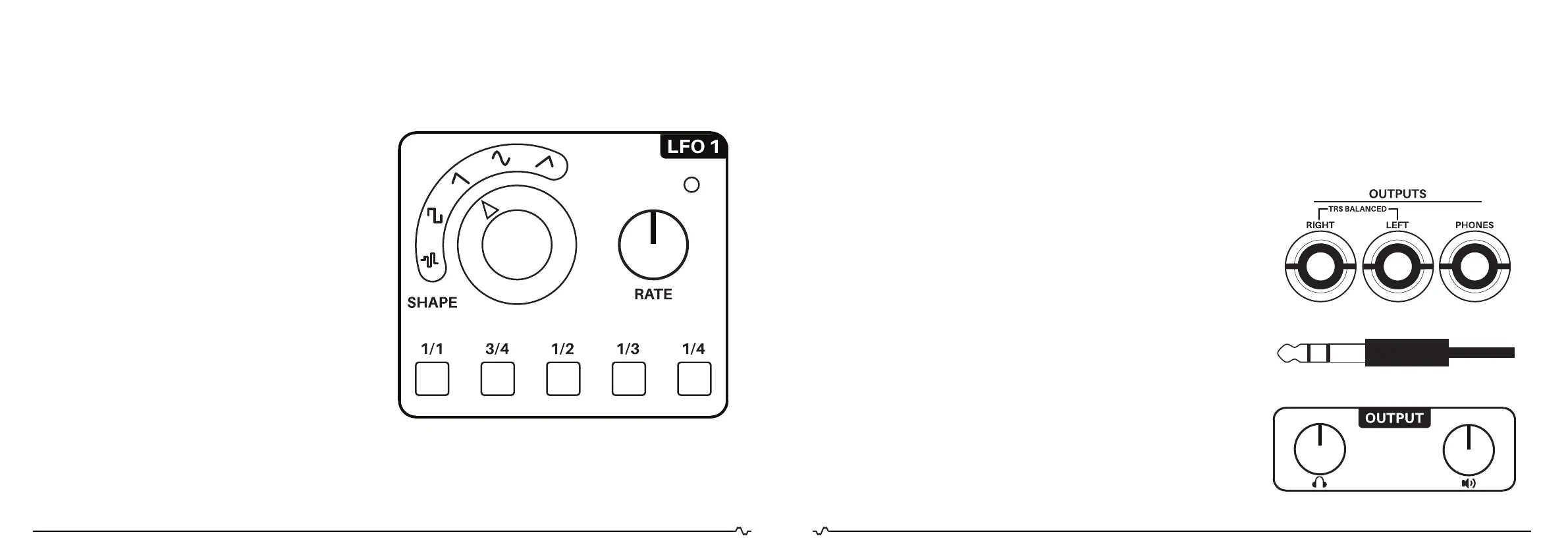
LOW FREQUENCY OSCILLATORS
The IMPLEXUS offers two low frequency oscillators
(LFOs) with a frequency range from 0.1 Hz to 100 Hz.
Both LFOs can be used to modulate HARMONICS, FOLD
and BIAS. LFO 2 also has a CV output on the back of the
IMPLEXUS, so you can patch it to any CV input. The LFOs
have SHAPE and RATE controls. We will detail them one
by one:
SHAPE
The SHAPE control is a rotary switch that selects the LFO
output waveform. You can select the following waveforms:
- RANDOM
- SQUARE
- SAW
- SINE
- RAMP
RATE
The LFO RATE can be set manually using the RATE con-
trol. This control knob sets the LFO frequency between
0.1 and 100Hz.
The LFO RATE can also be synchronized to three different
clock sources: Tap tempo, MIDI and external (Eurorack)
clock. This can be achieved using the division buttons.
You can undo the synchronization by pressing the blink-
ing division button again.
MAJELLA
ENGINEERING
IMPLEX
MADE IN THE NEHTERLANDS
OUTPUTS
The audio output section of the IMPLEXUS offers two audio outputs, each with their own volume control:
stereo balanced (Line) output and stereo headphone output. We will detail them one by one:
IMPORTANT NOTE: Listening to the IMPLEXUS at high sound volume can damage your hearing and cause temporary
or even permanent hearing loss. In addition, modulations can cause unexpected spikes in frequency and/or volume.
STEREO BALANCED LINE OUTPUT
The two 1/4” TRS (TIP, RING , SLEEVE) line level output jacks allow you to
record mono/stereo audio from the IMPLEXUS, over long cables without
signal loss. A TRS jack cable is “balanced” and rejects noise common
with unbalanced TS mono jack cables. Because the OUTPUTS are TRS
Balanced, use TRS cables when connecting to mono inputs like audio
interfaces or mixers. For example, if you want one channel mono out-
put, connect one TRS (see image on the left) cable from Output Left to
Audio Interface Channel 1, For stereo output (Delay effect), connect a
second TRS cable from Output Right to Channel 2. (This follows video
convention of Left/Ch 1, Right/ Ch 2.)
* IMPORTANT:
Do not use mono (TS) jack cables with IMPLEXUS outputs! Always use
TRS jacks, even for unbalanced unbalanced mono single channel
recording. Using a mono ( TS unbalanced) jack cable may damage your
IMPLEXUS over the long term.
HEADPHONE OUT
The stereo headphone output allows you to listen to the IMPLEXUS over
headphones. Just plug in your headphones and start playing!
MAJELLA
ENGINEERING
IMPLEX
MADE IN THE NEHTERLANDS
MAJELLA
ENGINEERING
IMPLEX
MADE IN THE NEHTERLANDS
TIP | RING | SLEEVE
3130.


 To Next Page