15
EN
Instructions Guide
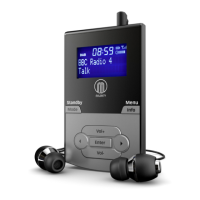
1. Press and hold the ‘Info/Menu’ button (Ref.1).
2. Use the ‘Prev/Next’ buttons (Ref.5/6) to choose “Alarm 1 Set” or “Alarm
2 Set” and press the ‘Enter’ button (Ref.7) for the alarm you wish to set.
3. Once alarm 1 or 2 is selected, OFF will display on the screen. To turn
the alarm on, use the ‘Next’ button (Ref.6) to make “ON” ash on the
display. Press the ‘Enter/Snooze’ button (Ref.7) to conrm the alarm
switch on.
4. The hour digits for the alarm will then ash. To set the hour you want
the alarm to sound, press the ‘Prev’ or ‘Next’ buttons (Ref.5/6) to browse
to the hour and press the ‘Enter’ button (Ref.7) to conrm your choice.
5. The minutes of the alarm are now able to be set. Using the ‘Prev’ or
‘Next’ buttons (Ref.5/6), scroll up and down the minutes and press the
‘Enter’ button (Ref.7) to conrm your choice.
6. Now choose when you would alarm to sound. Using the ‘prev’ or
‘Next’ buttons, scroll through the alarm options: ‘Once/Daily/Weekends/
Weekdays’. Use the ‘Enter’ button to conrm selection.
7. Once the alarm time is set, you can change the alarm volume by
pressing the ‘Prev’ or ‘Next’ buttons (Ref.5/6) to choose the noise level.
Press the ‘Enter’ button (Ref.7) to conrm.
8. You can now choose the alarm tone sound. Press the ‘Prev’ or ‘Next’
buttons (Ref.5/6) to change between which sound you would like:
Alarm, DAB or FM Radio, and press the ‘Enter/Snooze’ button (Ref.7) to
conrm.
Dual Alarm Setting



 To Next Page