Installation
2.1 Connecting to an Ethernet Switch
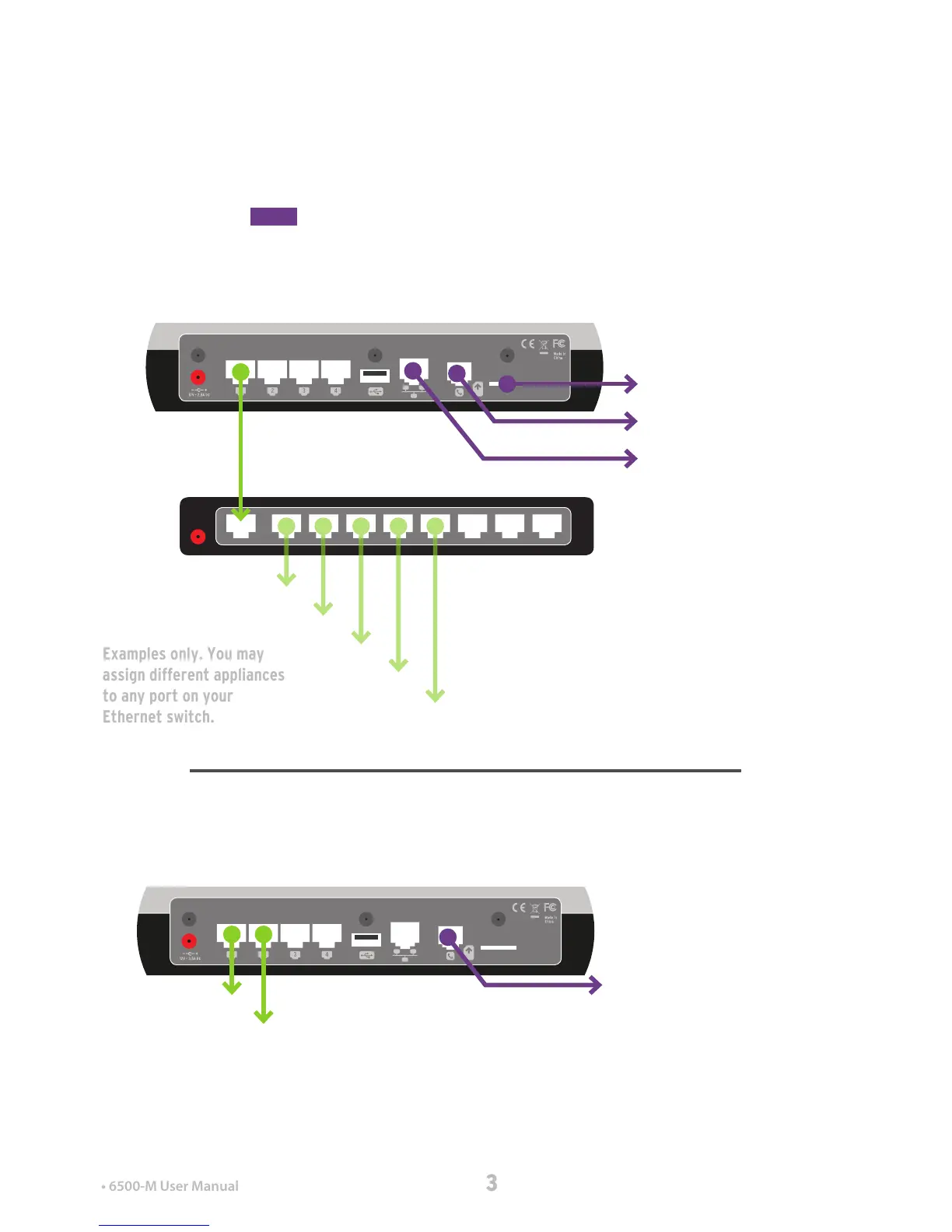
You must have AT LEAST ONE WAN connection to an
Internet service that’s up and running. In the diagram,
WAN connections are inPurple.
6500-M/3G and 6500-M/LTE models: Ideally, your main
WAN would either be a DSL or Cable/Ethernet connection,
simply because these connections are more reliable and
cheaper. That way you can use your cellular connection in
emergencies with CellularFailover .
You can also run multiple LANs from the Mako into the
same switch, but we advise against this unless you have a
sound knowledge of gatewaynetworking.
Computer 1
POS Terminal
Computer 2
Printer
Backup Mako
Mako 6500-M
SIM Card for 3G or 4G/LTE...
to DSL...
to Cable/Ethernet...
Ethernet Switch
A single-LAN network protects all of these devices
under the same rules and settings (with individual
routing parameters per device).
While smaller, this two-LAN network operates on two
distinct sets of rules and settings (unless configured
to ‘bridge’ one LAN to the other internally).
2.2 Simple Connection
In small networks you may wish to place one device per
LAN. This is ne, but be aware that each LAN is separate
from the others and requires individual conguration
ormaintenance. Switched networks (above) tend to be
easier to manage.
Computer 1
POS Terminal
Mako 6500-M
to DSL...


 To Next Page