Troubleshooting
7.1 Firmware Checks
The conguration installation process uses two main light
sequences.
§ Verify: The three lights on the right will go through
a ash sequence: left light on, center light
on, right light on, then each light turns o
in reverse. It will continue this back-n-forth
sequence as the Mako goes through its
verication phase.
§ Install: The three lights on the right will go through a
similar ash sequence, but reversed: Right light
on, center light on, left light on, then each light
turns o in reverse. It will continue this back-n-
forth sequence until the le has been installed.
n ‘conguration.zip’ installs successfully when the
Install light sequencenishes.
n If either the verication or installation was not successful
the lights will freeze. If 10 minutes has elapsed,
disconnect the Mako’s power, remove the USB key and
check to see if the le ‘conguration.zip’ is still on it – part
of a successful install is the auto-deletion of this le.
n In the unlikely event that the rst try fails, reload
‘conguration.zip’ onto the USB key and repeat the
installation process.
Always remember to disconnect power from the Mako
before inserting or removing the USB key. If you
encounter any other diculties, please contact yourMSP.
7.2 Testing WAN Connections
DSL/Ethernet
Once your network is set, open a web browser on one of
your Mako-protected PCs and access one or twowebsites.
Your network may have been congured to use a
Payment Card Industry Data Security Standard (PCI DSS)
template. The default action of this template is to allow
access only to pre-approved websites. Consult your
network service provider if you are unable to access
business-criticalwebsites.
Cellular Failover
If your Mako is congured for Cellular Failover, disconnect
your Primary WAN cable (DSL or Ethernet). The WAN light
( ) should turn from green to yellow ( ) over a period
of 2-5 minutes, depending on the complexity of your
network.
When yellow, try accessing a website or using a web
service likeemail.
Once tested, re-insert your Primary WANcable. It will
take another similar period to re-establish your primary
connection. When the WAN light returns to green, failback
is complete.
If re-inserting your DSL or Ethernet WAN cable doesn’t
revert to your primary connection within 10 minutes,
call your MSP.
7.3 Makoscope
Makoscope is Mako Networks’ diagnostic reporting tool.
After conguring your network and opening a web
browser you may access Makoscope twoways:
n Entering the LAN address of your network into your
browser’s address eld (the default URL for the Mako
is “192.168.[subnet number].254”, but variations
arecommon).
n Through the CMS. Login and go to:
Reports > Diagnostics >¤ Makoscope
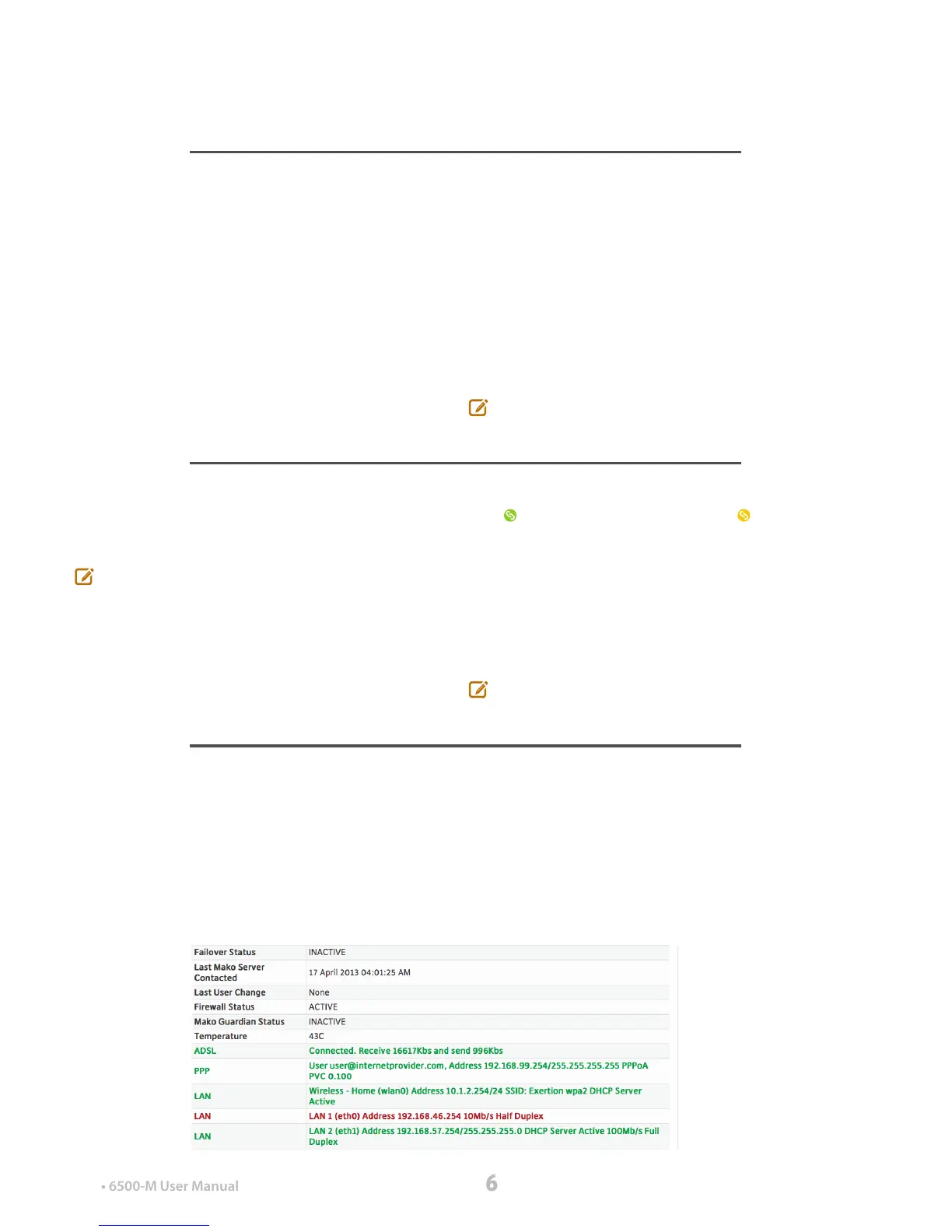
Of most importance is the colored text, indicating the
status of your connection. For more information on
Makoscope, see the Central Management System:
Setup & Congurationmanual.


 To Next Page
 Loading...