printer, then plugthe other end into a nearby AC power outlet. Flip the
Power Switch to the ON position.
Insert the included memory card into the slot on
the right side of the LCD module, the main
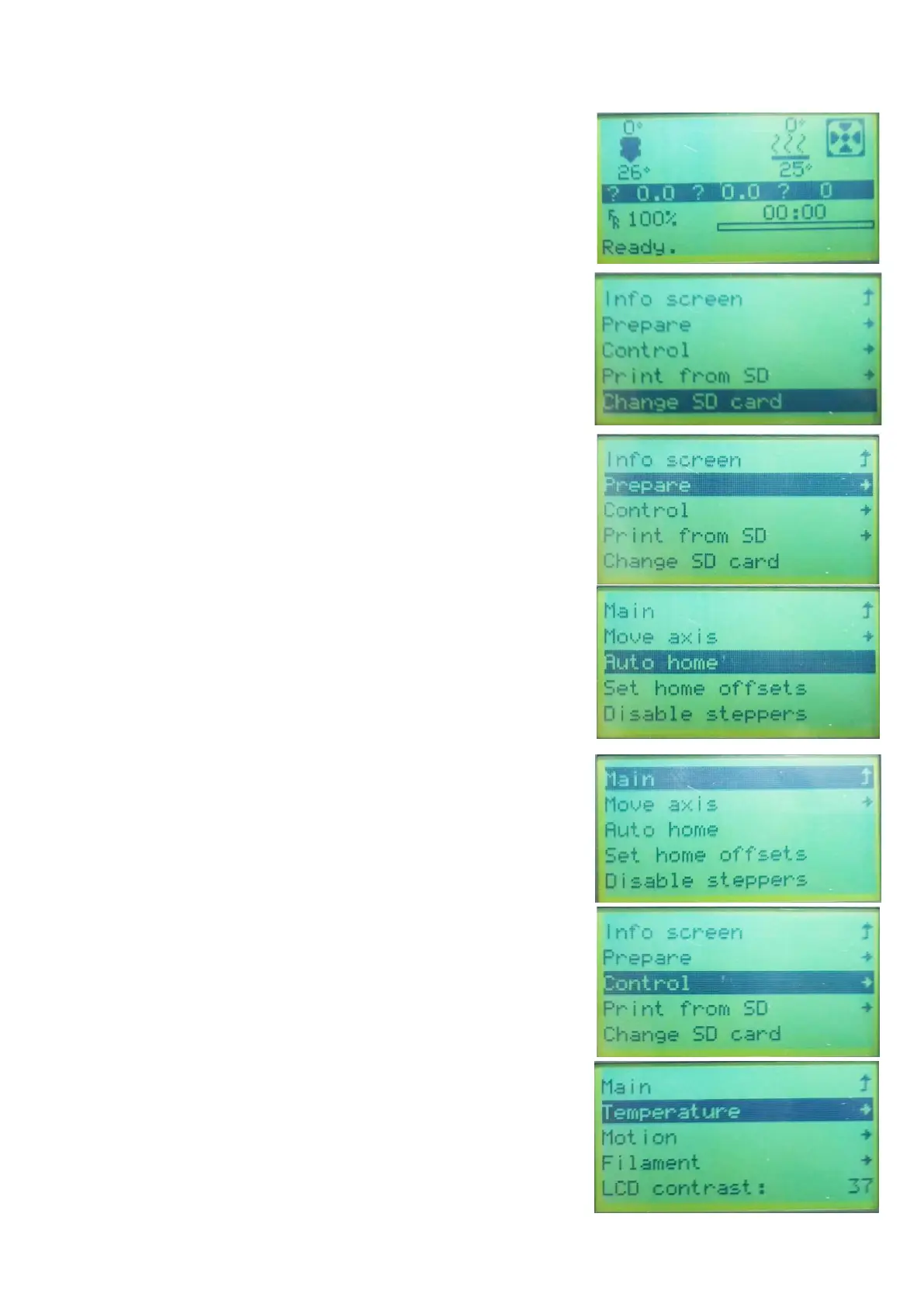
menu will display on the screen.
Press the center of control wheel and the contents
as the following picture will display on the screen.
Please rotating the control wheel clockwise to
choose the Change SD card if No SD card show
on the screen instead of Print from SD.
Rotating the control wheel clockwise to move
the highlight to Prepare, press the center of
control wheel to enter the menu.
Rotating the control wheel clockwise to move
the highlight to Auto home, the printer will move
the extruder to the home position automatically.
Check the distance between nozzle and platform,
if it is incorrect, please rotating the screw on the
bottom of four corners of the platform to adjust
the height of platform.
Rotating the control wheel counterclockwise to
move the highlight to Main, press the center of
the control wheel to back to the previous menu.
Rotating the control wheel clockwise to move
the highlight to the Control and press the center
of the control wheel to enter the menu.
09
3.
4.
5.
6.
7.
8.



 To Next Page