EasyManua.ls Logo

Mamiya Professional C330f - Before Taking Pictures; Parallax and Exposure Correction

Mamiya Professional C330f
44 pages
Print Icon
To Next Page IconTo Next Page
To Previous Page IconTo Previous Page
Loading...
Before
Taking
Pi·
ctures
X
f-15
f-2
I-
2.5
o
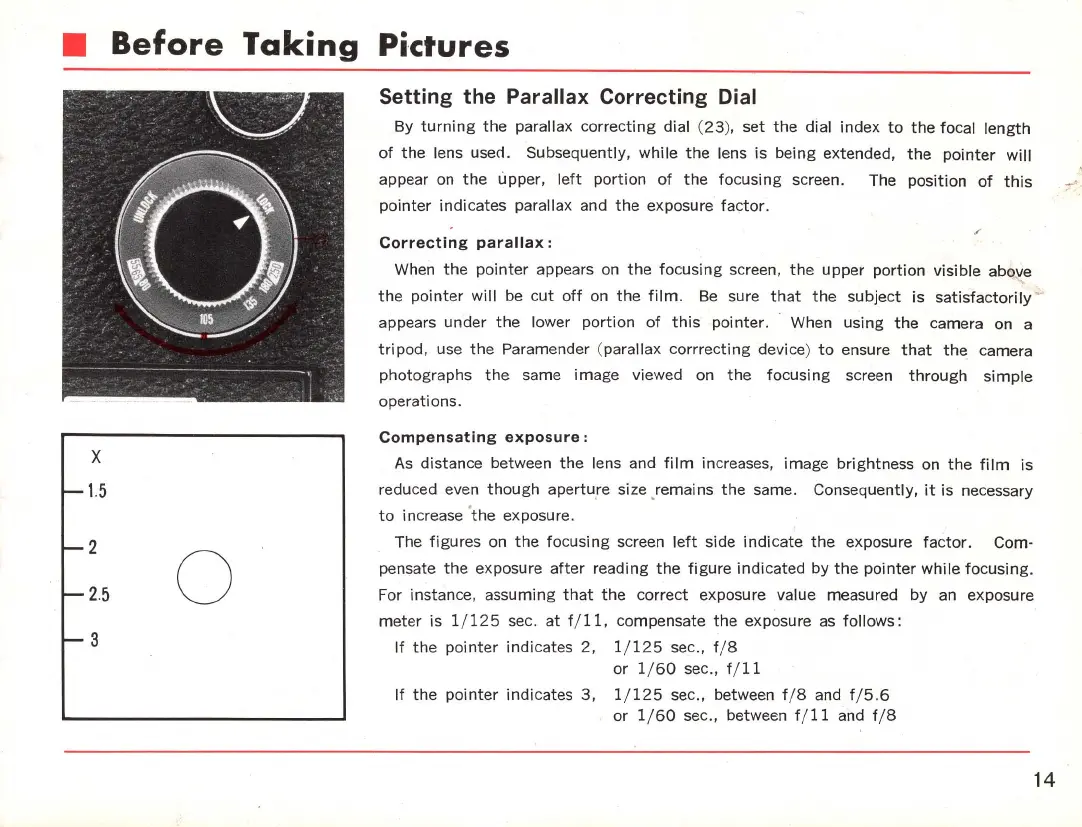
Setting the Parallax Correcting Dial
By
turning
the
parallax
correcting
dial (
23
), set
the
dial index
to
the
focal
length
of
the
lens used. Subsequently,
while
the
lens is
be
i
ng
extended,
the
pointer
will
appear on
the
upper,
left
portion
of
the
focusing screen. The
position
of
this
. T'
pointer
indicates
parallax and
the
exposure
factor
.
/'
Correcting
parallax:
When
the
pointer
appears on
the
focusing
screen,
the
upper
portion
visible abo
l(
e
the
pointer
will
be
cut
off
on
the
film
.
Be
sure
that
the
subject
is
satisfactorily
~
appears under
the
lower
portion
of
this
pointer. When using
the
camera on a
tripod
, use
the
Paramender (parallax
corrrecting
device)
to
ensure
that
the
camera
photographs
the
same image viewed on
the
focusing
screen
through
si
mple
operations.
Compensating
exposure:
As
distance between
the
lens and
film
increases, image brightness on
the
film
is
reduced even
though
aperture size ,remains
the
same. Consequently,
it
is necessary
to
increase '
the
exposure.
The
figures
on
the
focusing
screen
left
side indicate
the
exposure
fa
c
tor.
Com-
pensate
the
exposure
after
reading
the
figure
indicated
by
the
pointer
while
focusing.
For instance, assuming
that
the
correct exposure value measured by an exposure
meter
is 1/
125
sec.
at
fi
ll
, compensate
the
exposure
as
follows:
If
the
pointer
indicates 2, 1/
125
sec., f/ 8
or
1/
60
sec
.,
fi
ll
If
the
pointer
indicates
3,
1/
125
sec
.,
between tl 8 and f / 5.6
or
1/60
sec., between ti
ll
and tl 8
14

Related product manuals