EasyManua.ls Logo

Mamiya Professional C330f - Lens Replacement Procedure

Mamiya Professional C330f
44 pages
Print Icon
To Next Page IconTo Next Page
To Previous Page IconTo Previous Page
Loading...
21
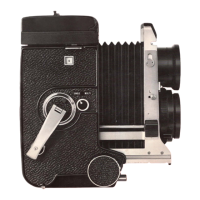
Changing
Lenses
By
turning
the
focusing knob, com-
pletely
retract
the
bellows so
that
the
lens
mount
portion
contact
to
the
body.
Recess
the
film
wind crank in
the
camera body.
TUrn
the
lens change knob (
24
) so
that
the
triangular
mark
points
to
the
word
"UNLOCK."
Tip
the
camera so
that
the
lens
faces upward, and while fi
rmly
grasp-
ing
the
lens barrel pinch
the
head
of
the
lens catch bracket (
20
), press
the
head toward
the
camera
b<;>dy,
pu~h
it
down to release
the
lens catch,
and remove
the
lens.
To
attach
another lens
to
the
camera
body, carefully position
the
lens so
that
the
lens
shutter
cocking lever
(
17
) connects
with
the
cocking lever
on
the
camera body.
This
operation
is correctly performed by previously
cocking
the
lens
shutter
with
the
fingers,
first
inserting
the
lens
from
the
cocking lever side on
the
body.
Clamp
the
lens catch (
20
)
to
its
origi-
nal -position, and
turn
the
lens change
knob (
24
) clockwise
to
the
"LOCK"
position.
With
this
operation, lens
replacement is completed.

Related product manuals