EasyManua.ls Logo

Mamiya Professional C330f - Taking Pictures

Mamiya Professional C330f
44 pages
Print Icon
To Next Page IconTo Next Page
To Previous Page IconTo Previous Page
Loading...
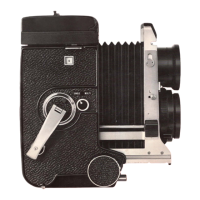
Distance
Scale
A
distance
scale is
provided
on
the
left
side
(viewing
the
camera
held
for
photographing).
By
turning
the
knob (26), set
the
distance
scale
to
coincide
with
the
lens used, so
that
the
scale faces
horizontally.
Distance
scales
for
55mm
,
65mm,
and
80mm
lenses
are
indicated
in red. Read these scales
at
the
index
position
in
the
window
.
Distance
scales
for
105mm,
135mm
,
180mm
: and
250mm
lenses are
indicated
in
black. Read
these
scales
at
the
front
end
of
the
camera
body
side plate.
Since
the
flange·focal
length
varies
between
the
105
mm
F3.5DS
or
105mm
F3
.
5D
lens and
the
ordi
nary
105mm
F3.5
lens, a
distance
scale
is
especially
provided.
A
distance
scale
marked
1
05
0.
OS
is used
for
105rnm
OS
and
105mmD
lenses (There are
two
types
, scaled
in
feet
or
meters
.).
A
distan
.ce scale
marked
105
is used
for
ordinary
105
mm
lens (There are
two
types
, scaled
in
feet
or
meter
.
).
Distance
graduations
of
lenses
other
than
the
105mm
lens are all
the
same.
Replacing the Distance
Scale
To remove
the
'
distance
scale,
at
first
,
fully
extend
the
bellows
by
turning
the
focusing
knob,
then
remove
the
scale end cover
by
sliding
it
to
the
front.
Next,
pullout
the
distance
scale
after
detaching
it
from
the
bearing,
by
holding
the
distance
scale
revolving
knob
portion
while
pressing
in
the
distance
scale
shaft
with
a pointed,
fine
wire.
When
installing
the
distance
scale,
insert
the
shaft
tip
op·
posite
the
revolving
knob
into
the
,
camera
body
bearing. In
this
case,
insert
the
shaft
tip
while
pressing
the
spring
located
near
the
bearing
to
the
inner side,
at
the
side
of
the
scale. Next,
fit
the
shaft
to
the
bearing
while
pushing
in
the
shaft
tip
with
a
finger
nail;
then
install
the
cover as
it
originally
was.
16

Related product manuals