16
solutions creator
WB 680
1
11
2
ISTRUZIONI PER L’USO
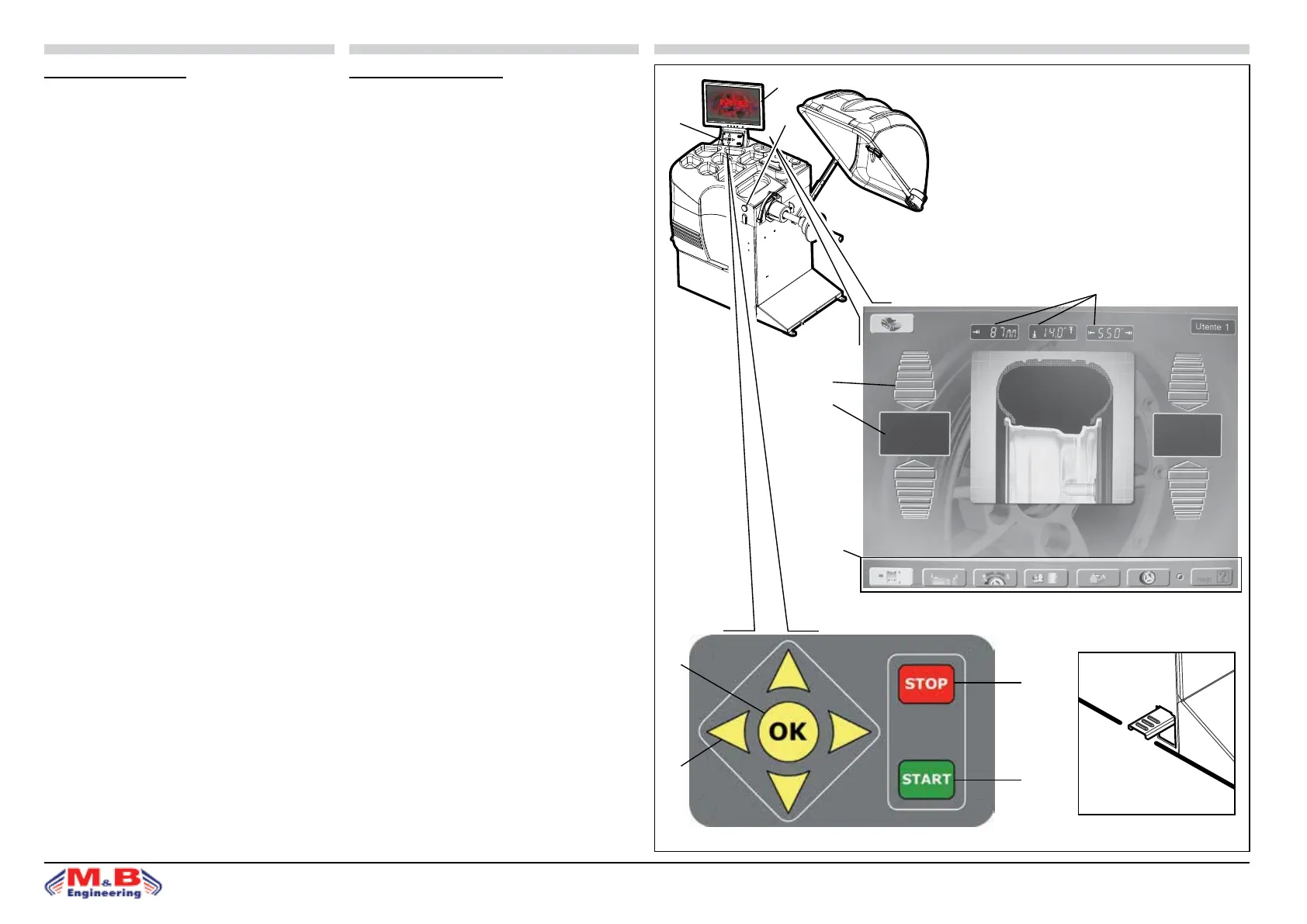
PANNELLO COMANDI - LEGENDA
1. Video a colori ad alta denizione
2. Tasti richiamo funzioni
3. STOP: tasto di arresto
4. START: tasto di avviamento
5. OK: tasto ingresso dati
6. Tasti per programmazione dati
7. Visualizzatori valore squilibrio
8. Indicatori direzione punto di squilibrio
9. Visualizzatori dati ruota
10. Visualizzatori per tasti funzione
11. Pulsante d’arresto in posizione “Stop on top”
N.B.: Quando la rotazione non è eettuata tramite il mo-
tore elettrico, premendo il pedale freno (g.18c) si blocca
la rotazione della ruota.
• le funzioni della macchina sono raggruppate in diverse
pagine; l’accesso alle varie pagine avviene attraverso una
struttura a menù;
• pannello comandi: tasti direzionali per la selezione dei
menù; tasto OK per entrare nel menù scelto.
ì
g.18
3
ITALIANO ENGLISH
4
5
6
9
8
7
10
INSTRUCTIONS FOR USE
CONTROL PANEL - KEY
1. High denition colour monitor
2. Functions back keys
3. STOP: stop key
4. START: start-up key
5. OK: data conrmation key
6. Data programming keys
7. Imbalance gure displays
8. Imbalance point direction indicators
9. Wheel data displays
10. Function key displays
11. “Stop on top” position stop button
N.B.: When the wheel is not being driven by the electrical
motor, pressing the brake pedal (g.18c) locks the rota-
tion of the wheel.
• The machine functions are grouped on dierent pages.
The pages are accessed using a menu system.
• Control panel: directional keys selecting in the menus,
OK key for conrm data.
g.18c
g.18a
g.18b



 To Next Page