22
solutions creator
WB 680
ITALIANO ENGLISH
IMPOSTAZIONE DATI RUOTA
PROGRAMMAZIONE CON CALIBRO AUTOMATICO
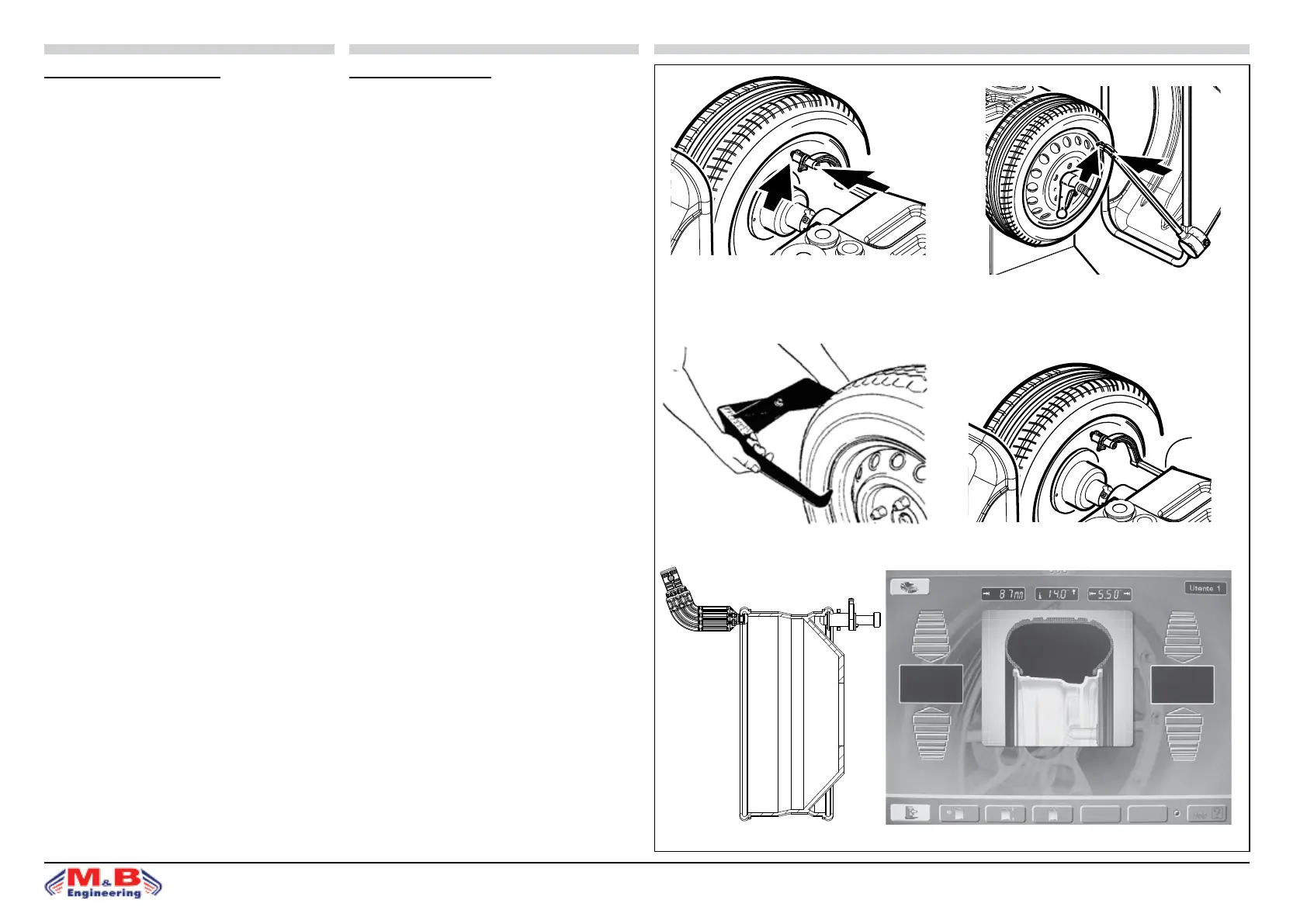
• La programmazione si eettua portando il calibro inter-
no (g.19a) e il calibro esterno (g.19b) contro il cerchio,
rimanendo in attesa del “beep”di conferma.
• I valori da programmare (distanza, larghezza e diame-
tro) vengono inseritiautomaticamente.
• L’operazione è unica ed avviene rapidamente, e senza
alcuna possibilitàdi errore.
N.B.: in caso di malfunzionamento dei calibri automatici
(e per i programmi “alluminio” o “lega leggera” ) vi è la
possibilità della programmazione manuale (ved. paragrafo
seguente).
IMPOSTAZIONE MANUALE DEI DATI RUOTA
Dalla PAGINA PRINCIPALE premere il tasto “Impostazione
misure ruota”.
Impostare sul pannello frontale i valori della larghezza,
diametro e distanza, della ruota su cui si deve operare:
• la misura relativa alla larghezza cerchio è in genere ri-
portata sul cerchio stesso oppure si ricava misurandola
con il calibro in dotazione alla macchina (g. 20a).
• il diametro del cerchio è in genere riportato sul cerchio
stesso oppure può essere letto sul pneumatico.
• la distanza cerchio viene misurata sul anco interno
del cerchio con il calibro a corsoio installato sulla mac-
china (g. 20b), e dalla scala si può leggere la distanza
da impostare.
N.B.: per ruote di piccole dimensioni (per esempio con
ruote di motociclo) deve essere determinato solo lo squili-
brio statico; in questi casi si utilizza il programma di equi-
libratura STATICA e si deve impostare il valore corretto del
solo diametro cerchio; le misure di distanza e larghezza
cerchi possono essere impostate su qualsiasi valore.
SETTING WHEEL DATA
SETTING WITH THE AUTOMATIC GAUGE
• Setting is achieved by moving the internal gauge
(g.19a) and external gauge (g.19b) against the rim.
Wait for the conrmation “beep”.
• The gures to set (distance, width, and diameter) are
entered automatically.
• It is a single, quick error free operation.
N.B.: If the automatic gauge malfunctions (and for the
aluminium and light alloy programs) manual programming
is possible (see following section).
MANUAL SETTING OF WHEEL DATA
From the MAIN PAGE, press the key of “Wheel size set-
ting”.
Set the gures for width, diameter, and distance, for the
wheel to be balanced, using the control panel.
• The rim width gures are generally given on the rim
itself, otherwise itcan be measured using the gauge sup-
plied with the machine (g. 20a).
• The rim diameter is generally given on the rim itself, or
can be read from the tyre.
• The rim distance is measured on the internal side of
the rim with the cursor gauge tted on the machine (g.
20b). The distance to be set can be read from the scale.
N.B.: For wheels of small dimensions (for example mo-
torcycle wheels) onlythe static imbalance has to be esta-
blished. In these cases the STATIC balancing program is
used and the correct gures only have to be set for the
rimdiameter. The rim distance and width can be set to
any gure.
g.19a
g.19b
g.21
ITALIANO ENGLISH SBM 55-55s
16
COD. 654160 Rev.1
K = punto di Lettura
K = reading point
K = point de lecture
K = Ablesestelle
K = punto de Lectura
K = òî÷êà ÷òåíèÿ
SELEZIONE PROGRAMMA DI EQUILIBRATURA
L’impiego di diversi tipi di contrappesi per l’equilibratura dei vari tipi di
cerchi (in acciaio o in lega leggera) produce delle differenze tra le misure
nominali impostate per la ruota da equilibrare e le misure effettive dei piani
di correzione. L’equilibratrice utilizza diversi programmi di equilibratura
per tenere conto di queste differenze.
L’operatore deve impostare la modalità di funzionamento desiderata in
base al tipo di ruota da equilibrare, ai contrappesi che intende utilizzare
ed ai piani di correzione prescelti.
Premendo il tasto MODE si accede in sequenza a tutti i diversi programmi
di equilibratura disponibili che sono:
» equilibratura dinamica standard con pesi a clip (con molletta),
» 5 programmi Alu per l’equilibratura dinamica con pesi adesivi,
» 3 programmi di equilibratura statica (con pesi a molletta o adesivi),
» 2 programmi Alu speciali per l’equilibratura dei pneumatici PAX Michelin
con pesi adesivi e misure in mm.
I led del pannello comandi indicano la posizione dei contrappesi sul cerchio
in base al programma di equilibratura prescelto.
All’accensione la macchina si configura automaticamente in programma
dinamica standard.
IMPOSTAZIONE DATI RUOTA
PROGRAMMAZIONE CON CALIBRO AUTOMATICO *
» La programmazione si effettua portando il calibro interno (fig.20) contro
il cerchio, rimanendo in attesa del “beep” di conferma.
» I valori da programmare (distanza e diametro) vengono inseriti
automaticamente.
» L’operazione è unica ed avviene rapidamente, e senza alcuna
possibilità di errore.
» Impostare manualmente il valore della larghezza.
N.B.: in caso di malfunzionamento dei calibri automatici (e per i programmi
“alluminio” o “lega leggera” ) vi è la possibilità della programmazione
manuale (ved. paragrafo seguente)
* In funzione del modello la macchina è dotata di questo dispositivo.
IMPOSTAZIONE MANUALE DEI DATI RUOTA
Impostare sul pannello frontale i valori della larghezza (tasto (6) in fig.19),
diametro (tasto (5) in fig.19) e distanza (tasto (4) in fig.19), della ruota
su cui si deve operare, tramite i tasti + / - .
» la misura relativa alla larghezza cerchio è in genere riportata sul
cerchio stesso oppure si ricava misurandola con il calibro in dotazione
alla macchina (fig. 20a);
» il diametro del cerchio è in genere riportato sul cerchio stesso
oppure può essere letto sul pneumatico;
» la distanza cerchio viene misurata sul fianco interno del cerchio con
il calibro a corsoio installato sulla macchina (fig. 20b), e dalla scala
si può leggere la distanza da impostare.
N.B.: per ruote di piccole dimensioni (per esempio ruote di motociclo)
deve essere determinato solo lo squilibrio statico; in questi casi si utilizza
il programma di equilibratura STATICA e si deve impostare il valore corretto
del solo diametro cerchio (tasto (5) fig.19); le misure di distanza e larghezza
cerchio possono essere impostate su qualsiasi valore.
INSERIMENTO DELLE MISURE IN mm
L’unità di misura predefinita per larghezza e diametro cerchio è pollici.
Per impostare le misure della ruota in mm occorre premere il tasto MM/
INCH e inserire le misure in millimetri così come si leggono sulla ruota.
Il led acceso indica che la misura selezionata è impostata in mm.
La distanza è sempre impostata in mm (led acceso).
N.B.: per i programmi PAX l’unità di misura predefinita per larghezza e
diametro cerchio è mm.
SELECTING BALANCING PROGRAM
The use of different types of counterweights for balancing different types
of rim (in steel or light alloy) results in variations in the nominal measure-
ments set for the wheel to be balanced and the actual measurements of
the correction planes. The wheel balancer offers a variety of balancing
programs in order to accommodate these differences.
The operator must set the operating mode required on the basis of the type
of wheel being balanced, the type of counterweights to be used, and the
selected correction planes.
Pressing the MODE button scrolls through all the balancing programs
available:
» Standard dynamic balancing with clip weights (with spring),
» 5 ALU programs for dynamic balancing with adhesive weights,
» 3 static balancing programs (with spring or adhesive weights),
» 2 special ALU programs for balancing PAX Michelin tires with adhe-
sive weights and measurements in mm.
The LED’s on the control panel indicate the position of weights on the rim
on the basis of the selected balancing program.
When the machine is switched on it automatically configures itself for the
standard dynamic program.
SETTING WHEEL DATA
SETTING WITH THE AUTOMATIC GAUGE *
» Setting is achieved by moving the internal gauge (fig.20) against the
rim. Wait for the confirmation “beep”.
» The figures to set (distance and diameter) are entered automatically.
» It is a single, quick, error-free operation.
» Set the width figure manually.
N.B.: If the automatic gauges malfunction (and for the “aluminum” and
“light alloy” programs) manual programming is possible (see following
section).
* The presence of this device depends on the machine model.
MANUAL SETTING OF WHEEL DATA
On the front panel use the +/- buttons to set the figures for width (button
(6) in fig.19), diameter (button (5) in fig.19) and distance (button (4) in
fig.19), for the wheel being balanced.
» The rim width figures are generally given on the rim itself, otherwise
it can be measured using the gauge supplied with the machine (fig.
20a).
» The rim diameter is generally given on the rim itself, or can be read
from the tire.
» The rim distance is measured on the internal side of the rim with the
cursor gauge fitted on the machine (fig. 20b). The distance to be set
can be read from the scale.
N.B.: For wheels of small dimensions (for example motorcycle wheels)
only the static imbalance has to be established. In these cases the STATIC
balancing program is used and the correct figures only have to be set for
the rim diameter (button (5) fig.19). The rim distance and width can be set
to any figures.
ENTERING MEASUREMENTS IN mm
The default unit of measurement for rim width and diameter is inches.
In order to set wheel measurements in mm press the MM/INCH button and
enter the figures in mm as they appear on the wheel.
The LED lights up to indicate that the figures are set to mm.
Distance is always set in mm (LED on).
N.B.: for PAX programs the default unit of measurement of rim width and
diameter is mm.
K
K = punto di lettura
K = reading point
g.20a g.20b
g.20c



 To Next Page