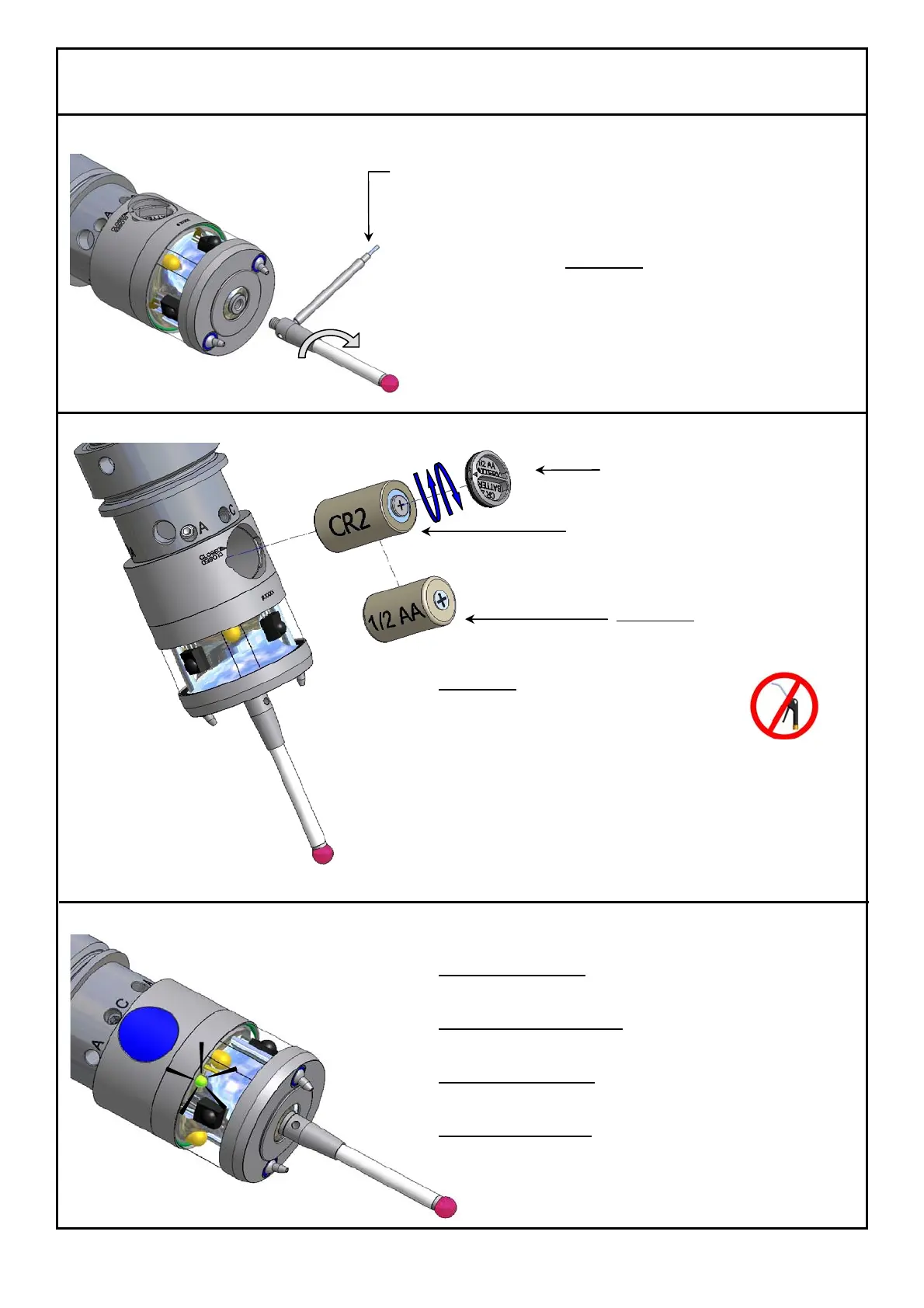
Infrared Probe 40.01
TX/RX
3
M
≈
2Nm
1.47 lbf.ft
Stylus Change
Attention !
After changing the stylus:
e Align stylus to spindle centre
e Calibrate probe
Battery Replacement
Attention !
e Wipe probe clean and dry
before opening!
Do NOT use compressed
air to clean!
e Turn battery cover with bayonet lock to open and close !
e When closing the battery compartment check the
O-Ring for any damage !
e Replace empty battery immediately !
Optical Status Display
LED blinking green:
e Probe transmitting signal
LED blinking green / red:
e Low battery warning
LED blinking orange:
e Stylus deflected
LED continuous red:
e Wrong battery type
Alternative:
Battery 3,6V
Type ½ AA
Mounting pin
#0885
Battery Type CR2 (3V)
#3869
Battery cover #3920
with O-Ring 13x1 Viton #3549



 To Next Page