5.1.4 Entering a Cooking Profile That Uses the Smoker
Applications
The “Smoker” operating mode is suitable for smoking food.
The “Smoker” operating mode will only be available in appliances with the smoker option. Before using
this operating mode, the appliance needs to be specifically set up for it.
Available extra functions
Reduced power
Program lock
Start time pre-selection
Instruction step
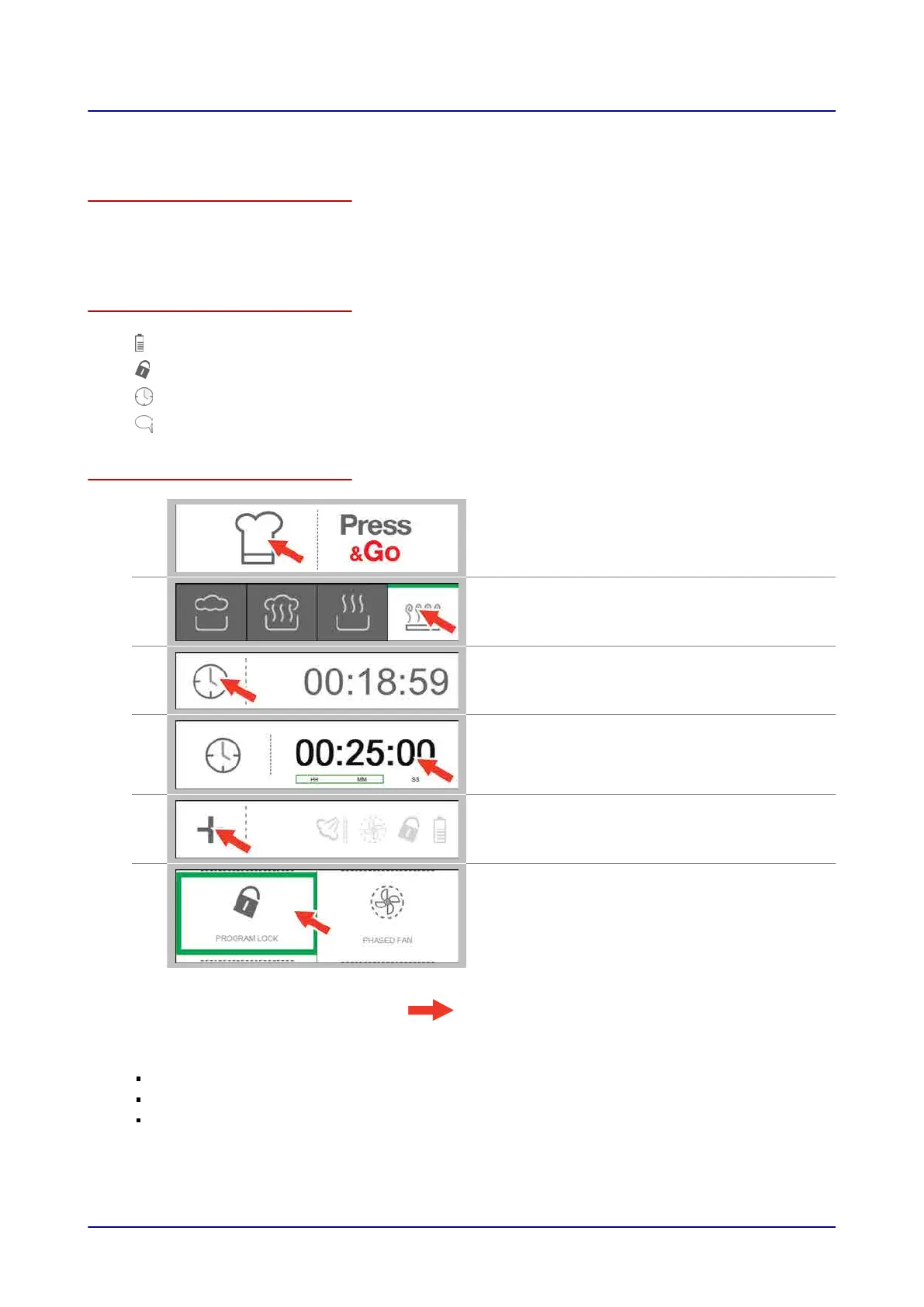
Entering the cooking profile
1.
Press the “Cook” button on the main screen.
2.
On the “Cooking” screen, select the “smoker”
operating mode.
3
Press the “Cooking time” button.
4.
Enter the smoking time you want on the “Time”
screen.
5.
Press the “Extra functions” button.
6.
On the “Extra functions” screen, select the extra
functions you want.
Result: You have now entered a cooking profile.
Next steps:
Starting the cooking sequence. For more information,
go to
Page 50
Saving the cooking profile in the cookbook. For more information,
go to
Page 57
For more information on cooking workflows,
go to
Page 51
5 Cooking and Rethermalizing Food with easyTouch
Operating instructions 47


 To Next Page