Step 5
Add cleaning agent
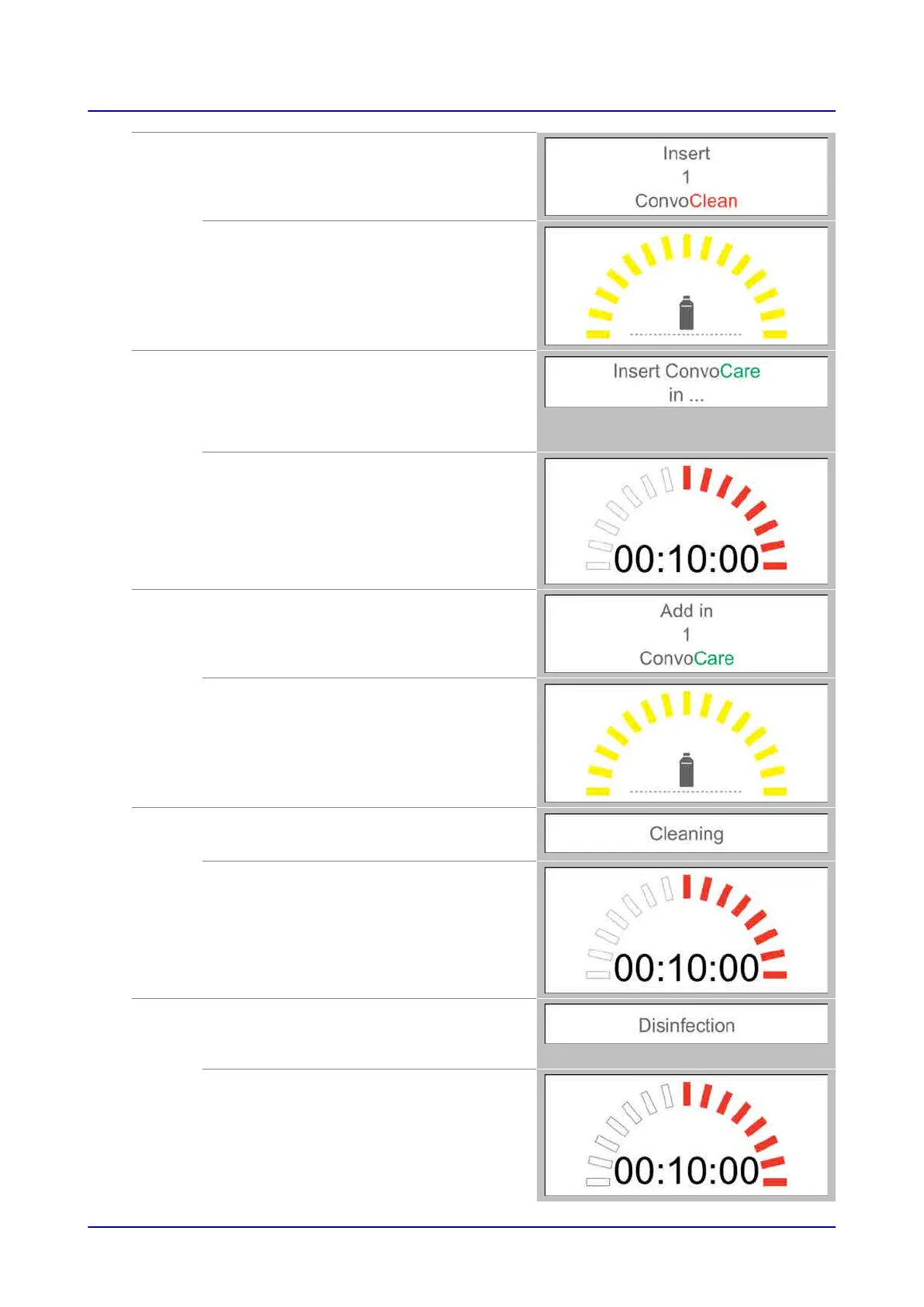
After the appliance door is opened, the
appliance prompts the user to add cleaning
agent and shows the required number of
single-measure dispensing bottles.
The appliance waits
The software will show the required number of
single-measure dispensing bottles (up to five
bottles). At the same time, it will emit an
acoustic signal and the progress indicator will
change color to yellow.
Step 6
Cleaning in progress
Once the cleaning agent is added and the
appliance door is closed, the cleaning
sequence starts.
The appliance will prompt the user to add
rinse aid after the cleaning stage is done.
Automatic cleaning sequence
At the same time, the appliance will show the
remaining cleaning time. The progress
indicator will show the corresponding progress
by lighting up the progress bars with a red
light (clockwise).
Step 7
Add rinse aid
After the appliance door is opened, the
appliance prompts the user to add rinse aid
and shows the required number of single-
measure dispensing bottles.
The appliance waits
The software will show the required number of
single-measure dispensing bottles (up to three
bottles). At the same time, it will emit an
acoustic signal and the progress indicator will
change color to yellow.
Step 8
Cleaning in progress
Once the rinse aid is added and the appliance
door is closed, the cleaning sequence starts.
Automatic cleaning sequence
At the same time, the appliance will show the
remaining cleaning time. The progress
indicator will show the corresponding progress
by lighting up the progress bars with a red
light (clockwise).
Step 9
The disinfection process starts
After cleaning, the appliance shows a
message indicating that the cooking
compartment is being disinfected with steam.
At the same time, the appliance will emit an
acoustic signal and show the remaining
disinfection time. The progress indicator will
show the corresponding progress by lighting
up the progress bars with a red light
(clockwise).
8 Cleaning with easyTouch
Operating instructions 74


 To Next Page