EasyManua.ls Logo

Manta MP4284B - User Manual

Manta MP4284B
29 pages
Go to English
Print Icon
To Next Page IconTo Next Page
Loading...
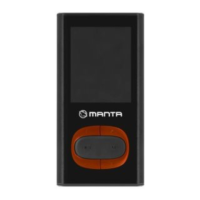
MP4 player
MP4284B
MP4284O
MP4284S
Instrukcja obsługi
User’s Manual
Question and Answer IconNeed help?

Do you have a question about the Manta MP4284B and is the answer not in the manual?

Summary

Key Definitions

Volume Controls

Controls for adjusting audio volume levels.

Playback and Navigation Buttons

Functions of PLAY, LAST, NEXT, and MODE buttons for media control.

Ports and Slots

Identifies the earphone jack, USB port, and Micro SD card slot.

Reset Function

Procedure for resetting the device to resolve issues.

Microphone

Location of the built-in microphone.

Playing Music

Basic Music Playback

Steps for playing music and navigating tracks.

Equalizer Settings

How to adjust audio output using equalizer presets.

Synchronous Lyric Display

Playing Videos

Video Playback Initiation

Instructions to start playing video files.

Recording Audio

Initiating and Managing Recordings

Steps for starting, pausing, and saving audio recordings.

Selecting Recording Type

Options for choosing different audio recording formats.

Voice Recording and Playback

Voice File Navigation

How to select and play recorded voice files.

Voice Stop Mode Operations

Available functions when voice playback is paused.

Voice Play Mode Operations

Available functions during voice file playback.

Using FM Radio

Station Tuning Methods

Auto search and manual tuning for FM stations.

Managing Saved Channels

How to save and listen to favorite FM channels.

Recording FM Broadcasts

Instructions for recording live FM radio content.

Photo Browsing

Navigating and Viewing Photos

Steps for browsing JPG and BMP image files.

Photo Mode Options

Submenu options available during photo browsing.

Device Setup

Accessing Settings Menu

Guide to entering the main system settings.

Setup Options Overview

Introduction to system settings like Clock, Language, and Power Off.

E-book Functionality

Selecting and Opening E-books

How to choose and load e-book files for reading.

E-book Reading Modes

Explanation of manual and auto-play text scrolling.

USB Disk Mode

USB Disk Operation

Using the player as a standard USB storage device.

PC Connection Modes

Understanding waiting, downloading, and uploading modes when connected to a PC.

Additional Settings

Playback Modes

Options for repeat, shuffle, and other playback behaviors.

A-B Repeat Function

How to set and use the A-B repeat feature for specific sections.

Replay Time Configuration

Setting the number of repetitions for A-B repeat.

Battery Level Indicator

Troubleshooting Common Issues

Power and Sound Problems

Solutions for no power or no sound issues.

Display and FM Reception

Troubleshooting steps for display glitches and poor FM performance.

File Download Problems

Guidance on resolving issues when downloading files from a PC.

Technical Specifications

Summary

Key Definitions

Volume Controls

Controls for adjusting audio volume levels.

Playback and Navigation Buttons

Functions of PLAY, LAST, NEXT, and MODE buttons for media control.

Ports and Slots

Identifies the earphone jack, USB port, and Micro SD card slot.

Reset Function

Procedure for resetting the device to resolve issues.

Microphone

Location of the built-in microphone.

Playing Music

Basic Music Playback

Steps for playing music and navigating tracks.

Equalizer Settings

How to adjust audio output using equalizer presets.

Synchronous Lyric Display

Playing Videos

Video Playback Initiation

Instructions to start playing video files.

Recording Audio

Initiating and Managing Recordings

Steps for starting, pausing, and saving audio recordings.

Selecting Recording Type

Options for choosing different audio recording formats.

Voice Recording and Playback

Voice File Navigation

How to select and play recorded voice files.

Voice Stop Mode Operations

Available functions when voice playback is paused.

Voice Play Mode Operations

Available functions during voice file playback.

Using FM Radio

Station Tuning Methods

Auto search and manual tuning for FM stations.

Managing Saved Channels

How to save and listen to favorite FM channels.

Recording FM Broadcasts

Instructions for recording live FM radio content.

Photo Browsing

Navigating and Viewing Photos

Steps for browsing JPG and BMP image files.

Photo Mode Options

Submenu options available during photo browsing.

Device Setup

Accessing Settings Menu

Guide to entering the main system settings.

Setup Options Overview

Introduction to system settings like Clock, Language, and Power Off.

E-book Functionality

Selecting and Opening E-books

How to choose and load e-book files for reading.

E-book Reading Modes

Explanation of manual and auto-play text scrolling.

USB Disk Mode

USB Disk Operation

Using the player as a standard USB storage device.

PC Connection Modes

Understanding waiting, downloading, and uploading modes when connected to a PC.

Additional Settings

Playback Modes

Options for repeat, shuffle, and other playback behaviors.

A-B Repeat Function

How to set and use the A-B repeat feature for specific sections.

Replay Time Configuration

Setting the number of repetitions for A-B repeat.

Battery Level Indicator

Troubleshooting Common Issues

Power and Sound Problems

Solutions for no power or no sound issues.

Display and FM Reception

Troubleshooting steps for display glitches and poor FM performance.

File Download Problems

Guidance on resolving issues when downloading files from a PC.

Technical Specifications

Manta MP4284B Specifications

General IconGeneral
BrandManta
ModelMP4284B
CategoryMP3 Player
LanguageEnglish