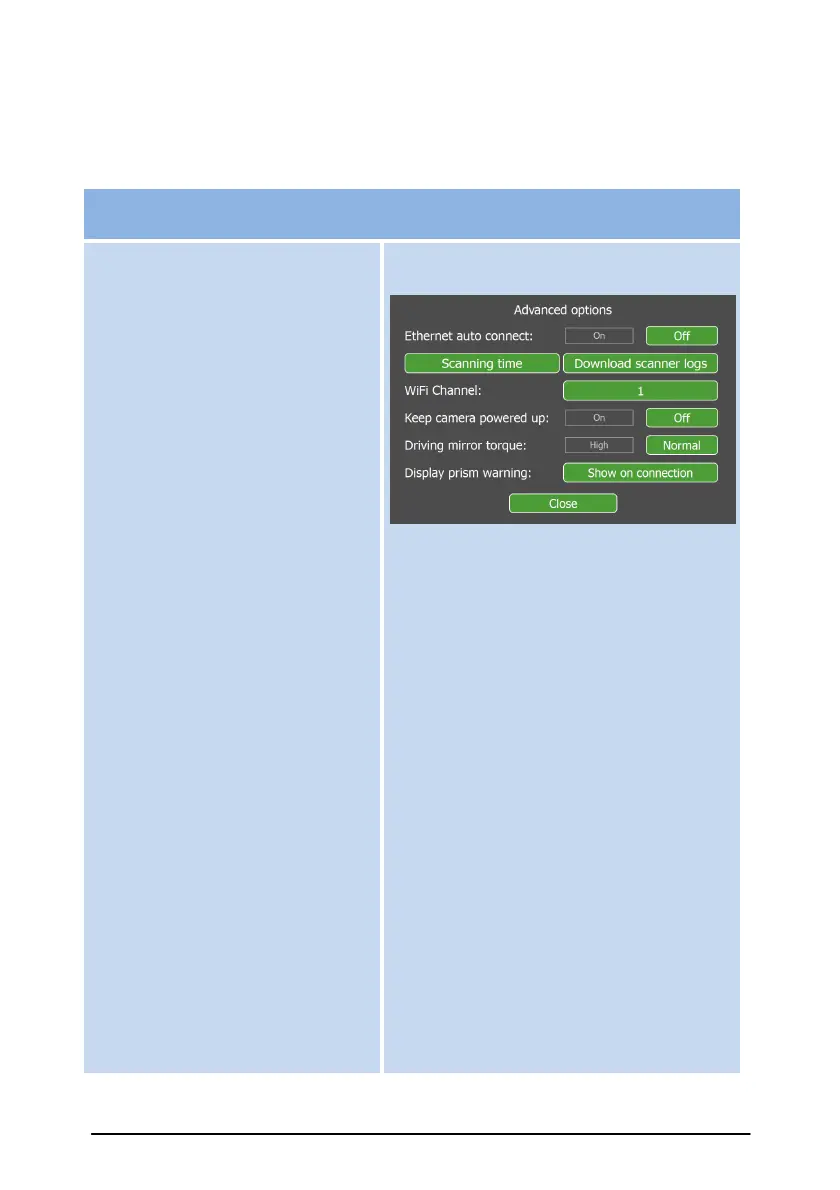
Ethernet auto connect allows
automatic connection to the
scanner via the Ethernet port
when detected. Otherwise,
connection requires using the
Connect button.
Scanning time will indicate
'scanning time from last service'
and 'total time scanned' by the
scanner.
Download scanner logs to a
USB flash drive. Your scanner
representative may request this
for troubleshooting.
Wi-Fi Channel allows the user
to choose between numerous
available Wi-Fi channels for
communicating with the
scanner. Note: If problems arise,
try another Wi-Fi channel. If
further problems arise and other
Wi-Fi channels do not solve the
problem, revert back to Ethernet
communications.
Keep camera powered up to
ensure Snapshot function stays
inititialised. Otherwise, the
camera will initialise every time
you enter the Snapshot page. If
the camera is left powered up,
battery life will be reduced.
Driving mirror torque setting slows
the scan rate down to 50kHz res 2.
Selecting this to “High” will eliminate
"Elevation Error: Requested speed not
reached“ errors, however it will double
the scanning time because the
maximum traveling speed will need to
be 7km/h.
Display prism warning, select this to
display prism warning again after every
connection.



 To Next Page