o
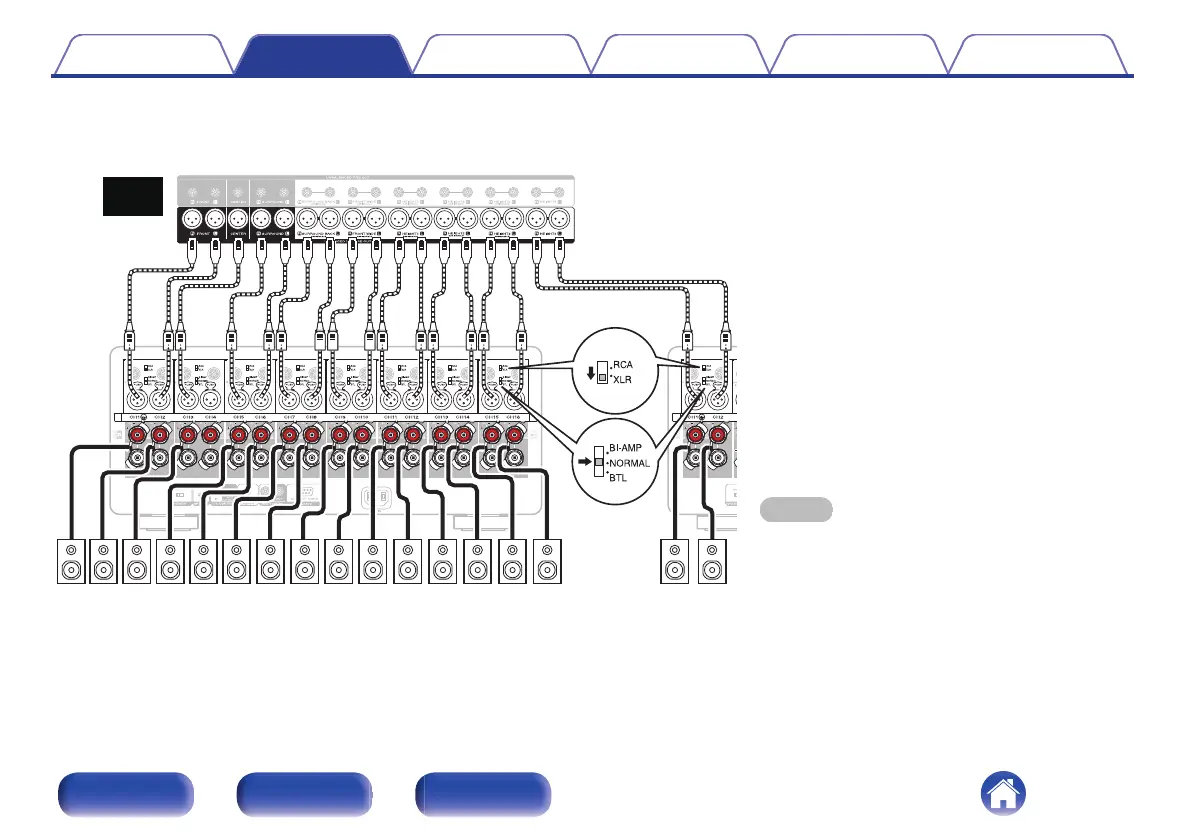
Connecting the BALANCED XLR PRE OUT connector
If using the BALANCED XLR connectors, switch the RCA/XLR INPUT selector setting of this unit to “XLR”. Set the NORMAL/BI-AMP/BTL selector to
“NORMAL”.
NOTE
0
Be sure to configure the RCA/XLR INPUT selector and
NORMAL/BI-AMP/BTL selector settings before turning the
power on. If you try to change these settings after turning
the power on, the settings will not change.
Marantz
AV10
SR SLFR FL C RHR RHL TMR TML CH TSFHR FHLFWR FWL
SBLSBR
Contents
Connections Playback Tips Appendix Specifications
17
Front panel Rear panel Index



 To Next Page