EasyManua.ls Logo

Marantz CD-63 SE - Program Play and Customization; Programming and Deleting Tracks

Marantz CD-63 SE
19 pages
Print Icon
To Next Page IconTo Next Page
To Previous Page IconTo Previous Page
Loading...
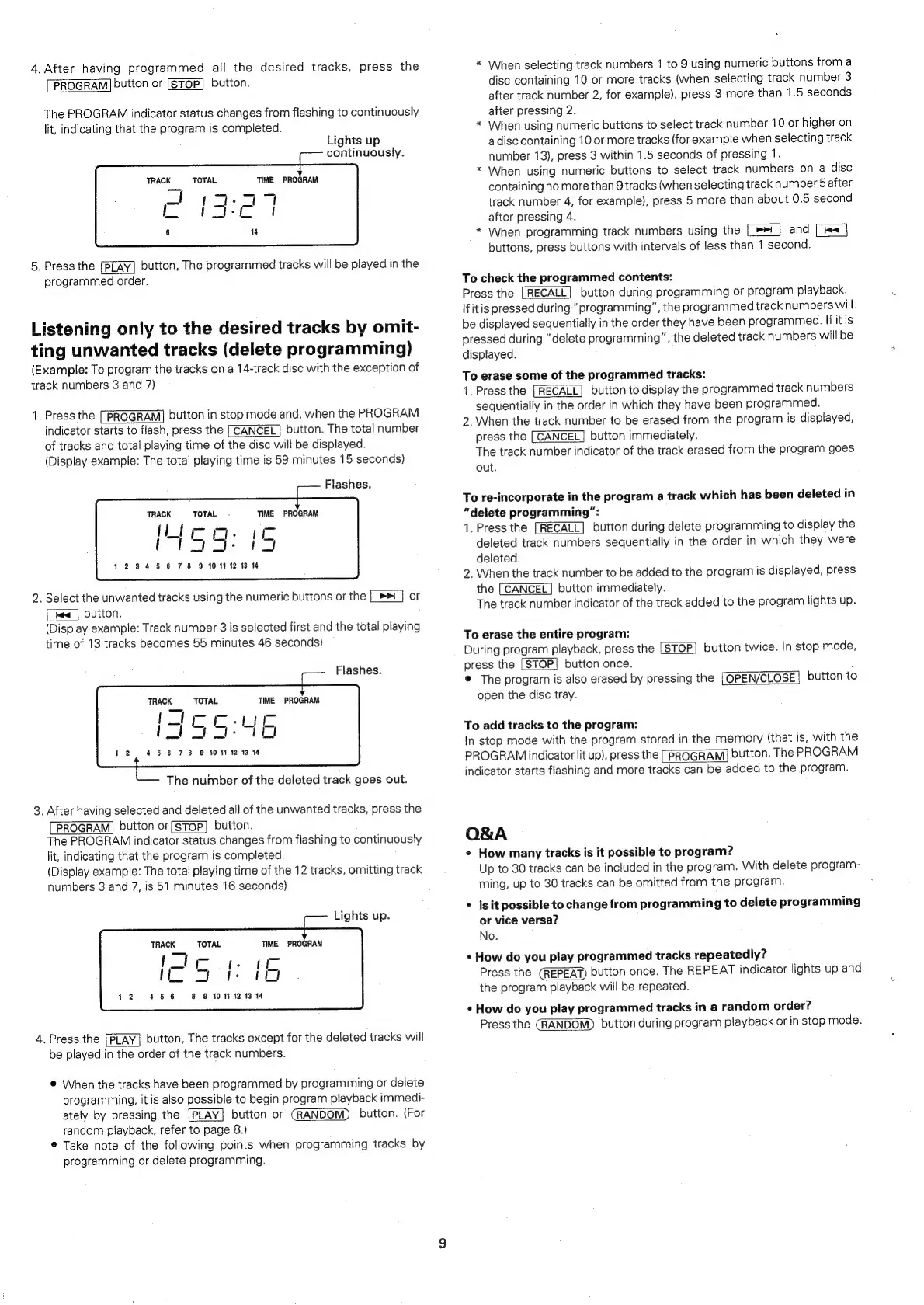
4.
After
having
programmed
all
the
desired
tracks,
press
the
*
When
selecting
track
numbers
1
to
9
using
numeric
buttons
from
a
PROGRAM]
button
or
[STOP]
button.
disc
containing
10
or
more
tracks
(when
selecting
track
number
3
after
track
number
2,
for
example),
press
3
more
than
1.5
seconds
The
PROGRAM
indicator
status
changes
from
flashing
to
continuously
after
pressing
2.
lit,
indicating
that
the
program
is
completed.
*
When
using
numeric
buttons
to
select
track
number
10
or
higher
on
Lights
up
a
disc
containing
10
or
more
tracks
(for
example
when
selecting
track
continuously.
number
13),
press
3
within
1.5
seconds
of
pressing
1.
<
: :
:
TeneKe
TOTAL
sie
PROLOAIE
When
using
numeric
buttons
to
select
track
numbers
on
a
disc
_
=o
oa
containing
no
more
than
9
tracks
(when
selecting
track
number
5
after
TY
:
track
number
4,
for
example},
press
5
more
than
about
0.6
second
4
after
pressing
4.
*
When
programming
track
numbers
using
the
|_»>
and
[
buttons,
press
buttons
with
intervals
of
less
than
1
second.
5.
Press
the
[Play]
button,
The
programmed
tracks
will
be
played
in
the
programmed
order.
To
check
the
programmed
contents:
Press
the
button
during
programming
or
program
playback.
Ifitis
pressed
during”
programming”,
the
programmed
track
numbers
will
Listening
only
to
the
desired
tracks
by
omit-
be
eae
seen
the
areertney
ne
a
oeclieee
iit
.
.
pressed
during
“delete
programming”,
the
deleted
track
numbers
will
be
ting
unwanted
tracks
(delete
programming)
digelevad:
(Example:
To
program
the
tracks
ona
14-track
disc
with
the
exception
of
track
numbers
3
and
7)
To
erase
some
of
the
programmed
tracks:
1.
Press
the
[RECALL]
button
to
display
the
programmed
track
numbers
sequentially
in
the
order
in
which
they
have
been
programmed.
2.
When
the
track
number
to
be
erased
from
the
program
is
displayed,
press
the
[CANCEL]
button
immediately.
The
track
number
indicator
of
the
track
erased
from
the
program
goes
1,
Press
the
[PROGRAM]
button
in
stop
mode
and,
when
the
PROGRAM
indicator
starts
to
flash,
press
the
[CANCEL]
button.
The
total
number
of
tracks
and
total
playing
time
of
the
disc
will
be
displayed.
(Display
example:
The
total
playing
time
is
59
minutes
15
seconds)
out.
Flashes.
To
re-incorporate
in
the
program
a
track
which
has
been
deleted
in
TRACK
TOTAL
-
TIME
PROGRAM
“delete
programming”:
{Lic-m.
1.
Press
the
button
during
delete
programming
to
display
the
iol
_!
meal
deleted
track
numbers
sequentially
in
the
order
in
which
they
were
deleted.
1234
5
6
78
9
10
11
12
13
14
2.
When
the
track
number
to
be
added
to
the
program
is
displayed,
press
the
[CANCEL]
button
immediately.
2.
Select
the
unwanted
tracks
using
the
numeric
buttons
or
the
[_>>
_]
or
aaah
F
v
The
track
number
indicator
of
the
track
added
to
the
program
lights
up.
we
|
button.
(Display
example:
Track
number
3
is
selected
first
and
the
total
playing
time
of
13
tracks
becomes
55
minutes
46
seconds)
To
erase
the
entire
program:
During
program
playback,
press
the
button
twice.
In
stop
mode,
Flashes.
press
the
button
once.
©
The
program
is
also
erased
by
pressing
the
button
to
TRACK
‘TOTAL
TIME
PROGRAM
open
the
disc
tray.
-|
Le:
To
add
tracks
to
the
program:
<>
In
stop
mode
with
the
program
stored
in
the
memory
(that
is,
with
the
Pal
ieee
ae
PROGRAM
indicator
lit
up),
press
the
[PROGRAM]
button.
The
PROGRAM
The
number
of
the
deleted
track
goes
out.
indicator
starts
flashing
and
more
tracks
can
be
added
to
the
program.
3.
After
having
selected
and
deleted
all
of
the
unwanted
tracks,
press
the
PROGRAM]
button
or(SToP]
button.
The
PROGRAM
indicator
status
changes
from
flashing
to
continuously
Q&A
lit,
indicating
that
the
program
is
completed.
e
How
many
tracks
is
it
possible
to
program?
(Display
example:
The
total
playing
time
of
the
12
tracks,
omitting
track
Up
to
30
tracks
can
be
included
in
the
program.
With
delete
program-
numbers
3
and
7,
is
51
minutes
16
seconds)
ming,
up
to
30
tracks
can
be
omitted
from
the
program.
*
Isit
possible
to
change
from
programming
to
delete
programming
Rights
Up;
or
vice
versa?
TRACK
TOTAL
TIME
PROGRAM
No.
{
TI
mote
te
¢
How
do
you
play
programmed
tracks
repeatedly?
{
a7
f
1.
Press
the
button
once.
The
REPEAT
indicator
lights
up
and
the
program
playback
will
be
repeated.
6
45
8
8
1011
12 13
14
¢
How
do
you
play
programmed
tracks
in
a
random
order?
Press
the
button
during
program
playback
or
in
stop
mode.
4.
Press
the
[PLAY]
button,
The
tracks
except
for
the
deleted
tracks
will
be
played
in
the
order
of
the
track
numbers.
@
When
the
tracks
have
been
programmed
by
programming
or
delete
programming,
it
is
also
possible
to
begin
program
playback
immedi-
ately
by
pressing
the
[PLAY]
button
or
button.
(For
random
playback,
refer
to
page
8.)
®
Take
note
of
the
following
points
when
programming
tracks
by
programming
or
delete
programming.

Table of Contents

Related product manuals