EasyManua.ls Logo

Marantz CD-63 SE - Normal Playback Operations; Basic Playback Controls; Track Navigation and Selection

Marantz CD-63 SE
19 pages
Print Icon
To Next Page IconTo Next Page
To Previous Page IconTo Previous Page
Loading...
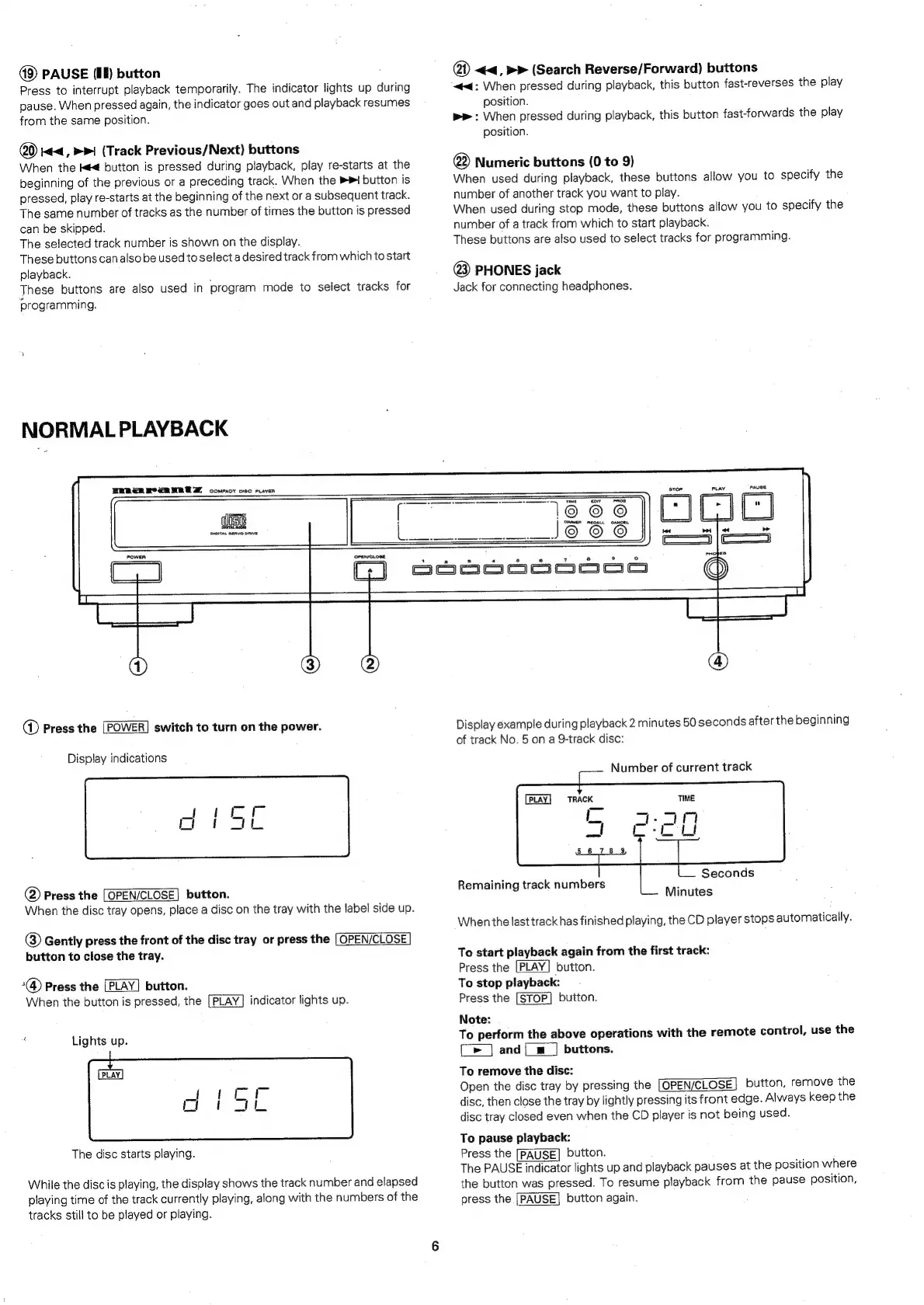
PAUSE
(lf)
button
Press
to
interrupt
playback
temporarily.
The
indicator
lights
up
during
pause.
When
pressed
again,
the
indicator
goes
out
and
playback
resumes
from
the
same
position.
20)
Kt<,
BP!
(Track
Previous/Next)
buttons
When
the
Kt
button
is
pressed
during
playback,
play
re-starts
at
the
beginning
of
the
previous
or
a
preceding
track.
When
the
>>
button
is
pressed,
play
re-starts
at
the
beginning
of
the
next
ora
subsequent
track.
The
same
number
of
tracks
as
the
number
of
times
the
button
is
pressed
can
be
skipped.
The
selected
track
number
is
shown
on
the
display.
These
buttons
can
also
be
used
to
select
a
desired
track
from
which
to
start
playback.
These
buttons
are
also
used
in
program
mode
to
select
tracks
for
‘programming.
NORMAL
PLAYBACK
WER
ER
OSM
BED
comor
osc
raven
@
<<,
»>
(Search
Reverse/Forward)
buttons
“<4:
When
pressed
during
playback,
this
button
fast-reverses
the
play
position.
pr:
When
pressed
during
playback,
this
button
fast-forwards
the
play
position.
@
Numeric
buttons
(0
to
9)
When
used
during
playback,
these
buttons
allow
you
to
specify
the
number
of
another
track
you
want
to
play.
When
used
during
stop
mode,
these
buttons
allow
you
to
specify
the
number
of
a
track
from
which
to
start
playback.
These
buttons
are
also
used
to
select
tracks
for
programming.
@3)
PHONES
jack
Jack
for
connecting
headphones.
Wise
DIGITAL
agAvO
ORIVE
OrenscLose
@
Press
the
[POWER]
switch
to
turn
on
the
power.
Display
indications
@
Press
the
[OPEN/CLOSE]
button.
When
the
disc
tray
opens,
place
a
disc
on
the
tray
with
the
label
side
up.
®
Gently
press
the
front
of
the
disc
tray
or
press
the
[OPEN/CLOSE
button
to
close
the
tray.
Press
the
|PLAY|
button.
When
the
button
is
pressed,
the
[PLAY]
indicator
lights
up.
#
Lights
up.
PLAY
The
disc
starts
playing.
While
the
disc
is
playing,
the
display
shows
the
track
number
and
elapsed
playing
time
of
the
track
currently
playing,
along
with
the
numbers
of
the
tracks
still
to
be
played
or
playing.
°
GJ]
Ssooooooseoa
Display
example
during
playback
2
minutes
50
seconds
after
the
beginning
of
track
No.
5
on
a
9-track
disc:
Number
of
current
track
PLAY.
TRACK
Seconds
Remaining
track
numbers
:
Minutes
When
the
last
track
has
finished
playing,
the
CD
player
stops
automatically.
To
start
playback
again
from
the
first
track:
Press
the
[PLAY]
button.
To
stop
playback:
Press
the
[STOP]
button.
Note:
To
perform
the
above
operations
with
the
remote
control,
use
the
[>
]
and|_m
|
buttons.
To
remove
the
disc:
Open
the
disc
tray
by
pressing
the
[OPEN/CLOSE]
button,
remove
the
disc,
then
close
the
tray
by
lightly
pressing
its
front
edge.
Always
keep
the
disc
tray
closed
even
when
the
CD
player
is
not
being
used.
To
pause
playback:
Press
the
[PAUSE]
button.
The
PAUSE
indicator
lights
up
and
playback
pauses
at
the
position
where
the
button
was
pressed.
To
resume
playback
from
the
pause
position,
press
the
[PAUSE]
button
again.

Table of Contents

Related product manuals