EasyManua.ls Logo

Marantz CD-63 SE - Troubleshooting Common Issues; Disc Playback Problems; Remote Control Malfunctions

Marantz CD-63 SE
19 pages
Print Icon
To Next Page IconTo Next Page
To Previous Page IconTo Previous Page
Loading...
USING
THE
REMOTE
CONTROL
UNIT
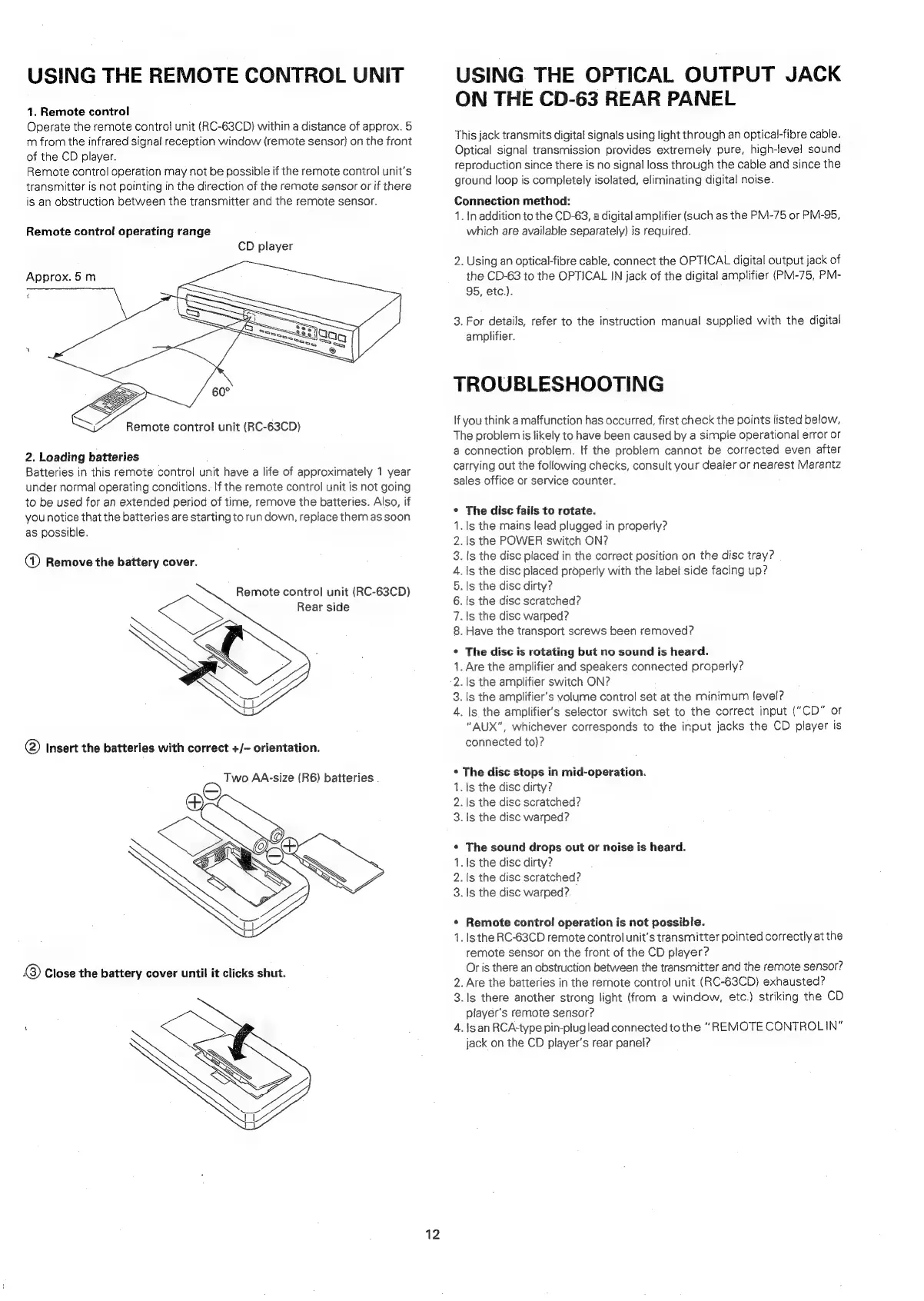
1.
Remote
control
Operate
the
remote
control
unit
(RC-63CD)
within
a
distance
of
approx.
5
m
from
the
infrared
signal
reception
window
(remote
sensor)
on
the
front
of
the
CD
player.
Remote
control
operation
may
not
be
possible
if
the
remote
control
unit's
transmitter
is
not
pointing
in
the
direction
of
the
remote
sensor
or
if
there
is
an
obstruction
between
the
transmitter
and
the
remote
sensor.
Remote
control
operating
range
CD
player
Approx.
5
m
Remote
control
unit
(RC-63CD)
2.
Loading
batteries
Batteries
in
this
remote
control
unit
have
a
life
of
approximately
1
year
under
normal
operating
conditions.
If
the
remote
control
unit
is
not
going
to
be
used
for
an
extended
period
of
time,
remove
the
batteries.
Also,
if
you
notice
that
the
batteries
are
starting
to
run
down,
replace
them
as
soon
as
possible.
a
Remove
the
battery
cover.
Remote
control
unit
(RC-63CD)
Rear
side
@)
Insert
the
batteries
with
correct
+/-
orientation.
Two
AA-size
(R6)
batteries
®
Close
the
battery
cover
until
it
clicks
shut.
12
USING
THE
OPTICAL
OUTPUT
JACK
ON
THE
CD-63
REAR
PANEL
This
jack
transmits
digital
signals
using
light
through
an
optical-fibre
cable.
Optical
signal
transmission
provides
extremely
pure,
high-level
sound
reproduction
since
there
is
no
signal
loss
through
the
cable
and
since
the
ground
loop
is
completely
isolated,
eliminating
digital
noise.
Connection
method:
1.
In
addition
to
the
CD-63,
a
digital
amplifier
(such
as
the
PM-75
or
PM-95,
which
are
available
separately)
is
required.
2.
Using
an
optical-fipre
cable,
connect
the
OPTICAL
digital
output
jack
of
the
CD-63
to
the
OPTICAL
IN
jack
of
the
digital
amplifier
(PM-75,
PM-
95,
etc.).
3.
For
details,
refer
to
the
instruction
manual
supplied
with
the
digital
amplifier.
TROUBLESHOOTING
If
you
think
a
malfunction
has
occurred,
first
check
the
points
listed
below,
The
problem
is
likely
to
have
been
caused
by
a
simple
operational
error
or
a
connection
problem.
If
the
problem
cannot
be
corrected
even
after
carrying
out
the
following
checks,
consult
your
dealer
or
nearest
Marantz
sales
office
or
service
counter.
¢
The
disc
fails
to
rotate.
1.
ls
the
mains
lead
plugged
in
properly?
.
ls
the
POWER
switch
ON?
.
ls
the
disc
placed
in
the
correct
position
on
the
dise
tray?
.
1s
the
disc
placed
properly
with
the
label
side
facing
up?
.
Is
the
disc
dirty?
.
ts
the
disc
scratched?
.Is
the
disc
warped?
.
Have
the
transport
screws
been
removed?
On
oaoBRWH
*
The
disc
is
rotating
but
no
sound
is
heard.
1.
Are
the
amplifier
and
speakers
connected
properly?
2.
Is
the
amplifier
switch
ON?
3.
1s
the
amplifier’s
volume
control
set
at
the
Minimum
level?
4.
Is
the
amplifier's
selector
switch
set
to
the
correct
input
("CD”
or
"AUX",
whichever
corresponds
to
the
input
jacks
the
CD
player
is
connected
to)?
*
The
disc
stops
in
mid-operation.
1.
ls
the
disc
dirty?
2.
Is
the
disc
scratched?
3.
1s
the
disc
warped?
¢
The
sound
drops
out
or
noise
is
heard.
1.
ls
the
disc
dirty?
2.
(s
the
disc
scratched?
3.
Is
the
disc
warped?.
*
Remote
control
operation
is
not
possible.
1.
lsthe
RC-63CD
remote
control
unit's
transmitter
pointed
correctly
at
the
remote
sensor
on
the
front
of
the
CD
player?
Or
is
there
an
obstruction
between
the
transmitter
and
the
remote
sensor?
2.
Are
the
batteries
in
the
remote
contro!
unit
(RC-63CD)
exhausted?
3.
1s
there
another
strong
light
(from
a
window,
etc.)
striking
the
CD
player's
remote
sensor?
4.
Is
an
RCA-type
pin-pluglead
connected
to
the
“REMOTE
CONTROLIN"
jack
on
the
CD
player's
rear
panel?

Table of Contents

Related product manuals