18
Menu map
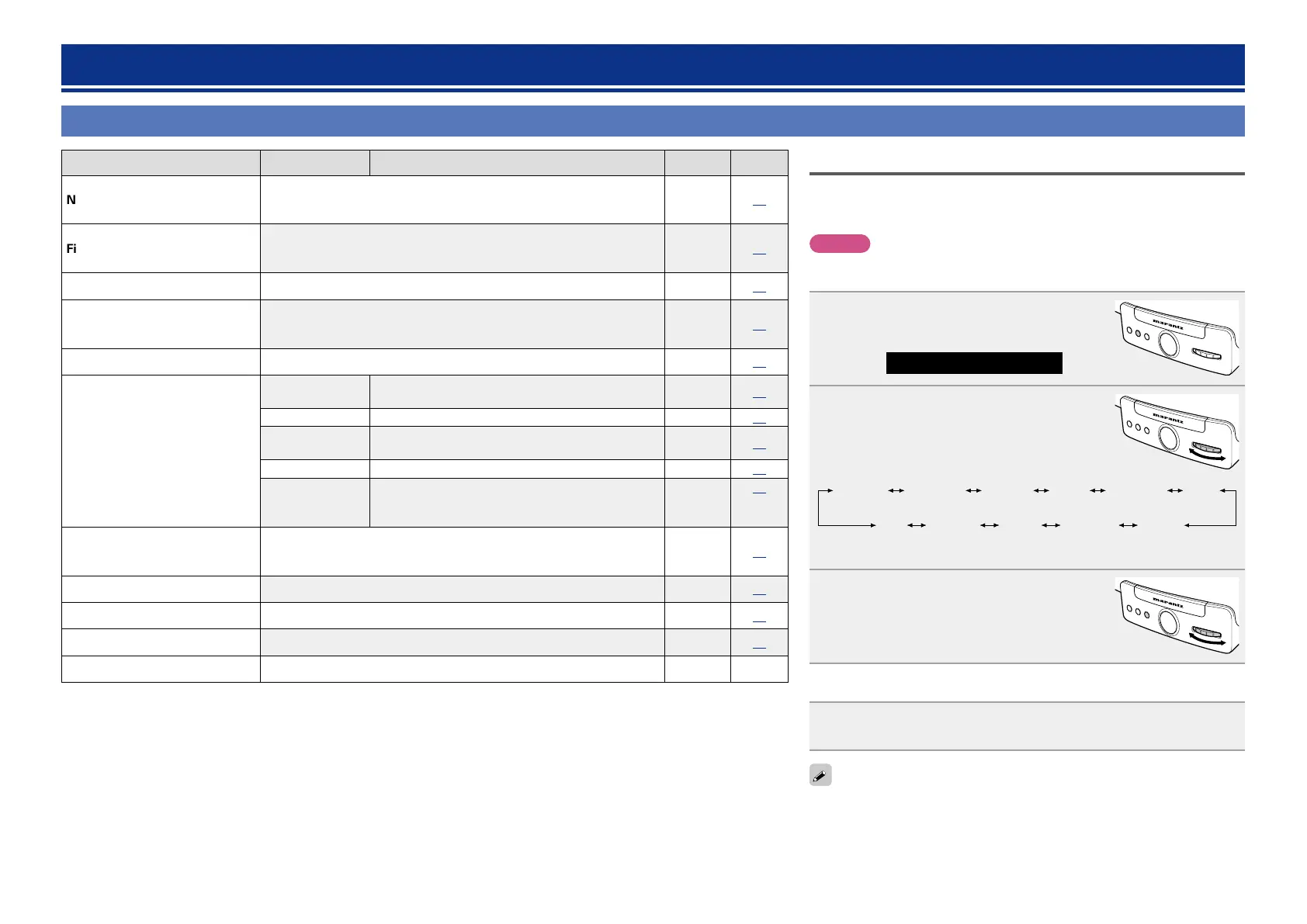
Setting items Detailed items Description Default Page
Network Info.
Display network information.
Friendly Name (Consolette) / DHCP /
IP Address / Primary DNS / Secondary DNS / MAC Address
–
19
Firmware Update
Starts the firmware update procedure.
If this unit is updated, the menu settings and preset internet radio
stations will be reset to the default settings.
–
19
Max Vol Level Make a setting for maximum volume. 99
20
Room Setting
Depending on the conditions of a listening room, playback sound may
be too resonant or either bass or treble may sound enhanced. Sets the
sound quality at your preference for your listening room conditions.
PureDirect
20
Language Sets the language for display the menu. English
20
Clock
Auto Adjust(On)
Automatically performs the clock setting from the
time information on the Internet.
On 21
Time Zone(-5H) Sets your local time zone (for Auto Adjust). -5H
21
Daylight Saving
Time(Off)
Sets the Daylight Saving Time information (for Auto
Adjust).
DST Off
21
Set Time Now Obtains the current time.
–
22
Manual Adjust
Adjusts the clock manually.
“Manual Adjust” is available when “Auto
Adjust(Off)” is set.
–
22
Auto-Standby
With the Auto Standby ON, this unit will automatically enter the
standby mode after about 30 continuous minutes of stop mode with no
operation.
Off
23
Network Control Set the network function on or off during standby. On
23
WPS(PIN) Sets the wireless connection using WPS (PIN code method). –
23
Factory Reset Reset to the defaults. –
32
Exit To exit the menu, select “Exit”. – –
How to make detailed settings
Menu operation
This section explains the basic menu operations. Steps for item selecting and
menu exiting are common to all menus. For detailed operations on each menu,
see the respective paragraphs.
NOTE
Use buttons on this unit for menu operations. Buttons on the remote control
do not work.
1
Press FUNCTION repeatedly until
“Settings” is displayed.
ELECTRONIC GYRO TOUCH
ENTER
FUNCTION
PLAY/PAUSE
Settings
2
Turn GYRO to select the menu you want
to set.
ELECTRONIC GYRO TOUCH
ENTER
FUNCTION
PLAY/PAUSE
Network
Info.
Firmware
Update
Max Vol
Level(99)
Room
Setting
Language Clock
Auto-
Standby
(Off)
WPS
(PIN)
Network
Control
(On)
Factory
Reset
Exit
3
Press ENTER.
•The unit enters the setting mode of the
selected menu.
•Turn GYRO to select and press ENTER to enter
your selection.
ELECTRONIC GYRO TOUCH
ENTER
FUNCTION
PLAY/PAUSE
n Exiting the menu to return to the normal mode
Press FUNCTION repeatedly until “Source” is displayed.
•The unit exits the setting mode and the normal display returns.
To return to the previous item, turn GYRO to select “Back”, then press ENTER.


 To Next Page