EasyManua.ls Logo

Marantz DV3100 - Selecting TV Aspect Ratio

Marantz DV3100
40 pages
Print Icon
To Next Page IconTo Next Page
To Previous Page IconTo Previous Page
Loading...
PAGE 32 INITIAL SETTINGS
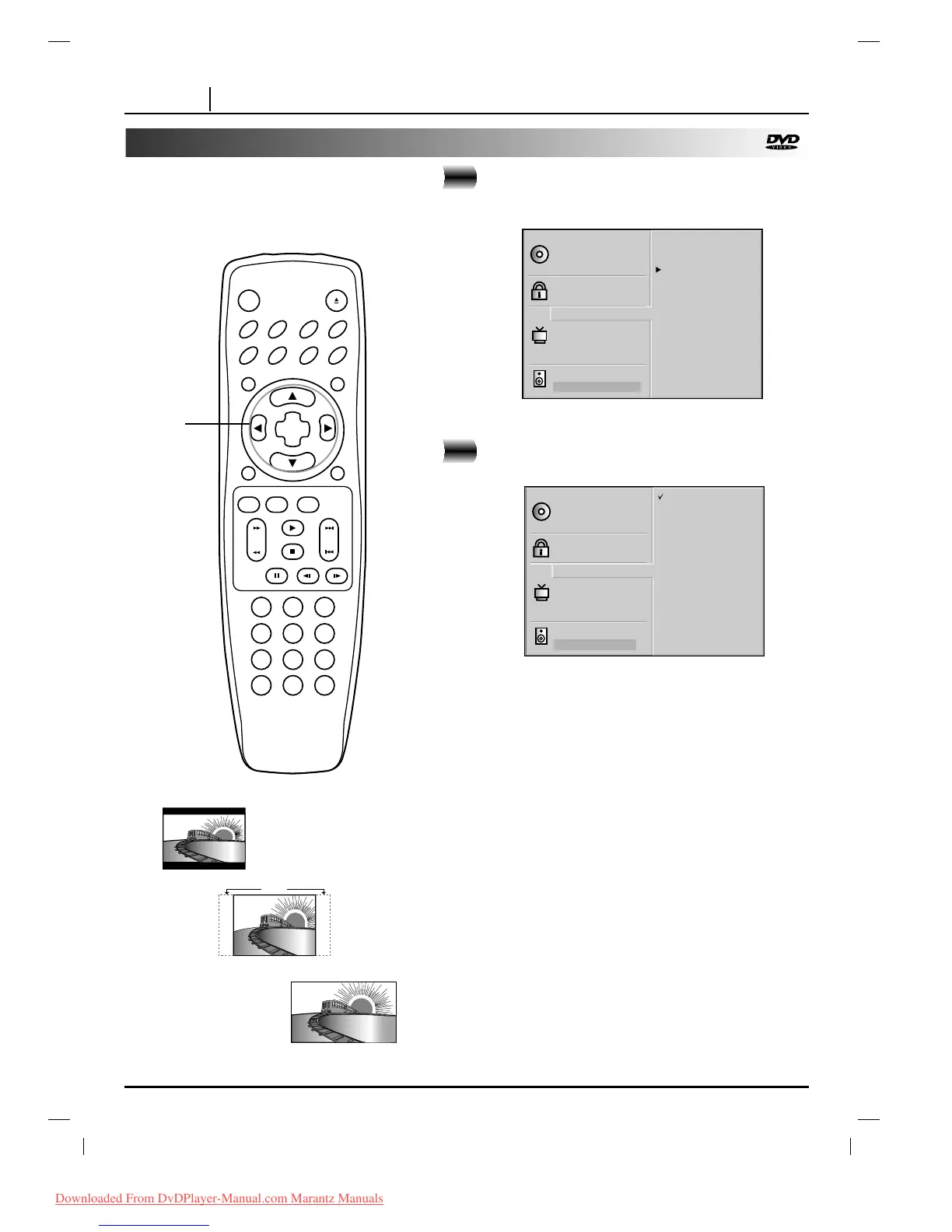
Selecting TV Aspect
Select the appropriate screen type according to
your TV set; conventional size screen (4:3) or
wide-screen (16:9).
16:9 Wide
4:3 Panscan
Cut Off
4:3 Letterbox
At the SETUP screen, press
DD
/
EE
to select TV
Aspect and press
GG
.
Press
DD
/
EE
to select the desired Aspect and
press SELECT/ENTER.
4:3 Letterbox : The video material not formatted in the Pan
& Scan style is played back in the letterbox style (black
bands appear at top and bottom of screen).
4:3 Panscan : Select when a conventional TV set is
connected. The video material formatted in the Pan & Scan
style is played back in that style (the left and right edges are
cut off).
16:9 Wide : Select when a wide-screen TV set is connected.
Played in FULL size. (Setting the wide-screen TV to FULL
mode is also necessary.)
* Each screen shows an example when the video material
for a wide-screen is played.
(This setting does not affect the video material for
conventional size.)
1
2

Disc Subtitle
Disc Menu
Rating
Password
TV Aspect
Menu Language
TV Output Select
Pseudo PAL
Digital Audio Output
5.1 Speaker Setup
Disc Audio
4:3 Letterbox
4:3 Panscan
16:9 Wide
Disc Subtitle
Disc Menu
Rating
Password
TV Aspect
Menu Language
TV Output Select
Pseudo PAL
Digital Audio Output
5.1 Speaker Setup
Disc Audio
4:3 Letterbox
4:3 Panscan
16:9 Wide
CLEAR PROGRAM
OSD RETURN
SELECT
/ENTER
TOP MENU MENU
AUDIO SUBTITLE SURR.ANGLE
SETUP REPEAT RANDOM
POWER OPEN/CLOSE
A-B
123
45
6
7
8
0
9
SLOW
ZOOM MARKER SEARCH
PAUSE
STOP
PLAY
SKIPSCAN
1, 2
Downloaded From DvDPlayer-Manual.com Marantz Manuals

Table of Contents

Other manuals for Marantz DV3100

Related product manuals