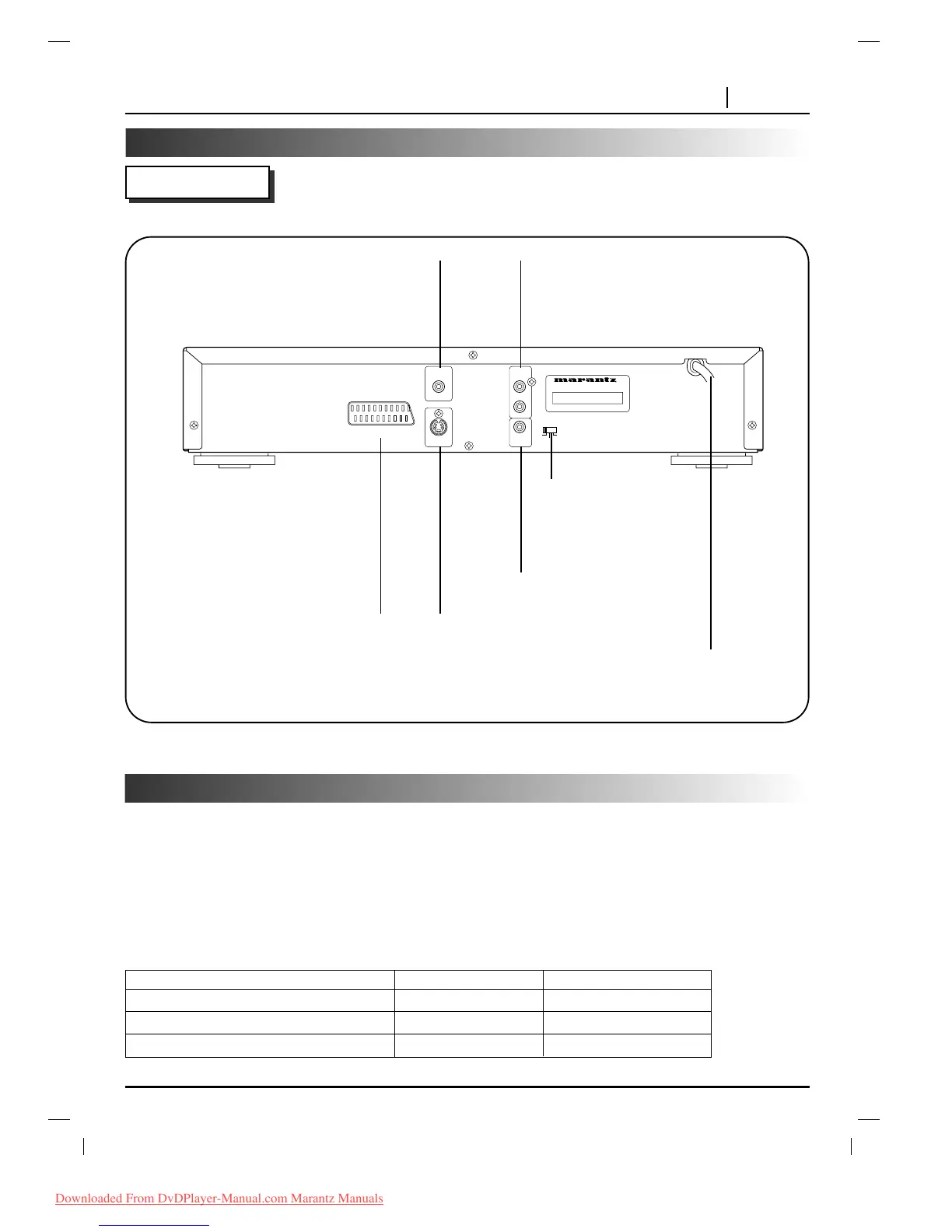
S-VIDEO OUT jack
A/V EUROCONNECTOR(SCART) jack
AUDIO OUT (L/R) jacks
VIDEO OUT jack
POWER CORD
Connect to an AC 230V, 50Hz
outlet only.
COAXIAL DIGITAL AUDIO OUT jack
TV System Select switch
Refer to below explanation.
TV System Select
You can enjoy NTSC or PAL discs by using your TV System Select switch to choose the appropriate system.
• If you try to play back PAL disc with NTSC-TV. The player will not playback the disc.
• When the selected TV, TV System Select switch does not coincide with the system of your TV, normal color
picture may not be displayed.
• Select the TV System Select switch when the power is turned off.
• When you playback NTSC disc with PAL-TV, some discs may produce black bands at the top and
bottom of the screen.
Position of TV SYSTEM SELECT switch Connected TV Available disc
PAL PAL NTSC/PAL DVD disc
NTSC NTSC NTSC DVD disc
AUTO MULTI system TV NTSC/PAL DVD disc



 To Next Page