o
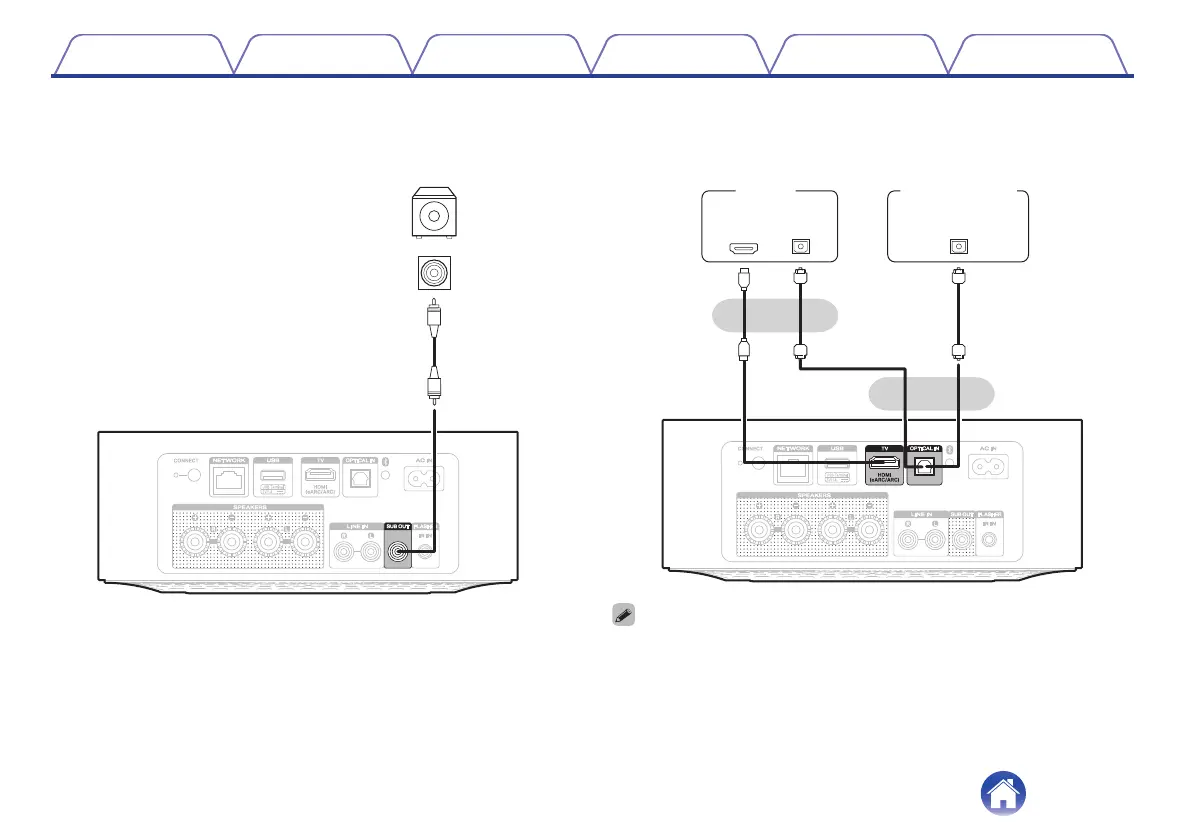
Connecting a subwoofer
Connect the SUB OUT connector to an input on your powered
subwoofer or your subwoofer amplifier.
IN
Subwoofer
with built-in
amplifier
o
Connecting a digital device
Connect this unit to a device with digital output connectors, such as a
TV.
IN
HDMI
(eARC/ARC)
TV
or
Digital device
or
OPTICAL
OUT
OPTICAL
OUT
0
When connecting a TV to this unit, turn off the audio output of the TV’s internal
speakers. See the owner’s manual of your TV for details.
0
When connecting the HDMI (eARC/ARC) terminal of this unit to your TV, connect it
to the HDMI input terminal of your TV that supports the eARC/ARC function.
0
When connecting to a TV that does not support the eARC/ARC function, use an
optical connection to play the TV audio.
Contents Setup Playback Troubleshooting Status LED Appendix
8



 To Next Page