4
Setup
Items not listed under Introduction > Box Contents are sold separately.
To set up PHA3 with your sound system:
1. Use the included power adapter to connect PHA3 to a power outlet.
Alternatively, remove the cover to this battery compartment to install 2 AA batteries in it.
Insert the positive (+) end of the battery first.
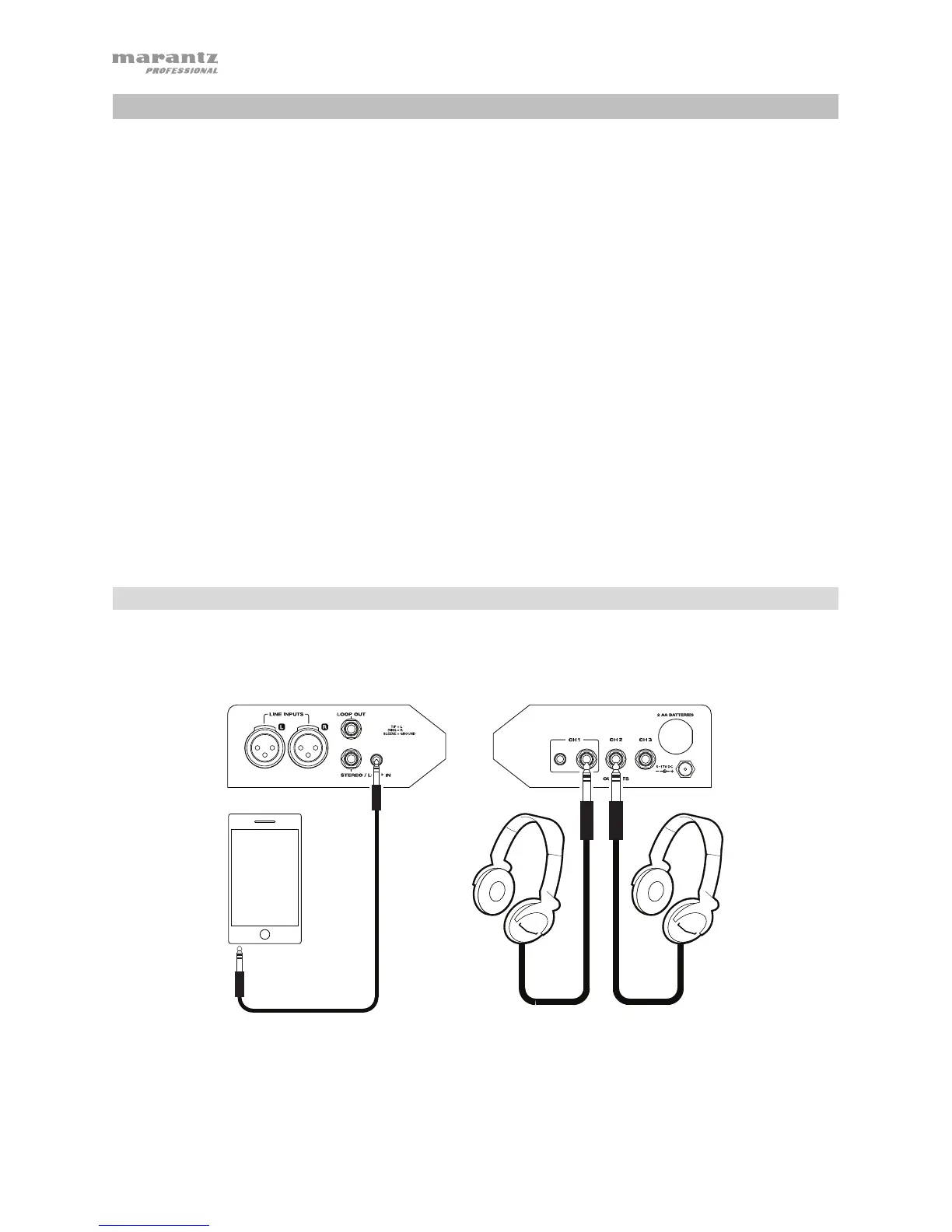
2. Use standard XLR cables to connect your audio sources to the line inputs.
You can also connect audio sources to the Stereo/Loop In using the included 1/4”-to-1/8”
(6.35 mm to 3.5 mm) TRS cable or a standard 1/4” (6.35 mm) TRS cable.
3. Connect 1/4” (6.35 mm) stereo headphones to the outputs. Channel 1 can also accept 1/8”
(3.5 mm) stereo headphones.
4. Power on all of your audio sources (mixer, stereo, etc.).
5. Power on PHA3. To use the power adapter, set the power switch to Ext. To use batteries,
set it to Batt.
Example 1
This is an example of a basic way to use PHA3.
Right Panel Left Panel
Smartphone, tablet,
computer, etc.
Headphones



 To Next Page