EasyManua.ls Logo

Marantz PM-62 - Remote Control Unit; Remote Operation; Battery Loading

Marantz PM-62
21 pages
Print Icon
To Next Page IconTo Next Page
To Previous Page IconTo Previous Page
Loading...
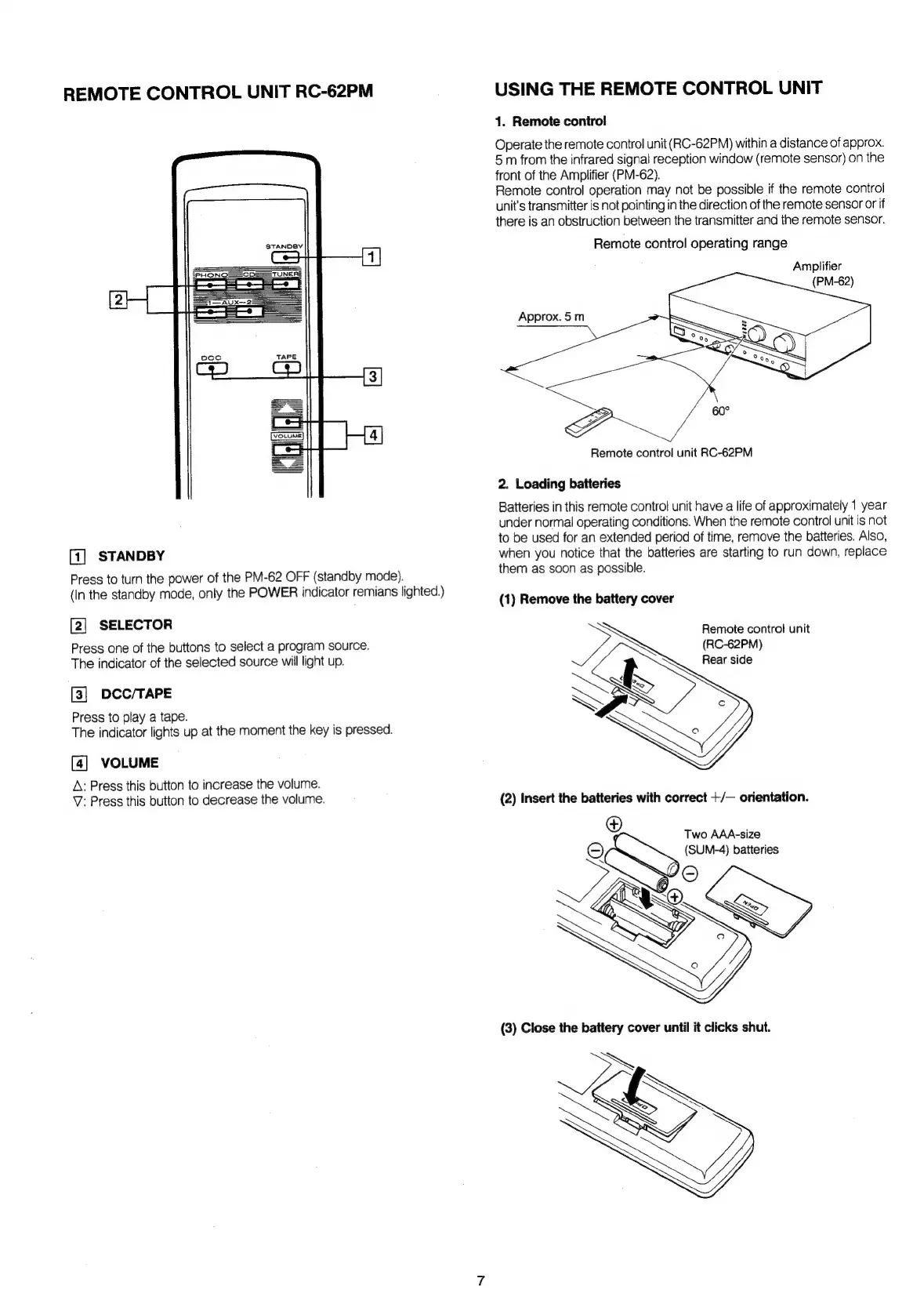
REMOTE
CONTROL
UNIT
RC-62PM
[1]
STANDBY
Press
to
turn
the
power
of
the
PM-62
OFF
(standby
mode).
(In
the
standby
mode,
only
the
POWER
indicator
remians
lighted.)
[2]
SELECTOR
Press
one
of
the
buttons
to
select
a
program
source.
The
indicator
of
the
selected
source
will
light
up.
[3]
DCC/TAPE
Press
to
play
a
tape.
The
indicator
lights
up
at
the
moment
the
key
is
pressed.
[4]
VOLUME
A;
Press
this
button
to
increase
the
volume.
V:
Press
this
button
to
decrease
the
volume.
USING
THE
REMOTE
CONTROL
UNIT
1.
Remote
control
Operate
the
remote
control
unit
(RC-62PM)
within
a
distance
of
approx.
5
m
from
the
infrared
signal
reception
window
(remote
sensor)
on
the
front
of
the
Amplifier
(PM-62).
Remote
control
operation
may
not
be
possible
if
the
remote
control
unit's
transmitter
is
not
pointing
in
the
direction
of
the
remote
sensor
or
if
there
is
an
obstruction
between
the
transmitter
and
the
remote
sensor.
Remote
control
operating
range
Amplifier
Approx.
5m
Remote
control
unit
RC-62PM
2.
Loading
batteries
Batteries
in
this
remote
control
unit
have
a
life
of
approximately
1
year
under
normal
operating
conditions.
When
the
remote
control
unit
is
not
to
be
used
for
an
extended
period
of
time,
remove
the
batteries.
Also,
when
you
notice
that
the
batteries
are
starting
to
run
down,
replace
them
as
soon
as
possible.
(1)
Remove
the
battery
cover
Remote
control
unit
(RC-62PM)
SES
(2)
Insert
the
batteries
with
correct
+/—
orientation.
®
Two
AAA-size
oS
(SUM-4)
batteries

Related product manuals