7
Wired
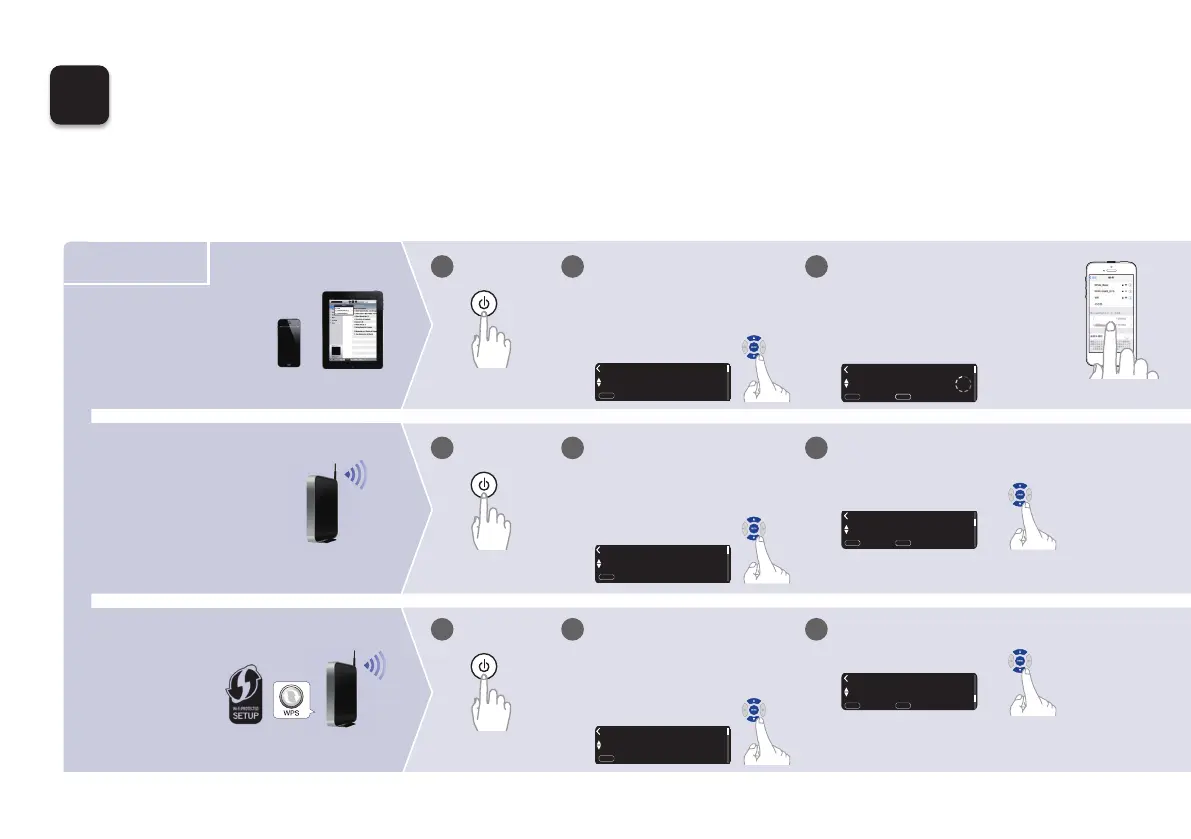
Choose from one of the following options.
5
Connect to the network
Wireless
Select “WPS Router”.
WPS router
Wi-Fi router
Select “Wi-Fi - scan” and wait as
your PM7000N looks for available
networks.
Router without
WPS button
Wi-Fi router
Power on. Select language.
(After selecting a language, please
be patient while the network
settings initialize. Expect to wait a
few minutes.)
English
Select Language
:
enter
ENTER
Wi-Fi - scan
Select Connection Method
:
cancel
:
enter
ENTER
BACK
iOS device
iOS version 7
or later
Make sure your iOS device is
connected to your Wi-Fi Network.
Select the network named “Marantz
PM7000N” from the Settings/Wi-Fi
screen on your device.
Marantz PM7000N
1
1 2 3
3
3
WPS Router
Select Connection Method
:
cancel
:
enter
ENTER
BACK
WAC - use your Apple
Select Connection Method
:
cancel
BACK
:
enter
ENTER
Power on. Select language.
(After selecting a language, please
be patient while the network
settings initialize. Expect to wait a
few minutes.)
English
Select Language
:
enter
ENTER
1
1 2
Power on. Select language.
(After selecting a language, please
be patient while the network
settings initialize. Expect to wait a
few minutes.)
English
Select Language
:
enter
ENTER
1
1 2
1.PM7000NN_ENG_QSG_190725.indd 7 2019/08/09 10:28:47







 To Next Page