2
* In the mode mentioned below, pressing the STOP/CANCEL button
will cancel the operation. An operation executed by pressing the Jog
wheel cannot be canceled.
※以下の各モードでは、
STOP/CANCEL
ボタンを押すと操作がキャンセルさ
れます。ジョグダイヤルを押して実行した場合はキャンセルできません。
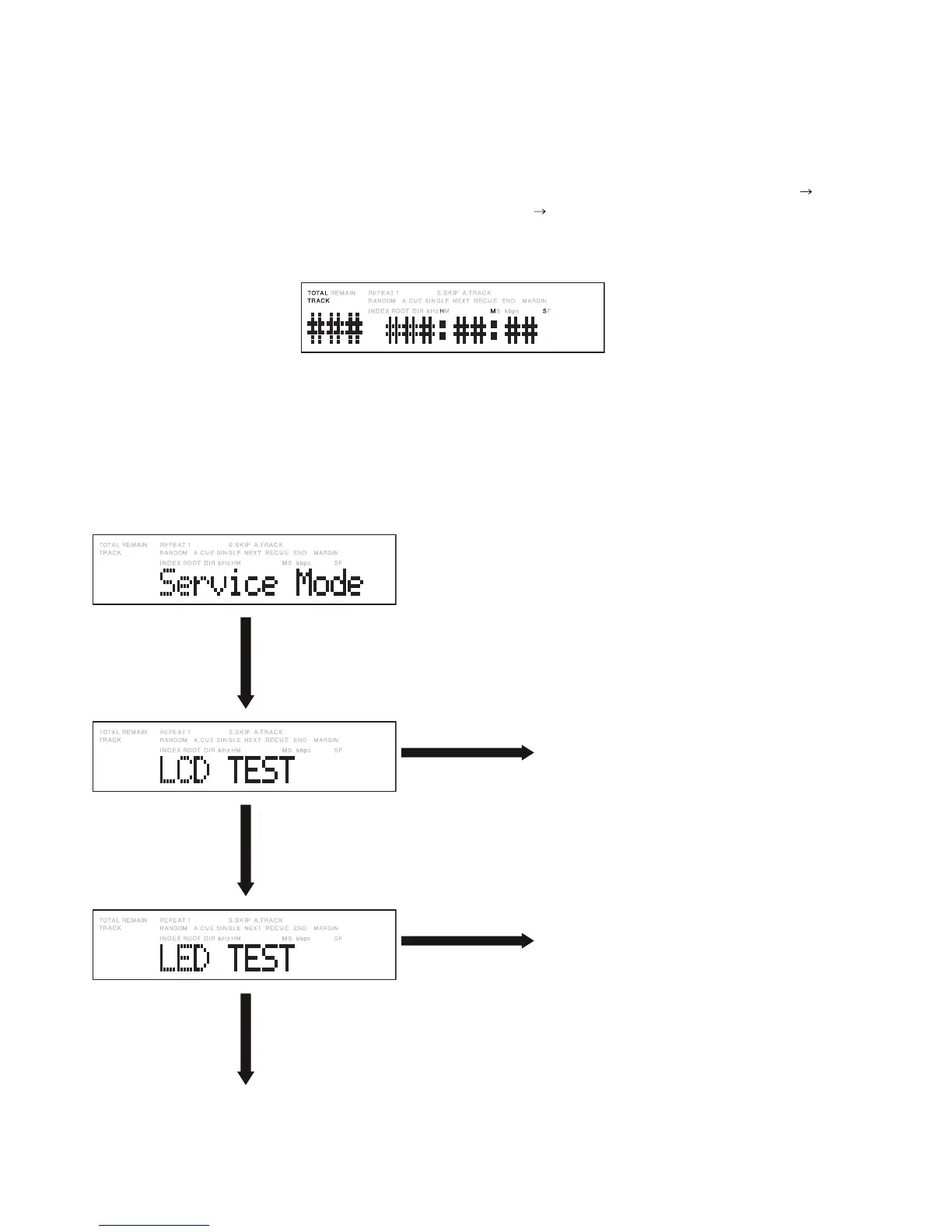
Turn right the Jog wheel
one click.
ジョグダイヤルを時 計
方向に1クリック回します 。
Press the Jog wheel while
this display is shown.
表示中にジョグダイヤル
を押します。
All LCD pixels are activated.
LCDが全点灯します。
Turn right the Jog wheel
one click.
ジョグダイヤルを時 計
方向に1クリック回します 。
Press the Jog wheel while
this display is shown.
表示中にジョグダイヤル
を押します。
The LEDs of the level meter, REC, REC
PAUSE, and PLAY buttons all light.
レベルメータ表示、
REC
ボタン、
REC PAUSE
ボタ
ン、
PLAY
ボタンの LEDが全点灯します。
Turn right the Jog wheel
one click.
ジョグダイヤルを時 計
方向に1クリック回します 。
2. SERVICE MODE
Service mode can be performed with the following
procedures:
1. Press the POWER ON/OFF switch to turn on the power.
When the power is turned on, “Booting” then “Initial”
then “Loading” appear on the display, followed by the
track number and time. Once the display shown below
appears, follow the procedures below.
* If a CF card has not been loaded, “No Card” appears.
2. If you press and hold both the STOP/CANCEL button
and DISPLAY/LOCK button for several seconds, the
unit will enter Service mode.
The following display appears.
2. サービスモード
以下の手順に従い、サービスモードを実行できます。
1.
POWER ON/OFF
スイッチを押し、PMD580の電源を入
れます。電源を入れた後、ディスプレイにBooting
InitialLoadingと表示され、最後にトラックと時間
が表示されます。下記のように表示された後に、次の手
順を操作してください。
※ CFカードが挿入されていないときは、No Cardが表
示されます。
2.
STOP
/
CANCEL
ボタンと
DISPLAY
/
LOCK
ボタンを同時
に長押しすると、本機はサービスモードになります。
このとき、以下のように表示します。


 To Next Page