5
3. SETTING THE MAC ADDRESS
Set “Mac Address” in Service mode.
1. Press the POWER ON/OFF switch to turn on the power.
2. If you press and hold both the STOP/CANCEL button
and DISPLAY/LOCK button for several seconds,
the unit will enter Service mode.
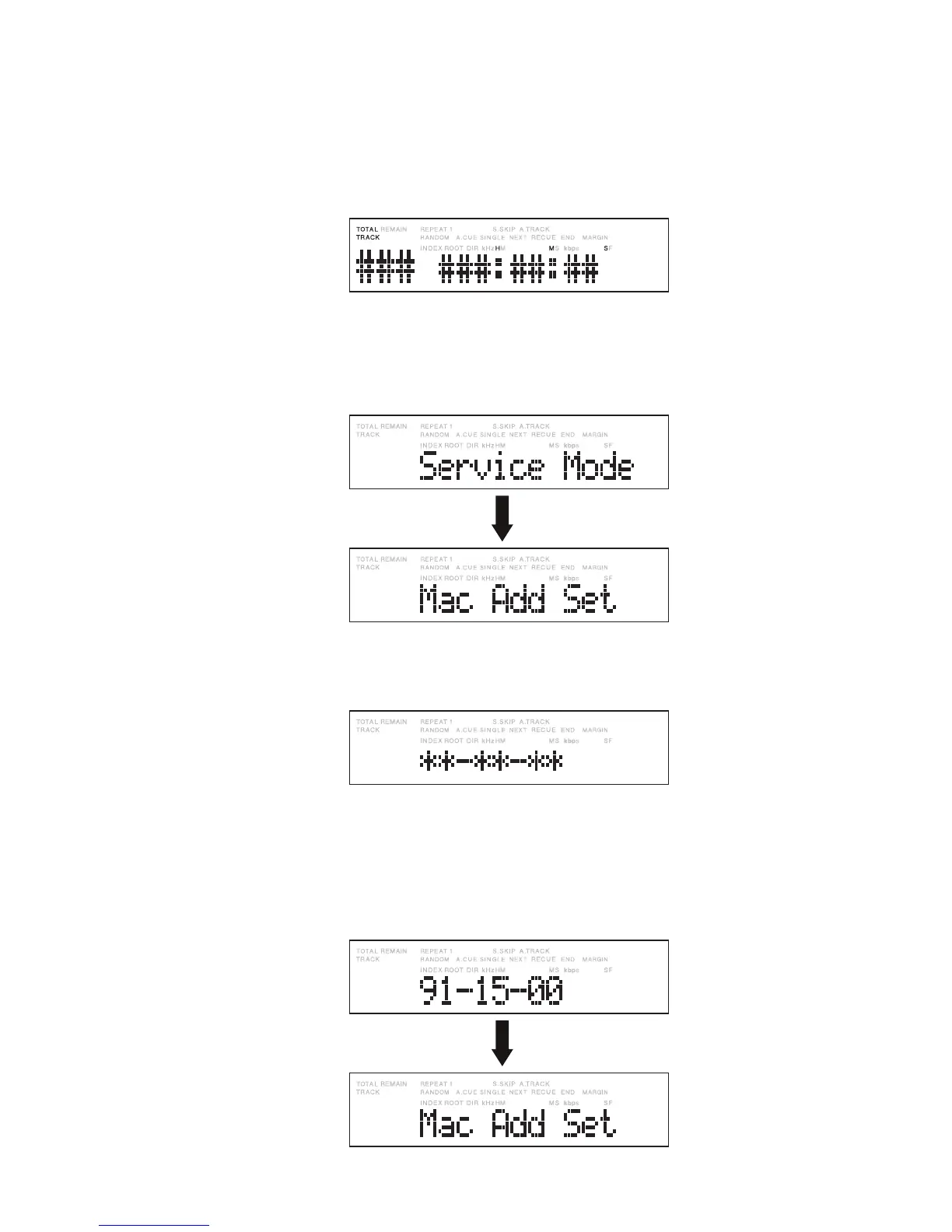
The following display appears.
3. Press the Jog wheel with “Mac Add Set” displayed.
The following display appears.
4. Set the Mac Address. Turn the Jog wheel until the target
digit is set then press the Jog wheel.
(Set each digit of the address from left to right in sequence.)
(Example) When the address is to be set to “91-15-00”
3. MAC ADDRESS設定方法
サービスモードにあるMacアドレス設定を行います。
1.
POWER ON/OFF
スイッチを押し、PMD580の電源を入
れます。
2.
STOP
/
CANCEL
ボタンと
DISPLAY
/
LOCK
ボタンを同時
に長押しすると、本機はサービスモードになります。
このとき、以下のように表示します。
3.
Mac Add Setを表示させた状態で、ジョグダイヤルを
押します。このとき、以下のように表示します。
4.
次に、Macアドレスを設定します。ジョグダイヤルを回
して目的の数字を設定し、ジョグダイヤルを押します。
(アドレス設定は、左から順に設定します。)
(例)アドレスを91-15-00に設定したとき
ジョグダイヤルを時計方向に回し、下図の
“
Mac Add Set
”
を
表示させます。
Turn right the Jog wheel until “Mac Add Set” is displayed,
as shown below.
Mac アドレス(6文字)を設定し終わったらジョグダイヤル
を押します。
Once all 6 digits of the Mac Address have been set,
press the Jog wheel.


 To Next Page