3
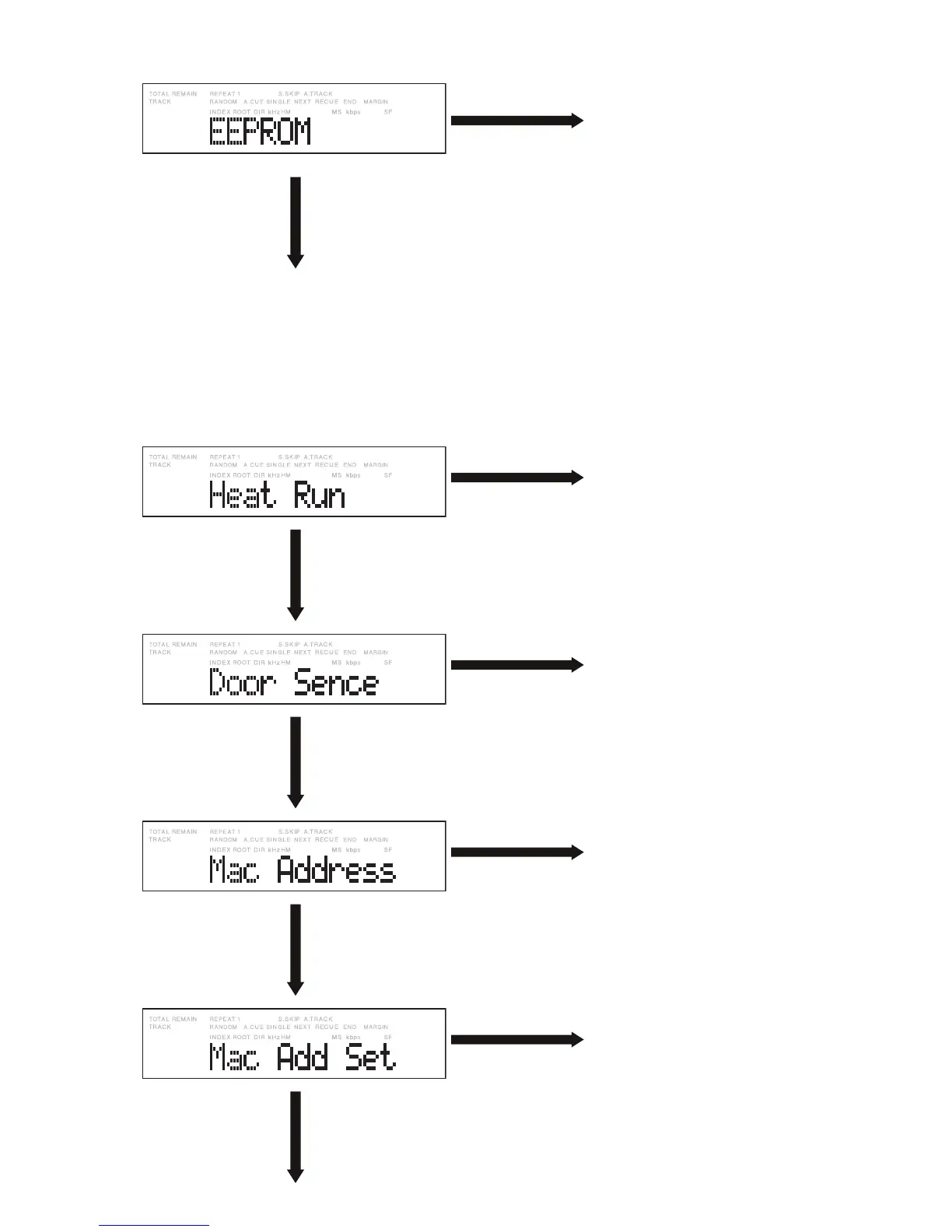
Turn right the Jog wheel
one click.
ジョグダイヤルを時 計
方向に1クリック回します 。
Press the Jog wheel while
this display is shown.
表示中にジョグダイヤル
を押します。
The default values for the destination
(Europe, United States, or Japan) are set for
initialization.
1) Select “US” for the United States, “EU” for
Europe, or “JP” for Japan.
2) Press the Jog wheel. A read/write check
of the EEPROM is performed, which takes
1 minute. Then the default values for the
destination are written to the EEPROM.
各仕向け(ヨーロッパ、アメリカ、日本)によるデ
フォルト値を設定し、初期化できます。
① アメリカ 向 け の 場 合 はUSを、ヨーロッパ向けの
場合はEUを、日本向けの場合はJPを選 択し
ます 。
② ジョグダイヤルを押すと、EEPROMのリード・
ライト・ チェック が 約 1分間実施され、その後に
仕向けに応じたデフォルト値を EEPROMに書き
込みます。
Press the Jog wheel while
this display is shown.
表示中にジョグダイヤル
を押します。
All tracks are played in Repeat All mode.
全トラック繰り返し(Repeat All)モードで再生さ
れます。
Turn right the Jog wheel
one click.
ジョグダイヤルを時 計
方向に1クリック 回します 。
Press the Jog wheel while
this display is shown.
表示中にジョグダイヤル
を押します。
ENABLE/DISABLE for the sensor of the Card
door can be set.
CFカードドアのセンサを ENABLE/DISABLEで
きます。
Turn right the Jog wheel
one click.
ジョグダイヤルを時 計
方向に1クリック 回します 。
Press the Jog wheel while
this display is shown.
表示中にジョグダイヤル
を押します。
The Mac Address can be confi rmed.
Mac Addressを確認できます。
Turn right the Jog wheel
one click.
ジョグダイヤルを時 計
方向に1クリック 回します 。
Press the Jog wheel while
this display is shown.
表示中にジョグダイヤル
を押します。
The Mac Address can be set.
(See “3. Setting the MAC ADDRESSS.”)
Mac Addressを設定できます。
(3. MAC ADDRESS設定方法を参照してください。)
Turn right the Jog wheel
one click.
ジョグダイヤルを時 計
方向に1クリック 回します 。


 To Next Page